What matters when choosing a family backup?
For UK households choosing between cloud storage, drives and a NAS, start with the outcome that matters most: restoring lost files, reaching them across devices, managing a growing archive or controlling family access.
Cloud storage
Choose it when: automatic uploads and access across phones and computers are priorities.
Trade-off: check account recovery, storage limits and deletion behaviour; synced changes may affect other devices.
External hard drive
Choose it when: you want a removable local copy of a computer archive and can update it regularly.
Trade-off: it will not automatically provide access to every phone, and a drive kept beside the computer can share the same risks.
Portable SSD
Choose it when: you often carry or transfer large files and have a compatible connection.
Trade-off: portability does not create an off-site copy or an automatic backup routine.
Network-attached storage
Choose it when: household members need a shared home archive and someone can configure and maintain it.
Trade-off: setup and ongoing backup remain your responsibility; drive redundancy is not a separate backup.
Local and cloud copies
Choose it when: you want both a usable local restore and a copy kept away from an incident at home.
Trade-off: you must keep both destinations up to date and check what each contains.
| Concern |
What to check when buying |
Who this matters to |
| Recoverable copies |
Check which files are copied, how deletions are handled, where the copy is kept and whether you can test a restore. |
If losing a phone or accidental deletion would be hardest to recover from, I would prioritise a separate copy I can restore; around 36% of consumers put recoverability first. |
| Automatic access |
Check coverage for each phone, computer and folder, and whether syncing or device backup is provided. |
When files are scattered across several devices, I want new photos and documents to reach the right library without relying on memory; around 29% of consumers prioritise automatic coverage and access. |
| Capacity and account terms |
Check the storage allowance, what else uses it, local capacity and how to export files if you leave a service. |
If our family archive keeps growing, I need enough room and a clear way to manage it over time; around 21% of consumers put capacity and account arrangements first. |
| Private family sharing |
Check who can view, add, edit or delete files, and review share-link and account settings. |
When I share selected photos or documents with relatives, I want control over who can see or change them; around 14% of consumers prioritise private, controlled sharing. |
Joybuy product options
These Joybuy options focus on removable SSDs and network-attached storage for a household local archive; keep a separate backup plan for files you need to restore.
 No image available
Samsung Portable SSD T7 2 TB, Grey
A removable local copy for household files; it is not a comprehensive backup solution by itself.
Capacity: 2 TB. Connection: USB Type-C 3.2 Gen 2 (3.1 Gen 2).
Joybuy
 No image available
Samsung Portable SSD T7 1 TB, Blue
A portable local-storage option for family files; check that your backup routine makes a separate copy.
Capacity: 1 TB. Connection: USB Type-C 3.2 Gen 2 (3.1 Gen 2).
Joybuy
 No image available
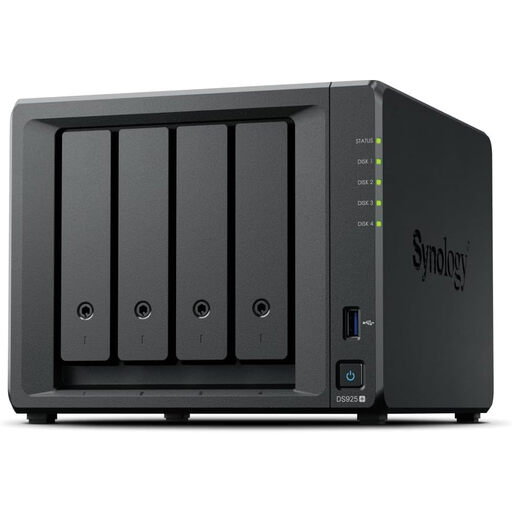
Synology DiskStation DS925+ 4-Bay NAS
A network-storage option for a household prepared to manage a shared archive and its maintenance.
Check whether the arrangement includes the drives you need and plan a separately restorable backup; Synology says RAID/SHR is not a backup solution.
Joybuy
 No image available
Samsung MU-PE1T0S 1 TB USB Type-C SSD, Black
A portable local copy for household files; keep another copy of important data and do not submerge the drive.
Capacity: 1 TB. Connection: USB Type-C 3.2 Gen 2 (3.1 Gen 2). The listing describes IP65 protection.
Joybuy
 No image available
SanDisk Portable SSD 2 TB
A portable local-storage option for a household photo, video and document archive; use a repeatable routine to keep a separate backup.
Capacity: 2 TB.
Joybuy
Family backup questions
Is a shared or synchronised photo library the same as a backup?
Not necessarily: a backup is a copy in a separate safe location that you can restore. Apple Support says iCloud Photos deletions can propagate across devices and those photos are not duplicated in iCloud device backup, so check the service’s behaviour and keep a separate copy of irreplaceable files.
What should we do after setting up a drive or cloud backup?
Check that recent photos and important folders are included, restore a sample and disconnect removable backup media when it is not in use. These are recommendations from the UK National Cyber Security Centre, not guarantees about a particular product.
Will two drives inside a NAS remove the need for another backup?
No: Synology says RAID/SHR is not a backup solution. Plan another copy that you can restore if files are deleted or the home setup is affected.
What should we check before choosing cloud storage?
Check the storage allowance, account and cancellation terms, inactivity policy and how long it would take to export your files. The UK Competition and Markets Authority’s consumer guide, published in 2016, advises considering these issues; check the current terms of the service you are considering.
Does the UK GDPR apply when a household stores its own family photos?
The Information Commissioner’s Office says the UK GDPR does not apply to processing carried out by individuals purely for personal or household activities. That condition does not cover business use or other activities outside its scope, and the ICO labels the guidance as under review.


