What to prioritise
For UK families choosing a gaming device for a child, the deciding factor is often whether the setup fits the games, household routines and account controls they need.
| Concern |
What to check when buying |
Who this matters to |
| Games and compatibility |
List the exact games and check their platform versions; for Switch games on Switch 2, check Nintendo’s title-specific compatibility information. |
If a particular game is the reason for buying, check it runs on the device before deciding. Around 25% of consumers put game compatibility first. |
| Communication and contact |
Review the child account’s communication settings and the game’s own chat and contact controls, including any account-linking requirements. |
If you want to manage who can contact your child while they play, check both account layers. Around 25% of consumers prioritise online contact settings. |
| Purchases and spending |
Identify the game’s storefront and billing route, then check purchase settings, payment methods and any stored account balance. |
If you want to approve or limit a child’s purchases, check how the game takes payment. Around 20% of consumers prioritise spending controls. |
| Shared use and schedules |
Check whether restrictions apply to the whole console or to a signed-in child account, and review the available playtime settings. |
If several people use one device, consider whether one set of restrictions will work for everyone. Around 15% of consumers prioritise shared-device routines. |
| Portability and other uses |
Decide where the device will be used, then check that the games and account tools fit that setup. |
If your child will play away from the TV, or the device needs to serve other household uses, check the games and apps that matter. Around 15% of consumers prioritise play location and other uses. |
Relevant brands and services
These brands and services are relevant to particular gaming setups; their controls apply to the products, accounts or services described, not necessarily to every game a child uses.
Nintendo
Relevant when a family wants Nintendo games and handheld or TV play.
- Nintendo documents play and feature restrictions, plus eShop purchase restrictions through a supervised Nintendo Account.
- Nintendo says console-level parental restrictions apply to everyone using that console. Some older Switch games may not be supported or fully compatible with Switch 2.
Sony PlayStation
Relevant for families whose desired games and TV-based setup fit PlayStation.
- PlayStation documents family settings for game access, online communication and spending.
- The PS5 Digital Edition has no disc drive; check the exact edition if the household owns discs.
Microsoft Xbox
Relevant for families choosing an Xbox console or managing specified Windows gaming use.
- Xbox documents child-account settings for content, screen time and communication; Microsoft Family Safety also covers specified Windows gaming use.
- Xbox Series S cannot play discs. A child can still spend funds already in their Microsoft account or use gift cards.
Apple
Relevant when the requested games are compatible iPad apps and the household wants a tablet for other uses too.
- Apple documents Screen Time controls for apps, content and communication, alongside Family Sharing purchase requests.
- Ask to Buy does not send a new request for every activity, including a child’s own redownloads, updates or use of a redemption code.
Google
Relevant when choosing a compatible Android gaming tablet and using Google Play controls.
- Google documents app management and purchase-approval options for Google Play.
- Google says Play purchase approvals apply only to purchases through its billing system; check a game’s other account and payment settings separately.
Valve Steam
Relevant to families considering PC games through Steam on a gaming PC or compatible PC handheld.
- Steam Families documents child game-access, Steam-feature and playtime controls.
- Those controls concern Steam; do not assume they cover other game stores or a game’s separate account.
Joybuy gaming devices
These Joybuy choices cover handheld gaming devices and games consoles. Match each device to the child’s exact games, preferred way to play and the account controls the household needs.
 No image available
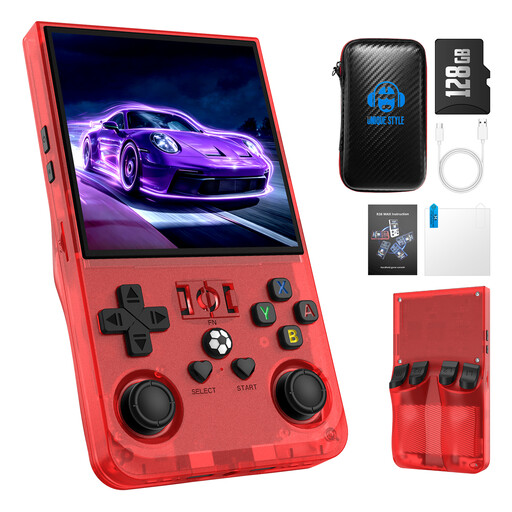
AISLPC R36MAX Retro Handheld Game Console, Red
This portable retro handheld may suit a family considering a dedicated handheld; check that its games fit the child’s needs.
4.0-inch IPS display; 720 × 720 resolution; Linux system; 128GB storage; 4000mAh battery.
View on Joybuy
 No image available
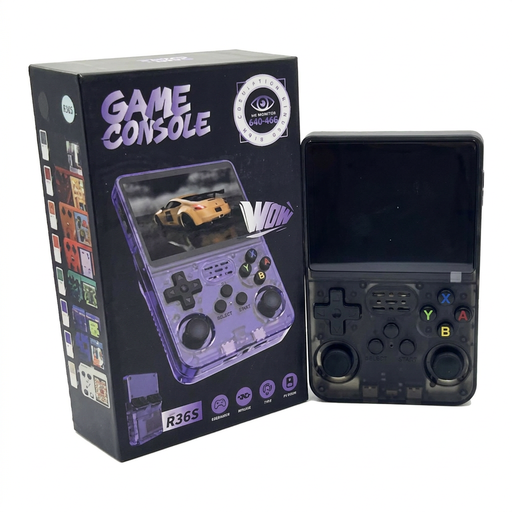
R36S Retro Gaming Handheld Console, Black
This compact handheld is a portable retro-gaming option; check the games it supports against the child’s specific choices.
64GB storage; 3.5-inch IPS colour display; dual analogue joysticks; rechargeable.
View on Joybuy
 No image available
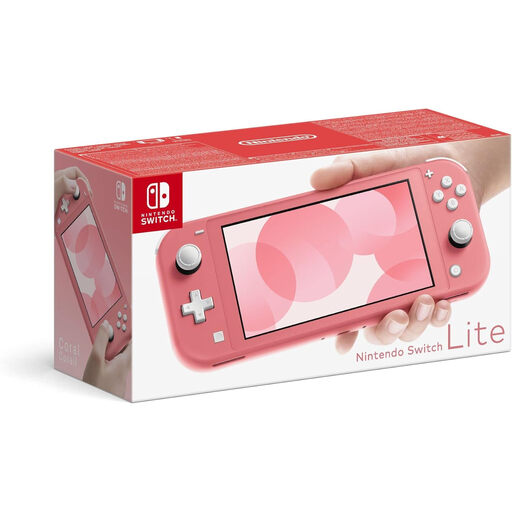
Nintendo Switch Lite, Coral
This dedicated handheld may suit a child who will play on the console itself rather than on a TV.
Handheld-mode-only play, with no TV output. Nintendo’s console restrictions apply to everyone using the console; eShop restrictions require a parent or guardian’s Nintendo Account in a family group.
View on Joybuy
 No image available
Nintendo Switch 2 Console, UK Version
This console is described as supporting handheld and TV play, so it may suit a household that wants both options.
Nintendo’s console restrictions apply to everyone using the console; eShop restrictions require a parent or guardian’s Nintendo Account in a family group. Some original Switch games may not be supported or fully compatible.
View on Joybuy
 No image available
Xbox Series S 512GB Console, White
This TV console may suit a household whose required games fit Xbox and whose family wants Xbox child-account settings.
All-digital design with no disc drive. Xbox documents screen-time and communication settings, but a child can still spend funds already in their Microsoft account or use gift cards.
View on Joybuy
Family gaming device FAQs
Should I choose a device before asking which games my child wants?
No. List the exact games and how your child wants to play, then check each game’s versions for the devices you are considering. Nintendo says some original Switch games may not be supported or fully compatible with Switch 2.
What should I set up before my child starts playing?
Set up or supervise the appropriate child account, review its content, playtime and communication settings, and then check the game’s own account controls. Nintendo separates console restrictions from eShop account restrictions, while Roblox offers controls through a linked parent account.
Does purchase approval stop every in-game payment?
No. Xbox says a child can still spend gift cards or funds already in their Microsoft account, and Google says Play approvals cover purchases made through Google Play billing. Check the payment route for the particular game.
Can a digital-only console play games on disc?
No. Xbox Series S and PS5 Digital Edition have no disc drive, so check the exact edition and the formats of games your household already owns before choosing one.
Do UK game age ratings make every online interaction age-appropriate?
No. UK Government guidance says games rated PEGI 12, 16 or 18 cannot be sold or hired to someone below the stated age. That does not establish how a particular game’s online interactions work, so check its features and available controls too.


