Families joining friends online
Check that the child’s chosen games work on the intended device and can connect with friends on their platforms; consider how communication will be managed too.


Start with the games the child wants to play and the devices their friends use, then decide whether a console, computer or accessory best fits the household. A headset or extra screen may address a specific need without replacing the main device; before buying, check the exact model’s game compatibility, disc format, included controllers, display connections and online-service requirements.
Check that the child’s chosen games work on the intended device and can connect with friends on their platforms; consider how communication will be managed too.
Understand the child-account settings and the game’s chat options before deciding whether a separate headset or microphone is needed.
Choose around whether gaming needs to share the family TV, move between rooms or accommodate several people playing together.
Start with the games and the devices friends use, then work out whether the household needs a main device, a separate accessory or a different way to share screens.
| Concern | What to check when buying | Who this matters to |
|---|---|---|
| The right games and platforms | Confirm the exact games and editions, friends’ platforms and online-play requirements. | If a particular game and playing with the child’s friends come first, those consumers are the priority; around 25% put game-and-friend compatibility first. |
| Communication and child-account controls | Check the child-account settings, the game’s chat method and whether a headset connection is compatible. | Consumers who want chat to work within the child’s permitted settings may need a headset, a built-in microphone or neither; around 25% put the communication arrangement first. |
| Where the family can play | Consider when the TV is available and whether the device has a suitable built-in screen or compatible external-display connection. | When TV time is shared or play needs to move between rooms, consumers may value a flexible setup; around 20% put shared-space use first. |
| Completing an existing setup | Check the box contents, simultaneous-player needs and accessory compatibility before adding a controller, headset or charging dock. | Consumers whose existing device is suitable but needs another accessory can check what the game and bundle already provide; around 15% put completing their setup first. |
| A computer for gaming and other tasks | Compare the exact computer configuration with the intended games’ requirements and consider where it will be used. | If one computer needs to serve gaming and other household tasks, consumers can compare a specific configuration against both uses; around 15% put a multipurpose computer first. |
A console’s stated output does not mean every game will use that mode; the display connection and supported content matter too.
Check the existing screen’s inputs and the particular game’s supported mode before adding a monitor or cable.
A compatible microphone is only one part of the setup: chat can also depend on the game, account permissions and an online service. Nintendo specifies a built-in microphone for Switch 2, while its GameChat has separate service and parental-control requirements.
Confirm the child-account settings and chat feature first, then check whether the intended device needs a separate headset.
The cited Xbox Series S and PlayStation 5 Digital Edition models do not have disc drives, so compatible physical game discs cannot be used on them.
Check the exact model and edition against the household’s disc collection before choosing a console.
The cited Xbox and PlayStation bundles each list one controller; whether another is needed depends on the game and how many people will play at once.
Check the box contents, game’s local-player requirements and controller compatibility before adding accessories.
Switch 2 is a built-in-screen and docked-TV option for households that want to move play between spaces.
The cited Xbox Series S and Series X models illustrate digital-only and disc-capable console choices.
The cited PS5 Digital Edition and disc-console models show why format and family-management setup matter.
The LOQ 15AHP10 configuration 83JG0096UK is one example of a gaming-laptop setup.
Arctis Nova 1 is an example of a wired headset to consider for an existing device.
These Joybuy choices cover a wired headset, consoles and a separate gaming monitor for families considering online communication, screen sharing and game format.
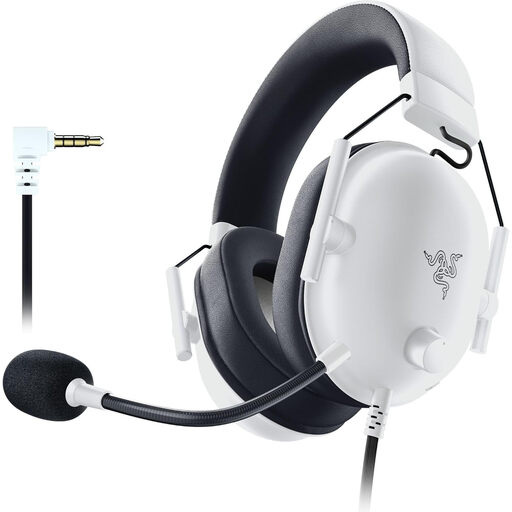 No image available
Consider it when a compatible device needs a separate wired audio and microphone option.
Wired 3.5 mm connection; the product information lists PC and console compatibility.
 No image available
Consider it when play needs to move between handheld, tabletop and TV arrangements; the product description lists a dock and controllers in the pack.
Nintendo specifies a built-in microphone for Switch 2. GameChat requires Nintendo Switch Online, and users under 16 must first set up the Parental Controls smart-device app.
 No image available
Consider a separate display when the household needs another screen for a console setup; check that the console, game and display support the mode you want.
QD-OLED; 2560 × 1440 (WQHD); listed 240Hz and 0.03ms specifications. The product information lists HDMI 2.1 inputs and console modes up to 120Hz at 1080p or 1440p; 240Hz is not listed as a console mode.
 No image available
Consider a disc-capable console if the household needs to use compatible physical PS5 or PS4 game discs.
The product information lists a built-in Ultra HD Blu-ray drive, HDMI output and one DualSense controller.
 No image available
Consider it when the household’s intended games are available digitally on Xbox and a disc drive is not needed.
512GB storage; all-digital console with no disc drive; the product information lists an included Xbox Wireless Controller.
Not always. Nintendo specifies a built-in microphone for Switch 2 GameChat; for another device or chat method, check microphone support, the headset connection and the child’s communication settings before buying.
Set up the relevant child or family account and review its communication settings. Sony documents family-management controls, while Microsoft Family Safety supports specified Windows and Xbox devices. Nintendo says users under 16 must set up the Parental Controls smart-device app before using Switch 2 GameChat; these instructions apply to their respective platforms.
Not necessarily: the console output, display input and game mode all need to support the setting. Nintendo specifies different Switch 2 output capabilities for TV and built-in-screen use, and the console’s stated maximum does not mean every game runs at that setting.
Yes, depending on the platform and feature. Sony lists a paid PlayStation Plus requirement for online multiplayer on its cited PS5 listings, and Nintendo says Switch 2 GameChat requires Nintendo Switch Online membership. Check the requirements for the intended game and service.
UK government guidance says faulty, misdescribed or unfit goods carry statutory remedies. For a qualifying distance purchase, it says the customer must notify the seller of cancellation within 14 days of receiving the item and then has another 14 days to return it; exceptions and conditions apply. Check the seller’s terms as well, while distinguishing them from statutory rights.