Families sharing one screen
If play usually happens in the same room or people take turns, check the games’ local-player limits before deciding whether an extra controller is enough.


Start with a shared console if family members mainly play on one screen or take turns, and check whether their chosen games need extra controllers. Separate PCs or consoles make more sense when people need independent screens at the same time. Treat voice-chat headsets and home-network equipment as separate decisions: check communication permissions and compatibility for the former, and diagnose connection problems before buying the latter.
If play usually happens in the same room or people take turns, check the games’ local-player limits before deciding whether an extra controller is enough.
If two people need independent screens and sessions, compare separate consoles or gaming PCs. Plan for each person’s account, game access and connection.
If children want to speak with friends or relatives while playing online, decide the account communication settings as well as which headset works with the device and game.
Choose it when: Players can use one screen together or take turns, and their games support the intended play mode.
Bear in mind: An extra controller will not let two people play different games on separate screens at once.
Choose them when: Independent, simultaneous play on separate screens is a regular requirement.
Bear in mind: Each device brings its own account, game-access, accessory and connection decisions.
| Priority | What to check | Your needs |
|---|---|---|
| Play pattern | Check each game’s local and online player modes. Work out whether players need one shared screen or independent sessions. | We mainly play together in one room or take turns; alternatively, two of us need to play separately at the same time. |
| Controllers | Check how many local players the game supports and which controllers work with the chosen console. | I want enough controllers for people playing together on one screen, without buying a second main device solely for that purpose. |
| Accounts | Check each player’s account and online-play requirements. Nintendo says users sharing a console are not automatically covered by its family membership; they must be added to the purchaser’s family group. | Each child needs the appropriate account settings, even if everyone uses the same console. |
| Voice chat | Check game support, child-account communication permissions and the headset’s connection method for the exact device. PlayStation and Xbox describe communication controls tied to child accounts. | We want spoken chat with friends or relatives only where our household rules allow it. |
| Home connection | Check performance where people play, router placement and concurrent use before choosing network hardware. Ofcom notes that Wi-Fi cannot outperform the underlying broadband service. | Gaming rooms need a dependable connection, especially when several household members are online. |
A second device matters when players need independent screens; it may not address a shortage of controllers for a supported same-room game.
List the intended games, their local-player limits and whether anyone needs a separate session at the same time.
A headset still has to connect to the chosen device, while a child account’s communication settings can restrict chat.
Set the household’s communication rule, then check the exact headset, controller or console connection and game support.
Coverage, router placement, concurrent use and the broadband service can each affect the connection. Ofcom notes that Wi-Fi cannot exceed the underlying broadband service.
Check the connection in the gaming room and review household use before deciding whether coverage equipment addresses the problem.
Nintendo says people on the same console are not automatically included in a Nintendo Switch Online family membership.
Check which players need the service and add eligible Nintendo Account users to the purchaser’s family group.
Consider its Switch and Switch 2 account arrangements if several people will use a console for supported online games.
Relevant to families weighing PS5 same-room play against child-account communication settings.
Relevant when comparing console and Windows-PC use alongside child-account multiplayer and communication settings.
These options cover a shared console, personal gaming PCs, a voice-chat headset and an extra controller. Choose the main device around how many people need to play independently, then check accessories against the games and accounts you will use.
 No image available
A personal PC setup to consider when one player needs their own screen; it does not replace a second device for another independent player.
Listed with an AMD Ryzen 5 7500F, NVIDIA GeForce RTX 5060 8GB, 16GB DDR5, 1TB NVMe SSD and Windows 11 Home, plus a monitor, keyboard, mouse, headset and mousepad. Confirm the supplied peripherals’ exact configuration before buying.
 No image available
A shared-console option if the intended games support the family’s preferred local or online play modes. Check each game’s player limits before adding controllers.
Check the online membership and account coverage needed for every intended player; sharing a console alone does not establish family-membership coverage.
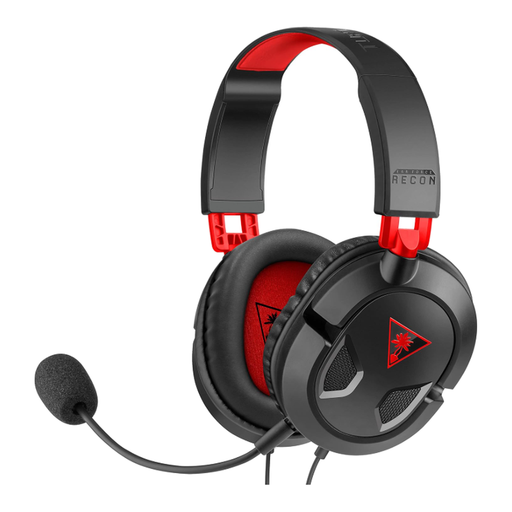 No image available
Consider a headset when spoken communication is wanted and the game and account settings allow it; the headset alone does not enable chat.
The product name lists PC, Xbox Series X or S, Xbox One, PS5 and PS4. Confirm the connection method for the exact device before buying.
 No image available
A personal desktop option for a household member who needs an independent gaming device. Check the intended games and what equipment is needed to complete the setup.
The product name lists 32GB RAM, a 2TB SSD, RTX5070 graphics and Windows 11. Confirm the supplied peripherals before buying.
 No image available
An extra controller to consider for PS5 same-room play when the chosen game supports another local player. It does not provide a separate screen.
The product name also lists PC, Mac and mobile use; confirm compatibility with the intended device and game.
One console can meet the need when family members take turns or play together on one screen in games that support the intended number of local players. Check game-specific local and online modes before buying controllers; an extra controller does not create an independent screen.
Choose separate consoles or PCs when two people regularly need independent screens and sessions at the same time. Plan each player’s accounts, game access and network connection alongside the devices.
No. Nintendo says its family membership can cover up to eight Nintendo Account users, but sharing a console does not automatically include them. Add each user who needs the service to the purchaser’s family group and check the game’s online requirements.
Only consider one if spoken chat is wanted and supported by the game and platform. Set child-account communication permissions first, then confirm that the headset’s connection method works with the exact console or controller.
Not necessarily. Mesh equipment addresses coverage, but Ofcom notes that Wi-Fi cannot outperform the underlying broadband service. Check the connection where people play, router placement and simultaneous household use before choosing network hardware.