Families planning a first shared setup
Decide whether play will mainly happen at a TV, around the home on a portable device, or on a computer. That decision comes before choosing extra controllers, headsets or online memberships.


Choose a TV console for a shared play space, Nintendo Switch 2 if portable and TV play both matter, or a gaming PC or laptop if the household also needs a Windows computer and can manage controls across its game services. Before buying, check the intended games’ account and online-play requirements, how children will communicate, and whether connection problems come from Wi-Fi inside the home.
The starting point is how the household will play together, not just which device can run games.
Decide whether play will mainly happen at a TV, around the home on a portable device, or on a computer. That decision comes before choosing extra controllers, headsets or online memberships.
Separate child accounts and the relevant family settings matter when children need different content, communication or purchase permissions. Check the controls on the platform and in the games they will use.
If multiplayer or voice chat falters in the usual play room, check the connection there before replacing networking equipment. Ofcom notes that the Wi-Fi link inside a home can limit the experience even when the broadband connection is faster.
Choose the play location and device type first; then check the games, accounts and connection that will make the setup usable for the family.
Consider it when: The family will mainly play in one room; PlayStation and Xbox offer child-account controls for their console ecosystems.
Keep in mind: PS5 Digital Edition and Xbox Series S do not accept game discs, and online multiplayer requirements depend on the platform and game.
Consider it when: Both portable and TV play matter, or the family plans to use local GameShare with compatible games and devices.
Keep in mind: Nintendo says its console parental controls apply to everyone using that console; online features and GameChat have separate conditions.
Consider it when: The household also needs a Windows computer and an adult can manage its device, account and game-service settings.
Keep in mind: A console account’s controls do not necessarily carry over to PC games; PlayStation identifies several of its console controls that do not apply to PlayStation PC games.
| Priority | What to check | Your needs |
|---|---|---|
| Where play happens | Decide whether the intended games will be played at a shared TV, on a portable console or on a computer. For local multiplayer, check that the game supports it and how many controllers it needs. | We will mostly play together in one room, or we need a device that can move between rooms. |
| Online access | Check each game’s account, internet and multiplayer requirements. Xbox Support says Game Pass is required for online multiplayer except free-to-play titles; Nintendo says Switch Online is needed for online features in many games, with some exemptions. Check the PlayStation game’s own requirements too. | I want to know which online features we will use before choosing a membership. |
| Child settings | Check how to create child accounts and set content, communication and purchase permissions. Nintendo says console parental controls apply to all its users; check account-level restrictions if children need different settings. On PC, check each game service as well. | Our children may need different permissions, so a single shared adult account would not fit. |
| Voice chat | Check the game’s chat and cross-network settings, any parental approval needed, and headset audio and microphone compatibility with the chosen device. Nintendo documents separate conditions for GameChat. | I want children’s communication settings in place before they join online play, and a headset that works with their actual device. |
| Home connection | Test in the usual play room at busy household times. Ofcom identifies in-home Wi-Fi as a possible bottleneck; Xbox Support describes a wired connection as its fastest and most reliable network option. Consider placement or coverage only after locating the problem. | Play or voice chat is unreliable away from the router, especially while other people use Wi-Fi. |
| Game format | Check whether the household expects to use physical discs. PlayStation identifies PS5 Digital Edition as disc-free, and Xbox identifies Series S as all-digital. | We need to decide whether downloads alone suit us before choosing a digital-only console. |
The need for a paid online-play membership varies by platform and game. Xbox and Nintendo both document free-to-play exceptions, while PlayStation identifies a PlayStation Plus requirement for online multiplayer on its referenced PS5 Digital Edition product page.
List the games and online features the family expects to use, then check each current game listing alongside the platform’s membership rules.
PlayStation, Xbox and Nintendo offer family settings with different scopes. Settings intended for a child may not apply as expected when play takes place through an adult profile.
Set up the adult organiser or family-manager account, add the child accounts, configure communication and purchase permissions, and protect access to the adult account.
Ofcom says the wireless link between a router and devices can be a bottleneck. A change to the broadband service alone would not address that in-home link.
Test in the gaming room when the household is busy. Try a practical wired connection, then assess router placement or wireless coverage if Wi-Fi is the problem.
PS5 Digital Edition and Xbox Series S do not accept physical game discs. A household planning to use discs needs to account for that distinction before choosing a console variant.
Check the exact model and decide whether buying and downloading games digitally suits the family.
These platform references describe control models and conditions; they do not indicate which products appear in the Joybuy selection below.
A TV-console ecosystem with family-manager and child accounts.
A TV-console ecosystem using Microsoft accounts and family settings.
Nintendo Switch 2 supports portable and TV play, with local sharing available for compatible games under Nintendo’s conditions.
Microsoft Family Safety is relevant to households managing supported Windows and Xbox devices together.
These options cover a Nintendo Switch 2 bundle, a Windows gaming laptop and accessories for voice chat, home networking and Xbox or Windows play. Choose a device route first, then check whether an accessory fits that particular setup.
 No image available
For a family considering portable and TV play, the listing describes a Switch 2 with a TV dock, detachable Joy-Con 2 controllers, a game download code and a 3-month Nintendo Switch Online membership.
Check the intended games’ online requirements. Nintendo says console parental controls apply to everyone using the console, while GameChat has separate account, membership and parental-approval conditions.
 No image available
A Windows 11 Home option for a household that also needs a computer. The listed configuration has an AMD Ryzen 7 170, 16GB memory, a 1TB SSD, GeForce RTX 5050 laptop graphics and a 15.6-inch Full HD 144Hz display.
It lists Wi-Fi 6 and Gigabit Ethernet; game performance still depends on the game and settings. Check family controls in each game service. The listing specifies a supplied 135W adapter and says USB-C charging needs a compatible 65W–100W USB Power Delivery charger.
 No image available
For wired game audio and voice chat, the listing identifies a 3.5mm connection, a boom microphone with flip-to-mute and a removable cable.
Check the intended device’s port or adapter needs and the cable reach. The listing names Nintendo Switch compatibility, but confirm audio and microphone support for the exact Nintendo Switch 2 setup before choosing it for that console.
 No image available
A three-unit mesh option to consider if testing shows weak Wi-Fi coverage where the family plays. The listing describes dual-band operation and Ethernet ports on the units.
It requires an existing modem or gateway. Placement, building materials, traffic and connected devices can affect the wireless result, so diagnose the connection before choosing mesh equipment.
 No image available
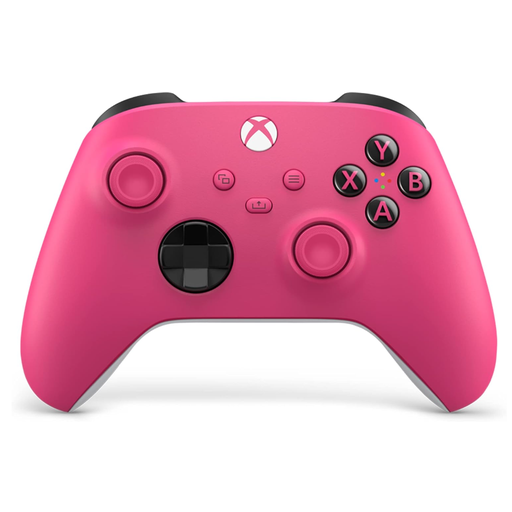
An additional controller option for a compatible Xbox or Windows setup. The listing identifies Xbox Wireless and Bluetooth connections, a 3.5mm headset jack and operation using two AA batteries.
Check compatibility with the exact device before buying, particularly if the household uses PlayStation or Nintendo Switch rather than Xbox or Windows.
Use separate child accounts when you need child-specific settings. PlayStation describes a separate account for each child, and Xbox and Microsoft manage settings through family-group members. Nintendo says its console parental controls apply to everyone on that console, with additional restrictions available through Nintendo Accounts.
Check the games before choosing a membership. Xbox Support says Game Pass is required for online multiplayer except free-to-play titles; Nintendo says Switch Online is required for online features in many games, with some exemptions. PlayStation identifies a PlayStation Plus requirement for online multiplayer on its referenced PS5 Digital Edition product page, so check the intended games’ current listings too.
Test the connection where the family plays first. Ofcom says in-home Wi-Fi can become a bottleneck, while Xbox Support describes a wired connection as its fastest and most reliable option. Use Ethernet where practical; consider placement, an access point or mesh if the wireless link remains the problem.
No single console setting should be assumed to cover every service the family uses. Check the game’s communication and cross-network settings as well as the platform controls. For PC play in particular, PlayStation says several of its console controls do not apply to PlayStation PC games and advises checking the controls on the PC platform used to access them.