For long family-history sessions, start with a keyboard whose layout, typing position and connection suit your computer and desk. A full-size layout is worth considering if you regularly enter dates or use navigation keys; choose a shaped ergonomic design if desk fit and typing position matter more. Address reflections from the bright window at the screen first: illuminated keys cannot remove screen glare.
Who this choice affects
Long-session family-history researchers
If you transcribe records and write notes for extended periods, pay attention to where the keyboard sits and whether its shape fits your typing position. The Health and Safety Executive advises placing the keyboard centrally, just below elbow height.
Bright-window desk users
If daylight creates screen reflections, adjust the desk and screen position before choosing keyboard lighting. Clear legends or adjustable illumination may still matter as room light changes.
Multi-device research organisers
If your records are spread across a computer and other devices, check the keyboard layout, supported connections and operating-system compatibility before relying on device switching.
What to consider when buying
For a desk beside a bright window, deal with screen reflections first. Then weigh typing position, the keys you use for records and dates, and how the keyboard connects.
| Concern |
What to check |
Who this matters to |
| Typing position |
Check desk fit and whether the keyboard can sit centrally, just below elbow height, as the Health and Safety Executive advises. |
When I spend a long session transcribing records, I want a keyboard position I can maintain without reaching awkwardly. Around 36% of consumers put sustained typing comfort first. |
| Dates and navigation |
Confirm the physical UK layout and whether the exact model has the numpad, arrow keys or navigation keys you use. |
If I enter dates repeatedly and move through documents, ready access to those keys matters more to me than a compact board. Roughly 29% of consumers prioritise record-entry and navigation keys. |
| Window light and key legends |
Control screen reflections; then check adjustable lighting and whether the exact keycaps have shine-through legends if you need them. |
As daylight changes, I want to read the keys clearly, but I still need to keep glare off the screen. Around 21% of consumers place changing-light legibility first. |
| Connection and compatibility |
Check your computer’s ports or Bluetooth support, operating system and any software needed for shortcuts. |
If I move between devices, I want to know how the keyboard will connect before changing my setup. Approximately 14% of consumers make connection simplicity their primary concern. |
Buying pitfalls
-
Expecting illuminated keys to fix window glare
Keyboard lighting does not remove reflections from a screen. The Health and Safety Executive advises arranging the desk and screen to avoid glare or bright reflections.
Adjust the screen position and use blinds or curtains where needed before deciding whether adjustable key lighting would also help.
-
Assuming every backlit mechanical version has illuminated legends
Keychron lists shine-through ABS and non-shine-through PBT keycap versions in its K10 Pro ISO range. The distinction matters if you want to see the legends lit up.
Check the keycaps on the exact configuration, rather than relying on the model family name or an image of another version.
-
Choosing a shaped keyboard without checking desk fit
A split or wave-shaped board still needs to sit in a workable position; its size and fixed shape may not suit every desk or typing habit.
Check the board’s dimensions against your available space and whether you can keep it central, just below elbow height, with the mouse within comfortable reach.
Relevant brands to consider
Logitech
Its low-profile productivity keyboards and separately shaped ergonomic models address different priorities.
- Logitech lists ambient-responsive backlighting and switching among up to three compatible devices for MX Keys S.
- Its ERGO K860 has a curved split keyframe and palm-lift settings, but the shape needs to fit your desk and typing position; neither model removes screen glare.
Keychron
Relevant if you specifically want a UK-ISO mechanical layout and configuration choices.
- Keychron lists UK-ISO K10 Pro variants with options for connecting to multiple devices.
- Its K10 Pro ISO ABS keycaps are listed as shine-through, while the PBT option is not. Check the exact version if illuminated legends matter.
HP
Its cited wired models offer either illuminated full-size keys or a wave-shaped design.
- HP lists three lighting levels, a numpad, a USB-C cable and a USB-A adapter for its 400 Backlit Wired Keyboard.
- HP’s 485 Comfort Wired Keyboard has a wave-like shape and cushioned wrist rest, but its fit is a separate choice from the 400 model’s lighting features.
Joybuy keyboards for this setup
These wired and wireless keyboards are options to consider for a family-history desk setup. Check each model’s exact key arrangement and your screen position separately; a keyboard’s lighting cannot control window reflections.
 No image available
ASUS ROG Strix Scope II 96 Wireless, black, UK layout
Consider this UK-layout wireless model if you want to keep a familiar key arrangement for research. Check the exact keys you use for dates and document navigation, as well as how the keyboard fits on your desk.
View on Joybuy
 No image available
HyperX Alloy Rise 75 Wireless, UK version
Consider this wireless UK-version model if its key arrangement suits the way you work through records. If you regularly enter dates on a numpad, check the exact key arrangement before choosing it.
View on Joybuy
 No image available
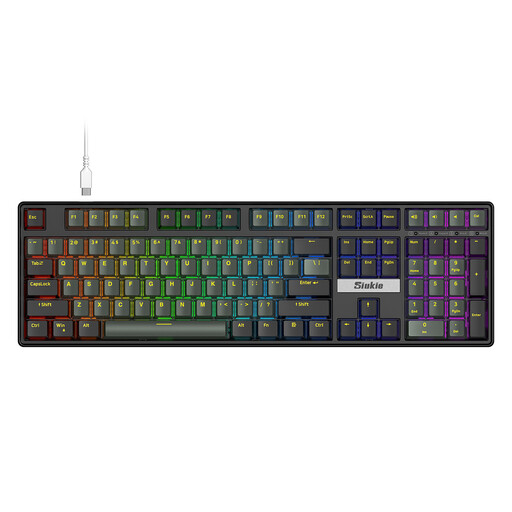
Siukie CR108 108-key wired mechanical keyboard
Consider this 108-key wired model if you prefer a direct connection at a fixed desk. Confirm its physical layout and the keys you need for numeric entry before buying, particularly if you are accustomed to a UK keyboard.
View on Joybuy
Frequently asked questions
Will a backlit keyboard solve glare from a bright window?
No. The Health and Safety Executive advises arranging the desk and screen to avoid glare or bright reflections; blinds or curtains can help control intrusive light. Adjustable keyboard lighting may still help you see keys as room light changes, but it will not remove screen reflections.
Do I need a full-size keyboard for family-history research?
Choose a full-size layout if you regularly use a dedicated numpad or navigation keys for dates and records. A smaller layout may free up desk space, so check which keys you actually use before deciding.
Where should the keyboard sit during longer research sessions?
Place it centrally and just below elbow height, following Health and Safety Executive guidance. If you work on a laptop for prolonged periods, a separate keyboard and mouse let you position the screen independently.


