Choose the route that fits the games and friends your children want to reach, and where they will play: on a shared TV, away from it or on a computer. Then check child-account and chat settings, local-player support, online-service requirements and included accessories; Nintendo says Switch console restrictions apply to everyone using that console, and a device alone does not make online play safe.
Who this guide is for
Families coordinating online friends
Need to check that the intended games, multiplayer arrangements and contact settings work for the people their children want to play with. Nintendo, Xbox and PlayStation each describe platform-specific account or communication controls.
Families sharing one gaming space
Need to work out who uses the TV, who needs a separate screen and whether device-wide restrictions fit everyone sharing the console. Nintendo says Switch and Switch 2 console restrictions apply to all users of that console.
Families adding portable or PC play
Want play away from the shared TV or access to PC games, while checking game compatibility and the relevant account settings. Steam and Microsoft describe controls with specific scopes and conditions.
What to check before buying
TV-connected consoles
Consider this when: the intended games and friends fit PlayStation, Xbox or Nintendo, and play will mainly happen around a TV.
Check: disc support varies by exact model, and extra controllers or online services may be needed for the planned sessions.
Handheld gaming devices
Consider this when: children need a screen away from the shared TV; Switch 2 offers TV, tabletop and handheld modes, while Switch Lite is handheld-only.
Check: the game library and account controls differ between console and PC handhelds, and a portable screen does not provide a second device for simultaneous play.
Gaming-capable computers
Consider this when: the required games call for a PC, or the household also needs the computer for non-gaming tasks.
Check: each game’s requirements and the separate settings used by Windows, a storefront and the game itself.
For families choosing a first or replacement device for online gaming involving children aged 8–17, begin with the intended games and friends, then check account and chat settings, shared-space arrangements and the additional equipment needed.
| Concern |
What to check when buying |
Who this matters to |
| Games and friends |
Check the exact game version, supported platforms and multiplayer modes. Confirm whether online play needs a particular account or service. |
If my children want to join friends in specific games, I want to confirm that their versions and multiplayer modes match; around 25% of consumers put game and friend compatibility first. |
| Communication settings |
Review child-account, friend and chat permissions across the console, game and service. Nintendo requires additional parental-controls app setup for Switch 2 GameChat users under 16. |
If I need to manage who can contact my child and how they can communicate, I want to check each relevant setting before play; around 25% of consumers prioritise communication oversight. |
| Shared-device play |
Confirm the game’s local-player support, the controllers included and whether restrictions apply to an account or the whole console. Nintendo says Switch and Switch 2 console restrictions apply to everyone using that console. |
If several people will share the TV or device, I want the player setup and restrictions to suit everyone using it; around 19% of consumers put shared-space arrangements first. |
| Play away from the TV |
Check the exact games, handheld or tabletop mode, charging arrangements and storefront controls. Valve describes Steam Families settings for game access and playtime. |
If my child needs to play without taking over the family TV, I want a suitable portable screen and games; around 19% of consumers prioritise portable play. |
| Complete setup |
Check whether the chosen game or feature needs an online membership, extra controller, charging accessory or compatible disc drive. Nintendo says the Switch 2 Joy-Con 2 charging grip is sold separately. |
If I want to know what the household needs beyond the console itself, I will check the exact game, bundle and accessories; around 12% of consumers prioritise the complete setup. |
Buying pitfalls
-
Choosing a console before checking the children’s games and friends’ platforms
Local multiplayer, online multiplayer and cross-network play are different features, so a console choice alone does not establish that the intended group can play together.
Check each game’s supported platforms and modes first, then match the device to the intended session.
A different game version, service or device may be needed for the group to join the same session.
-
Assuming family controls apply to each child or cover every chat service
Nintendo says Switch and Switch 2 console restrictions apply to everyone using the console. Microsoft’s web filtering also has supported-browser and signed-in-account conditions.
Review the device, child account, storefront and game settings separately, especially on a shared device.
-
Treating the device as the complete setup
Online memberships, compatible controllers, charging equipment and disc support depend on the selected platform, model and game.
Make a list for the intended games and each player, then check the exact bundle and any required accessories.
The household may need a compatible controller, charging accessory, online membership or optional disc drive in addition to the console.
Relevant brands to consider
Nintendo
Relevant when one device needs to move between TV, tabletop and handheld play.
- Nintendo documents all three Switch 2 play modes and provides parental controls.
- Console restrictions apply to everyone using that console. GameChat for users under 16 requires additional setup through the Nintendo parental-controls app.
Sony PlayStation
Relevant when the intended games and friends use PlayStation and the main setup is TV-connected.
- PlayStation documents child-account controls for games, communication, playtime and spending.
- Check the exact console model and the game’s multiplayer arrangements before choosing.
Microsoft Xbox
Relevant for households whose intended games and friends use Xbox and whose main setup is a TV console.
- Xbox documents family settings for communication and multiplayer.
- Disc support varies: Series S is disc-free, and Series X also has a digital-only variant. Check the exact model.
Valve
Relevant when the household wants compatible Steam games on a handheld away from a desk.
- Steam Families settings include game access, Steam feature access and playtime limits.
- Steam settings should not be assumed to manage other games or services used on the device.
ASUS
Relevant when access to suitable PC games is the main reason for considering a Windows handheld.
- ASUS lists different UK ROG Xbox Ally models and specifications, so the model identifier helps distinguish them.
- Microsoft says web and search filtering depends on a supported browser and a signed-in account; these settings do not establish control over every game or chat service.
Joybuy products for family gaming
These listings cover Xbox and Nintendo consoles, a handheld-only console and an Xbox/Windows controller, for families considering TV play, portable play or an additional compatible controller.
 No image available
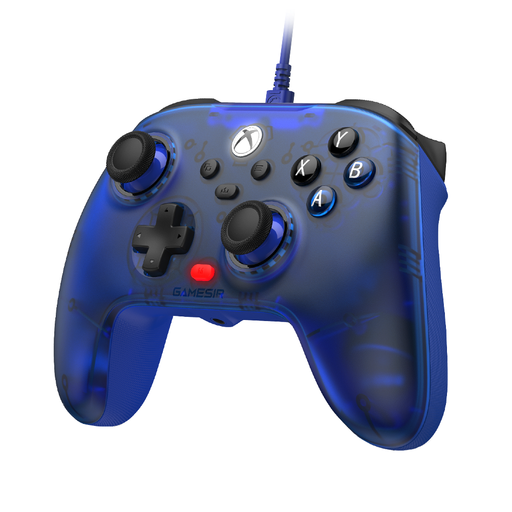
GameSir T7 Wired Xbox Controller (Blue)
For an Xbox or Windows setup that needs a wired controller; the listing specifies Xbox Series X|S, Xbox One and Windows 10/11 compatibility.
Hall Effect sticks and triggers, programmable back buttons, a detachable 3-metre USB-C cable and a 3.5 mm audio jack are specified. The controller connects by wire.
View on Joybuy
 No image available
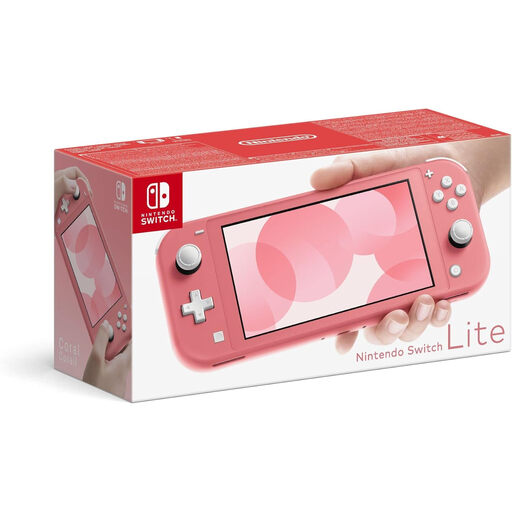
Nintendo Switch Lite (Coral)
For a child who needs a dedicated screen away from the shared TV; this model is handheld-only.
The listing specifies integrated controls and Wi-Fi. It also states that online play requires a Nintendo Switch Online subscription; check the requirements for the specific game.
View on Joybuy
 No image available
Xbox Series S 512GB Console (White)
For a household whose intended games and friends use Xbox and that wants a TV-connected console setup.
This 512GB model is all-digital and has no disc drive. The listing specifies an included Xbox controller and HDMI cable.
View on Joybuy
 No image available
Xbox Series S 1TB
For a household whose intended games and friends use Xbox and that wants a TV-connected console.
This 1TB model is all-digital, so it does not use game discs.
View on Joybuy
 No image available
Nintendo Switch 2 Console + Nintendo Switch Sports Resort
For a household that wants to move play between a TV, tabletop and handheld mode; Nintendo documents all three modes for Switch 2.
The listing specifies included Joy-Con 2 controllers. Nintendo says console restrictions apply to everyone using the console. GameChat for users under 16 requires setup through the Nintendo Switch Parental Controls app; online services also require internet access, a Nintendo Account and Nintendo Switch Online membership.
View on Joybuy
Frequently asked questions
Does a child need a separate account on a shared gaming device?
Use the child-account arrangements described by the chosen platform for child-specific settings. PlayStation and Xbox document family settings for child accounts, while Nintendo says Switch and Switch 2 console restrictions apply to everyone using the console.
Can a child under 16 use Switch 2 GameChat straight away?
No. Nintendo says a parent must link the console to the Nintendo Switch Parental Controls app and complete the additional GameChat setup for users under 16. GameChat also requires an internet connection and Nintendo Switch Online membership; Nintendo’s free welcome offer ended in March 2026.
Will Windows web filtering cover every browser and game chat?
No. Microsoft says Family Safety web and search filters work in supported browsers while the family member is signed in. Check other browsers and the communication settings for each game or storefront separately.
Does online play always require a subscription?
No single requirement applies to every game and platform. Xbox says Minecraft online multiplayer on an Xbox console needs at least Game Pass Essential, while Nintendo says Switch 2 GameChat requires Nintendo Switch Online; check the intended game and feature.
How should we check controllers and charging before choosing?
Check local-player support in the selected game and the exact bundle contents before choosing additional equipment. Nintendo says Joy-Con 2 controllers can charge while attached to Switch 2 and that the Joy-Con 2 charging grip is sold separately.


