What matters when choosing a device?
Check game availability before comparing control systems. Then decide whether your household needs restrictions tied to each child, one shared-console setting, or broader controls for apps and websites as well as gaming.
Nintendo Switch or Switch 2
Consider it when: The wanted games are available and everyone sharing the console can use the same baseline restrictions.
Trade-off: Nintendo says restrictions apply to the console rather than each user; some Nintendo Account family settings also need separate attention.
Xbox or PlayStation
Consider it when: Separate, adult-managed child accounts are important to the household. Microsoft documents family-member privacy settings, while Sony documents controls tied to PlayStation child accounts.
Trade-off: The child must use the managed account. Sony also advises securing adult profiles and restricting guest access and new-user creation on a shared PlayStation.
iPad
Consider it when: The family also wants a portable, general-use device with Apple Screen Time controls for apps, websites, communications and use time.
Trade-off: The child needs their own Apple Account in Family Sharing, and Apple says available controls can vary by device, software version, region and age.
Android tablet or Chromebook
Consider it when: Family Link’s supervised app, screen-time and Chrome controls fit the child’s intended Android or Chromebook use.
Trade-off: Google says Family Link does not supervise iPads or non-Chromebook computers; check the wanted games and their own account settings separately.
| Concern |
What to check |
Who this matters to |
| Child accounts and permissions |
Check for a separate child account, an adult organiser and the family-group settings available on the intended service. |
If I am setting up my child’s first online account, I want permissions attached to their own login rather than mine. Around 31% of consumers would put child-account permissions first. |
| Chat and cross-play |
Identify the wanted game’s platform chat, in-game chat, friend and cross-play settings; check any separate game account. |
When my child plays online with friends, I need to know which contact I can manage without assuming every chat feature works alike. Communication would be the main concern for around 31% of consumers. |
| Sharing with siblings and adults |
Check whether restrictions apply to the whole device or to individual accounts, and whether adult and guest access can be secured. |
If children of different ages share a console, I need restrictions that still make sense when someone else signs in. For around 25% of consumers, managing the shared device would take priority. |
| Apps, websites and use time |
Check the operating system and supported supervision tools, then confirm whether the intended games require additional settings. |
When the device is also used for browsing and other apps, I want to manage more than gaming time. Broader device controls would come first for around 13% of consumers. |
Relevant platforms and brands
These control systems are useful points of reference when comparing devices; the account setup and supported features matter more than the brand name alone.
Nintendo
Switch and Switch 2 are shared-console options with console controls, a parental-controls app and separate Nintendo Account family settings.
- Nintendo documents play-time, age-rating and communication restrictions through its parental-control tools.
- Restrictions apply to the console rather than individual users; check Nintendo Account settings separately for the functions your child will use.
Xbox / Microsoft
A Microsoft family group provides an account-based route for managing a child’s Xbox privacy and online-safety settings.
- Microsoft says a family organiser can manage settings for family-group members across its Xbox family tools.
- Those settings depend on creating a correctly aged child account and having the child use it.
PlayStation / Sony
PlayStation uses child-account controls for PS4 and PS5, with family management available through Sony’s account and console tools.
- Sony documents settings for games and content, communication, privacy and playtime.
- Sony advises protecting adult profiles and preventing unrestricted guest or new-user access on a shared console.
Apple
An iPad can be managed through Screen Time and Family Sharing when the child has their own Apple Account.
- Apple documents controls for app and website access, communications and device-use timing.
- Available controls can vary with the device, software version, region and child’s age; game-specific settings still need checking.
Google
Family Link is a supervision route for eligible Android devices and Chromebooks using a child Google Account.
- Google documents app management, screen-time settings and selected Chrome filtering controls.
- Google says Family Link does not supervise iPads or non-Chromebook computers; Chrome controls on other computers do not cover every browser or profile.
Console options for family online play
These Joybuy choices are games consoles. Compare their family-account arrangements with the games your child wants to play; the tablets and computers discussed above serve different household needs.
 No image available
Sony PlayStation 5 Console – Disc Edition – Slim
Consider this PS5 if the child’s wanted games are available on it and you want Sony’s child-account controls for a shared household.
This is the Disc Edition, Slim variant. Sony documents controls for communication, privacy and playtime; use a managed child account, protect adult profiles and review guest and new-user access.
View on Joybuy
 No image available
Xbox Series X Console 1TB – Black
Consider this console if the wanted games are available on Xbox Series X and a Microsoft family organiser will manage the child’s account.
The listed variant is black with 1TB in its product name. Microsoft documents family-member privacy and online-safety settings; check the child’s game-specific chat and cross-play options as well.
View on Joybuy
 No image available
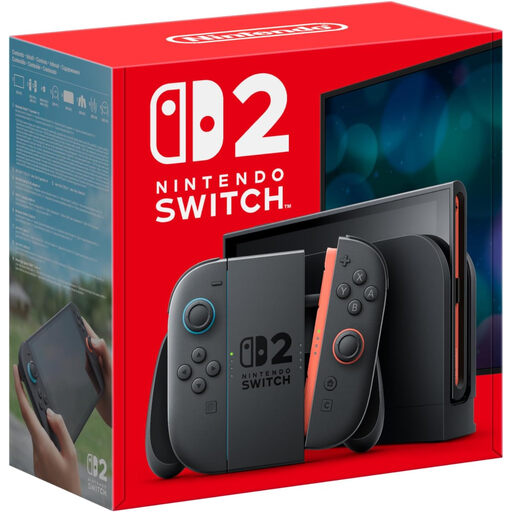
Nintendo Switch 2 Console (UK Version)
Consider this shared-console route if the child’s wanted games are available on Switch 2 and everyone using it can accept the same baseline restrictions.
Nintendo says parental restrictions apply to the whole console, not separately to each user. Set them with the youngest regular player in mind and review the relevant Nintendo Account family settings too.
View on Joybuy
Questions parents ask
Can one parental-control setting cover the device and every online game?
No. Device, operating-system, platform-account and game settings can cover different functions. Nintendo, for instance, separates some console and app restrictions from Nintendo Account family settings, so check each layer used by the games and communication services your child wants.
Should my child use my adult gaming account?
Use a separate, correctly aged child account where the chosen platform supports one. Ofcom advises checking the registered age because platforms can restrict features, games and content for younger users; an adult login may not apply the child settings you intend.
Can siblings have different parental restrictions on one Nintendo Switch?
Not through the console-wide Switch parental restrictions: Nintendo says they apply to the console rather than each user. If siblings need substantially different permissions, weigh that shared baseline against a platform with account-specific child management.
How do I stop another PlayStation profile bypassing a child’s settings?
Secure the other ways to access the console as well as configuring the child account. Sony advises protecting adult profiles with login passcodes and setting console restrictions on guest login and new-user creation.
Will Family Link supervise any computer my child uses for gaming?
No. Google says Family Link supervision covers supported Android devices and Chromebooks, not other computers. Google also warns that its Chrome controls on Windows, Mac and Linux may not apply if a child signs out, changes profile or uses another browser; check the computer and game services separately.


