What to check before choosing
Start with the files you could not easily replace, then check how copies are created, restored and kept separate from the device you use every day.
| Priority |
What to check |
Your needs |
| Recoverable separate copy |
Check that photos, documents and device data are copied to a separate location; choose the folders or device content to include; test restoration of a non-sensitive file. |
I want important files to remain available if the original phone or computer is lost, damaged, deleted or affected by malware. |
| Current backups |
Confirm automatic backup is enabled on each relevant device; check power, Wi-Fi and charging requirements; review the date and time of the last successful backup. |
I do not want recent family photos and documents to depend on remembering a manual copying routine. |
| File recovery |
Check whether earlier file versions can be restored; note the retention period; distinguish whole-account recovery from restoring individual files. |
I want a way back from an accidental edit, overwrite or deletion, not just a copy of the latest version. |
| Account protection |
Review provider security and availability for the files you plan to store; enable a unique password and 2-step verification; check private and shared-folder permissions. |
I want to control who can access family records and avoid losing access to the account that holds the backup. |
| Offline separation |
Consider a removable drive that can be disconnected between sessions; keep at least one copy separate from the live device; use cloud plus removable media where one route alone is not enough. |
For irreplaceable files, I want one copy that is less exposed if an incident affects my computer or always-connected storage. |
Joybuy product options
These Joybuy options cover removable local storage for an external-drive backup routine, plus one USB flash drive for a deliberately limited portable file set.
 No image available
Samsung MU-PG2T0B 2 TB USB Type-C SSD
A removable 2 TB destination for a substantial local copy of household photos, videos and documents.
Stated USB-C and USB 3.2 Gen 2x2 connection, up to 2,000 MB/s transfer speed, password authentication and 256-bit AES hardware encryption.
Check that your devices support USB 3.2 Gen 2x2 for the stated speed, and confirm the backup, version-retention and restoration workflow before relying on it.
Joybuy
 No image available
Samsung Portable SSD T7 2 TB USB Type-C Grey
A 2 TB removable drive for households making a separate local copy across compatible personal devices.
Stated USB 3.2 Gen 2 connection, Type-C-to-C and Type-C-to-A cables, and compatibility with Windows, Mac and Android devices.
Password protection is stated as optional; configure it for sensitive records, and check backup scheduling, file versions and restoration before making it the main backup method.
Joybuy
 No image available
Samsung MU-PE1T0S 1 TB USB Type-C SSD
A 1 TB removable local-copy option for selected household files from PCs, Macs and compatible Android devices.
Stated USB Type-C 3.2 Gen 2 connection, compatibility with Macs, PCs and Android devices, IP65 resistance and up-to-3 m drop resistance.
Check whether 1 TB suits the current library and growth, and verify the backup, version-history and restoration workflow before using it as the main method.
Joybuy
 No image available
SanDisk Portable SSD 2 TB
A compact 2 TB removable destination for a substantial separate copy of family media and documents.
Stated USB compatibility, up to 800 MB/s read speed, 2 m drop protection and a 3-year manufacturer guarantee.
Check read/write compatibility with every intended device and verify password protection, encryption, backup software and restore tools if they are important to your routine.
Joybuy
 No image available
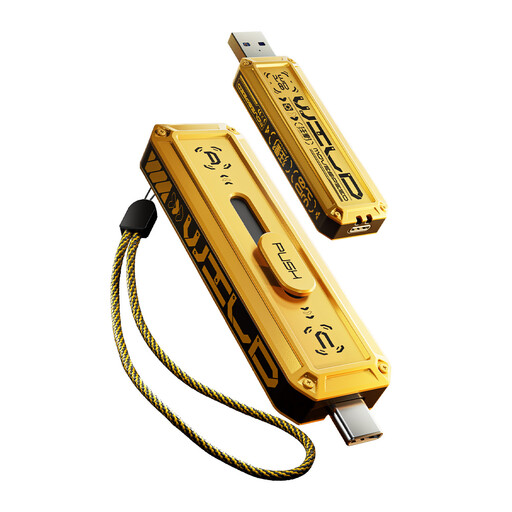
MOVESPEED YSUWD10-1TSY 1 TB Dual-Interface USB Flash Drive
A portable option for a deliberately limited separate copy of key documents and selected files.
Stated 1 TB capacity, USB-A and Type-C connectors, USB 3.2 Gen 2x1 connection, and Windows, macOS and Android support.
A USB stick is more suitable for a limited portable file set than a continuously growing family library; verify device-specific read/write compatibility and store it separately between copy sessions.
Joybuy
Frequently asked questions
Is cloud sync the same as a complete backup?
Not necessarily. Check which folders, apps and device data are included, because a cloud backup can exclude data already synced elsewhere or held in another cloud service. Identify the files you need to restore and confirm that a usable copy exists.
What should I check before choosing a cloud-storage subscription?
Check the storage amount, what shares that storage, backed-up devices and folders, restoration or version-history options, sharing permissions, account recovery, cancellation and renewal terms. Google states that its storage is shared across several services and that a full quota stops new Google Photos backups.
How do I protect a cloud backup from account takeover?
Use a strong, separate password and enable 2-step verification for the cloud-storage account and its recovery email account. The National Cyber Security Centre says 2-step verification adds protection even if a password is known.
Should an external drive stay connected all the time?
It can stay connected while an automated backup needs access, but do not treat a permanently connected drive as the only protection against malware. The National Cyber Security Centre explains that an offline backup is intended to remain unaffected by incidents affecting live systems, so disconnect a separate copy between backup sessions.
Does data protection matter when sharing a family backup folder?
For personal use, keep folders private unless sharing is intended, invite only people who need access, and review permissions regularly. The Information Commissioner’s Office advises thinking carefully about who can access uploaded cloud files; if storage is used beyond personal or household affairs, seek current compliance advice.


