For irreplaceable family photos and personal files, using cloud storage alongside a removable copy can reduce reliance on one location or account. Cloud storage suits files you want to access across supported devices; a drive provides a local copy, while either route depends on the right files being backed up and restorable. Check what each option covers and try restoring a file before relying on it.
Who needs a household backup plan?
Families protecting irreplaceable photos
They need more than a convenient place to view photos: they want a recoverable copy if a device or storage location is lost. The National Cyber Security Centre advises considering both cloud storage and removable media for irreplaceable family photos.
Households backing up several devices
They need to distinguish photo syncing from phone device backup and computer file backup before choosing shared cloud capacity or a local drive. Apple Support and Google Photos Help describe how photo services and account storage work.
Computer users building a local archive
They need enough space and a compatible, repeatable backup-and-restore workflow for photos and documents. Microsoft Support and Apple Support explain the restore features and destination requirements for their respective computer backup tools.
What should you prioritise when choosing backup storage?
For irreplaceable family photos, the National Cyber Security Centre advises considering copies in both cloud storage and removable media. For consumers choosing storage for family photos and personal-device backups in the UK, the main decision is which practical concern should lead the choice.
| Concern |
What to check when buying |
Who this matters to |
| Recoverable, separate copies |
Check which files are covered, where the copies are stored and how to restore a sample file. |
If these photos would be difficult to replace, I want a copy that remains separate from the device and can be restored. Around 36% of consumers put recoverability first. |
| Capacity for the whole library |
Estimate the space needed for the intended files and future additions; check whether other services share the cloud quota. |
When my library grows, I need the complete set of intended photos and files to fit. Around 29% of consumers make capacity their primary concern. |
| Device and restore compatibility |
List the phones and computers involved; check ports, backup software and whether the intended files can be restored. |
If our household uses different phones and computers, I need the workflow to cover the intended files and restore them. Compatibility is the main concern for around 21% of consumers. |
| Ongoing cost and access |
Check the plan’s current terms and how to export files before changing providers or cancelling a service. |
If recurring charges matter most, I want to understand the plan’s terms and keep access to my files if I leave. Around 14% of consumers put ongoing cost and continued access first. |
Backup storage buying pitfalls to avoid
-
Treating a synced photo library as a second independent backup
Apple Support says that photos using iCloud Photos are not duplicated in iCloud device backup, and changes or deletions can sync across devices using the service.
Check the chosen service’s deletion and restore behaviour, and keep another copy of photos that would be difficult to replace.
-
Leaving the only external backup connected continuously
The National Cyber Security Centre notes that malware incidents have affected connected backup drives as well as the original data.
After making and checking a removable-media backup, disconnect it when it is not in use. Consider a separate off-site copy for irreplaceable files.
-
Choosing a drive by connector or advertised speed alone
A connector does not establish that a drive supports the required backup workflow. Apple Support says a Windows-formatted disk cannot be used for Time Machine without reformatting.
Check the exact model, capacity, cable, computer ports, drive format and backup software before buying.
Reformatting a disk for Time Machine permanently removes its existing files, so copy anything you need elsewhere first.
Relevant brands and services
These notes relate to the specific services and product lines described, not to every product from each brand.
Apple
iCloud+ and iCloud Photos are relevant to households using Apple devices or maintaining an Apple photo library; Time Machine is a separate Mac-to-drive workflow.
- Apple lists iCloud+ storage tiers and family sharing. Apple Support explains that iCloud Photos content is not duplicated in iCloud device backup.
- Apple Support says deletions in iCloud Photos can propagate to enabled devices, so syncing should not be mistaken for a second independent photo library.
Google
Google Photos and Google One are relevant when household members want cloud photo access across supported phones and computers.
- Google Photos Help says Google Account storage is shared across Photos, Gmail and Drive. Google One Help says family members can share an eligible plan’s quota without automatically sharing their files.
- Check the chosen plan and account storage use against the library; a shared quota does not mean family members’ files are shared with one another.
Seagate
The Expansion Portable is a local drive option for a computer photo or file archive; capacity depends on the exact variant.
- Seagate’s datasheet identifies the STKM2000400 as a 2 TB USB-powered model.
- Seagate says the drive needs reformatting for Time Machine use. Check the exact model and required format before use.
Samsung
The Portable SSD T7 is a local-drive option when a compact SSD and file transfers matter to the choice.
- Samsung rates the UK-listed blue 1 TB MU-PC1T0H/WW T7 at up to 1,050 MB/s read and 1,000 MB/s write.
- Samsung states that reaching those maximum speeds depends on the specified host, cable and mode; they are not a guarantee of performance on every computer.
SanDisk
The Ultra Dual Drive Go is a removable-file option for transferring selected files between compatible USB-C and USB-A devices.
- SanDisk describes dual connectors and a Windows/macOS app backup feature for its listed product.
- Check the precise capacity and intended phone workflow; connector compatibility alone does not establish full-device backup or restore capability.
Removable storage options on Joybuy
The products below focus on removable storage for local copies of household photos and files. The USB flash drive is suited to selected-file transfers; its presence does not establish full-device backup support.
 No image available
Samsung Portable SSD T7 2 TB USB Type-C 3.2 Gen 2, Grey
A removable local-storage option for keeping a copy of photos and files.
The product listing specifies 2 TB capacity and USB 3.2 Gen 2. It also says the drive is not a replacement for a comprehensive backup solution.
View on Joybuy
 No image available
SanDisk Portable SSD 2TB
A removable drive option for a local copy of a photo and file library.
The product name specifies 2 TB capacity; the listing describes use for photos, videos and files.
View on Joybuy
 No image available
Western Digital Elements Port. 4TB Black USB 3.0
A local external-drive option for storing and backing up photos, videos and documents.
The product name specifies 4 TB and USB 3.0. The listing describes a USB-A cable and Windows 10+ recognition.
View on Joybuy
 No image available
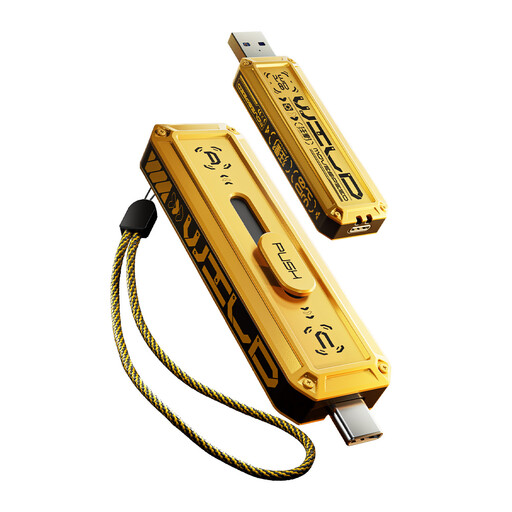
MOVESPEED YSUWD10-1TSY 1TB dual-interface USB flash drive, Yellow
A removable option for selected files and transfers between compatible devices.
The product name specifies 1 TB and USB-A and Type-C interfaces. The listing describes Windows, macOS and Android support; check that the intended device and file-transfer workflow are supported.
View on Joybuy
 No image available
Lexar ES4 Portable SSD Magnetic Set 2TB
A removable local-storage option for photo and file backups across listed compatible devices.
The product listing specifies 2 TB, USB 3.2 Gen 2, and compatibility with iPhone 15/16, Android, PC and Mac. It lists USB-C-to-C and USB-A-to-C cables; MagSafe wireless charging is not supported while the SSD is attached.
View on Joybuy
Family photo backup FAQs
Does syncing my iPhone photos to iCloud create a separate copy in iCloud device backup?
No. Apple Support says photos using iCloud Photos are not duplicated in iCloud device backup. Changes and deletions sync across devices using iCloud Photos, so keep another library copy if you need protection from losing the synced version.
How can I check that a computer backup will restore a file?
Check that the intended folders appear in the backup, then restore a sample file. Windows File History supports restoring saved file versions, and Mac Time Machine supports restoring backed-up files; use a compatible destination for the computer.
Can a Windows-formatted drive be used immediately for Mac Time Machine?
No. Apple Support says Time Machine cannot back up to a Windows-formatted disk. Preparing it for Time Machine may erase its existing contents, so copy any files you need elsewhere before agreeing to reformat.
What should I check before changing or cancelling cloud storage?
Check the provider’s notice and export terms, and allow time to make another copy before changing or ending the service. UK government guidance advises consumers to check how much notice a provider requires and make sure there is enough time to transfer or back up their data.


