What matters when choosing a backup?
The NCSC recommends regular backups of important files and checking that they can be restored. Compare each option by what it covers, how it stays up to date and whether a copy is kept apart from the device it protects.
| Concern |
What to check when buying |
Who this matters to |
| Routine copying and recovery |
Check which folders and device data are included, when the last copy completed and how to restore a sample file. |
If new photos arrive on my phone every week, I want recent copies I can retrieve after losing or replacing it. About 31% of consumers put routine copying and successful recovery first. |
| Capacity and ongoing cost |
Compare current used space with the exact drive capacity or plan allowance, and check what happens if a cloud plan is downgraded. |
When a family archive keeps growing, I need enough room for its photos and videos without losing track of the plan's limits. About 25% of consumers prioritise archive capacity and continuing cost. |
| Transfers and device compatibility |
Check the ports, supplied cables, host-device support and whether a drive may need reformatting. |
If I regularly move large folders between a phone and computer, I need a connection that works with both devices and a manageable copying routine. About 19% of consumers focus first on transfers and compatibility. |
| Shared storage and upkeep |
For a NAS, check supported drives, access for household devices, configured backup jobs and a separate destination for the NAS backup. |
When several people need a shared home file store, I want one I can set up and maintain, with a way to recover its files. About 13% of consumers put shared storage and its upkeep first. |
| Privacy and account access |
Check sharing settings, the product's encryption arrangements and how account or encryption recovery works. |
If private household files are stored online, I want to control who can access them and still have a workable way back into my account. About 12% of consumers prioritise privacy and access recovery. |
Joybuy products for local and shared storage
The products below are portable SSDs for local file copies and Synology NAS options for shared household storage. A separate backup routine still matters for recovery.
 Image unavailable
Samsung Portable SSD T7 4 TB
Consider it for a sizeable local photo and document archive or for moving large folders between compatible devices.
4TB capacity; USB 3.2 Gen 2; USB-C-to-C and USB-C-to-A cables are listed as included. Password protection is optional and must be enabled to use it.
Joybuy
 Image unavailable
Samsung Portable SSD T7 2 TB
Consider it for a local copy of photos, documents and other files, or for transferring large folders between compatible devices.
2TB capacity; USB 3.2 Gen 2; USB-C-to-C and USB-C-to-A cables are listed as included. Password protection is optional and must be enabled to use it.
Joybuy
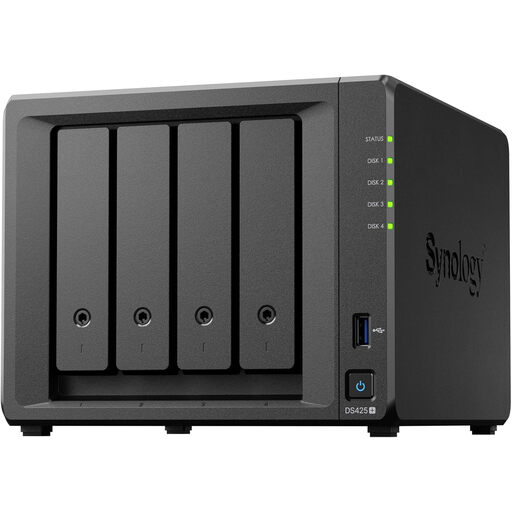 Image unavailable
Synology DS425+ 4-Bay NAS
Consider it when household devices need a central file and media storage destination and someone can manage the setup.
Four-bay NAS; the listing describes access controls, automated backups and snapshots. Check drive requirements and plan a separate backup destination for NAS data.
Joybuy
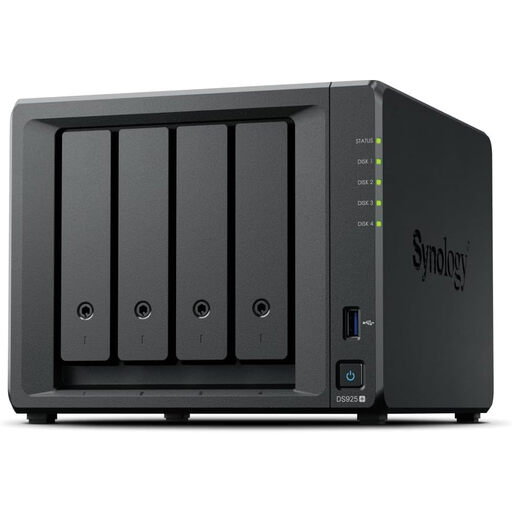 Image unavailable
Synology DiskStation DS925+ 4-Bay NAS
Consider it for a central household photo and file library that may need to expand.
Four-bay NAS; the listing describes expansion up to nine bays with the DX525. It states compatibility only with Synology-branded drives, so check drive requirements before choosing.
Joybuy
 Image unavailable
Samsung MU-PE1T0S 1TB USB Type-C External SSD
Consider it for a local copy of personal files or transferring files between compatible devices.
1TB capacity; USB Type-C connectivity. The listing describes compatibility with PCs, Macs and Android devices.
Joybuy
Backup questions answered
Is copying photos to a USB stick once the same as ongoing backup?
No. A one-time copy will not include photos taken later. Set a repeatable copying routine, disconnect removable backup media when it is not in use and check that you can restore a file. This is NCSC guidance, not a legal requirement.
What should I check before relying on phone-to-cloud copying?
Check the service's backup status, which folders and device data are included, available storage and account recovery. For iCloud Photos, Apple says photos are not also duplicated in iCloud device backup, so plan another copy if you need one.
Will a NAS with two drive bays replace a separate backup?
No. Synology warns that RAID crashes and drive failures can still cause data loss, and recommends backing up NAS data to a different destination. A NAS needs a separate recovery plan.
What happens to cloud backup if I cancel a plan or exceed its storage allowance?
It depends on the service's terms. Apple says that if an iCloud+ downgrade leaves storage over the new allowance, syncing and iCloud backups stop until space is freed or capacity is increased. Microsoft says OneDrive cannot upload, edit or sync new files while over its quota. Check your own plan before changing it.
Can family members automatically see my files when we share cloud storage?
Not necessarily. Google says other members cannot access a Google One family member's files without permission, and Apple says family members' personal iCloud+ files remain separate. Check the chosen service's sharing settings; a shared storage allowance does not necessarily create a shared photo library.


