Who this guide is for

Families protecting irreplaceable photos

If losing a phone, connected drive or live photo library would put important pictures at risk, consider keeping a separate copy that you can restore. The UK National Cyber Security Centre and Apple both describe risks that make a separately managed copy relevant.

Households with photos on several phones

If family photos are spread across devices, check which folders each app uploads and what happens when a photo is deleted. Google and Microsoft describe different phone-upload services and workflows.

Families building a growing archive

If your collection includes photos, videos and documents, compare the space available on a drive with the allowance and sharing rules of a cloud plan. Apple, Microsoft and Toshiba provide examples of storage options and device connections.

What to consider when choosing

External hard disk drive

Consider it: If you want a sizeable local copy and can connect the drive to a compatible device for manual copying.

Trade-off: It does not provide remote access by itself, and you need to keep the drive separate between backup sessions.

External SSD

Consider it: If you regularly move a large photo or video collection between compatible devices.

Trade-off: A speed rating does not automate copying or create a separate off-site copy; check the exact drive and host connection.

Paid cloud storage

Consider it: If automatic uploads from supported phones and access away from home are important.

Trade-off: Access depends on the account, and synchronised deletions or account-recovery problems can affect your library.

Local and cloud copies

Consider it: If you want cloud access as well as a copy managed separately from the live library.

Trade-off: You need to maintain both copying routines and confirm that exported files are full-resolution originals.

Concern What to check when buying Who this matters to
Recovery after loss or deletion Where separate copies are stored, the service’s deletion rules, when the last copy completed and whether sample files can be restored. If losing irreplaceable photos is your main worry, prioritise a copy you can restore independently. Around 33% of consumers put recovery first.
Uploads from family phones Check each phone’s account, included photo locations and upload status; confirm whether deleting a phone photo also deletes its online copy. If you want new photos from several phones saved without repeated manual transfers, check that uploads finish on each device. Around 27% of consumers prioritise phone uploads.
Capacity and plan terms Measure the collection and allow room for growth; compare usable drive capacity with the plan allowance and check whose files count towards shared storage. If your archive is growing, focus on how much room your household can use and the plan terms that apply. Around 20% of consumers prioritise capacity and plan terms.
Access and compatibility Check intended devices, connectors and file systems, plus cloud sharing permissions and the account-recovery method. If you need to open or share files across different devices, check access and permissions on those devices before committing. Around 20% of consumers prioritise cross-device access.

Backup pitfalls to avoid

  • Treating a synced photo library as a separate backup

    Apple says deletions in iCloud Photos propagate across devices, and those photos are not duplicated in iCloud device backup. A separate copy gives you another restore route if the live library changes.

    Keep an additional copy of irreplaceable originals and periodically try restoring sample files from it.

  • Using outdated cloud-plan storage terms

    Microsoft says new Microsoft 365 Family subscriptions from 7 October 2026 receive 2 TB of pooled OneDrive storage, while existing subscriptions have separate transition terms.

    Check the allowance that applies to your account and include all family members’ storage use before choosing a plan.

  • Choosing a drive by connector or headline speed alone

    Direct phone access depends on the device, drive and file system. Samsung’s stated T7 maximum transfer rates also depend on a suitable host and connection.

    Check the exact drive variant, host, cable and format, then test copying and opening an original file. You may need a compatible adapter or cable if the connectors differ.

  • Copying previews instead of full-resolution originals

    Apple distinguishes optimised device copies from full-resolution originals stored in iCloud. A set of previews may not be the complete local archive you intended to keep.

    Use the documented original-download or export process, wait for it to finish and open sample files before relying on the copy.

Relevant brands

Seagate

The Expansion portable HDD line is relevant if you want to manage a local photo copy manually.

  • Seagate describes drag-and-drop copying and USB 3.0 connectivity for the Expansion line.
  • Those details describe the cited line, not automatic phone backup. Check the chosen model and host, and keep a separate copy if you need another recovery route.

Toshiba

The Canvio Flex portable HDD line is relevant if you want to move a local copy between compatible USB-A and USB-C devices.

  • Toshiba specifies USB-A and USB-C cables for Canvio Flex.
  • Cross-device use depends on compatibility, and the drive needs a copying routine. It is not a substitute for a separately managed copy if a local incident affects both the drive and originals.

Samsung

The portable SSD range includes an option for households that move larger files; the cited performance figures apply to the T7 1 TB Titan Grey variant.

  • Samsung rates that T7 variant at up to 1,050 MB/s sequential reads and 1,000 MB/s writes when used with a suitable USB 3.2 Gen 2 connection, cables and UASP.
  • These are manufacturer figures for that variant, not independent measurements or a rating for every Samsung SSD. A fast drive does not create or automate a separate backup.

Apple

iCloud+ is a cloud-plan option for households using iCloud Photos across supported devices.

  • Apple lists UK storage tiers and family-plan sharing.
  • Apple says iCloud Photos propagates deletions and is not duplicated in iCloud device backup. Keep another copy of photos you cannot replace.

Google

Google Photos and Google One are options for households seeking phone photo uploads and shared cloud storage.

  • Google documents automatic photo uploads. Google also says family members sharing eligible Google One storage cannot access one another’s files without permission.
  • Check the chosen plan, account and recovery rules. Shared storage does not itself create a separately managed backup.

Microsoft

OneDrive camera backup and Microsoft 365 Family are relevant to households storing photos and documents across phones and computers.

  • Microsoft says camera backup uploads photos and videos to OneDrive rather than syncing them both ways.
  • Microsoft says new Family subscriptions from 7 October 2026 receive 2 TB of pooled storage, with separate transition terms for existing subscribers. Check which allowance applies to your account.

Joybuy product choices

These Joybuy options focus on local storage for photo archives, from portable drives to USB-C storage. Check device compatibility and your copying routine before relying on any local copy as a backup.

Samsung Portable SSD T7, 2 TB, Grey

Samsung Portable SSD T7, 2 TB, Grey

Consider it for keeping a local copy of photos and documents when you have a compatible device and a routine for copying files.

2 TB capacity; USB Type-C 3.2 Gen 2.

A connected drive can be affected alongside the originals, so keep another copy isolated and check that files can be restored.

Joybuy

Samsung T7 Shield Portable SSD, 1 TB, Blue

Samsung T7 Shield Portable SSD, 1 TB, Blue

Consider it for carrying a local photo copy between compatible devices; check the connection and copying process you plan to use.

1 TB capacity; USB 3.2 Gen.2.

A connected drive can be affected alongside the originals, so keep another copy isolated and check that files can be restored.

Joybuy
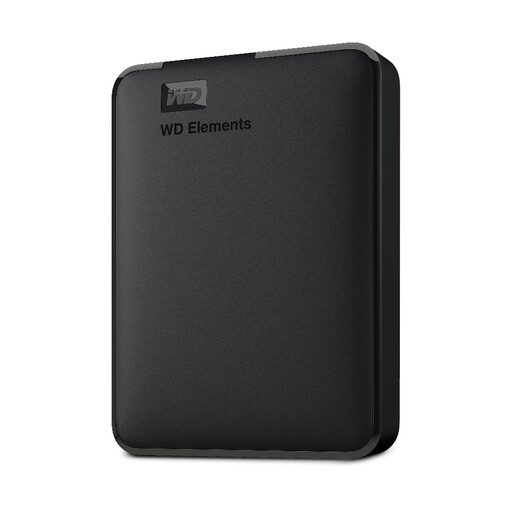
WD Elements Portable External Hard Drive, 2 TB, PC and Mac format

WD Elements Portable External Hard Drive, 2 TB

Consider it for a local copy of photos, videos and documents when your computer supports the drive’s stated format.

2 TB capacity; USB 3.0; formatted for PC and Mac.

A connected drive can be affected alongside the originals, so keep another copy isolated and check that files can be restored.

Joybuy

SanDisk Phone Drive with USB-C, 128 GB, Arctic White

SanDisk Phone Drive with USB-C, 128 GB, Arctic White

Consider it for a local copy from a compatible USB-C device; confirm that the drive and its backup workflow work with your phone before relying on them.

128 GB capacity; USB-C.

A connected drive can be affected alongside the originals, so keep another copy isolated and check that files can be restored.

Joybuy

SanDisk Portable SSD, 2 TB

SanDisk Portable SSD, 2 TB

Consider it for keeping a local copy of photos and other files when you need portable storage and have a compatible device.

2 TB capacity.

A connected drive can be affected alongside the originals, so keep another copy isolated and check that files can be restored.

Joybuy

Family photo backup FAQs

Will a paid photo library replace a separate backup?

Not necessarily. Apple says deletions in iCloud Photos are reflected across synced devices and that these photos are not duplicated in iCloud device backup. Keep and periodically check another copy if you want a separate restore route.

What should I do before replacing or losing a phone?

Confirm the account, backup settings and completed uploads on the old phone, then open sample photos from another device. Microsoft says OneDrive camera backup uploads photos and videos rather than syncing them both ways. Check that you can also use the account’s recovery method.

Can I connect an external drive directly to an iPhone?

It depends on the iPhone, connector or adapter, drive and format. Apple says a recognised external device must have a single data partition and use a supported format, including exFAT or APFS. Test the intended drive and export process rather than relying on the connector alone.

How can I check whether a cloud plan has enough room for my family photos?

Measure the files you want to keep, allow for growth and check how shared storage is allocated across family members. Microsoft says new Microsoft 365 Family subscriptions from 7 October 2026 receive 2 TB of pooled OneDrive storage, while existing subscriptions have separate transition terms; check the allowance for your account.

Can family members see one another’s files in shared cloud storage?

Check the sharing permissions for the specific service and files. Google says family members sharing eligible Google One storage cannot access one another’s files without permission, but shared storage does not itself mean that files have been shared.