What matters when choosing a backup?
Decide what must be recoverable and where the originals live before choosing how to store additional copies.
Cloud storage
Consider it: When family members need phone uploads and access away from home, and the service works with their devices.
Plan for: Account recovery and the difference between shared capacity and files deliberately shared with others.
External HDD or SSD
Consider it: When you want a separate local copy; Which? describes HDDs as suited to longer-term computer backup and SSDs as generally faster.
Plan for: A routine for making and testing copies, and somewhere safe to keep a drive when it is disconnected.
Network-attached storage
Consider it: When several computers need a central local destination and someone can manage the system.
Plan for: Updates, access controls and a separate destination; Synology warns that RAID does not remove data-loss risk.
Local and cloud copies
Consider it: When family photos and records should not depend on one device, location or account.
Plan for: Checking both copies and restoring sample files; the National Cyber Security Centre warns that connected backups can be compromised alongside originals.
| Priority | What to check | Your needs |
|---|
| Recovery |
Confirm that each source device is backed up, check whether older versions can be restored, and restore a sample folder. Keep a copy separate from the original device. |
I need to recover photos and documents after a phone is lost or a file is deleted, not just see what is currently online. |
| Device access and sharing |
Check uploads and downloads on every active device. Distinguish shared storage capacity from a shared library, and review file permissions. |
Our phones and computers use different systems, but family members should still control which personal files they share. |
| Storage and upkeep |
Measure the existing library and expected growth. Compare a subscription's capacity rules with the space, maintenance and replacement planning needed for local storage. |
I want room for our existing photos and videos without choosing a plan or drive solely by its headline capacity. |
| Access protection |
Set up 2-step verification for important storage accounts, preserve recovery methods, and consider encryption for a portable copy. |
If a drive goes missing or I lose access to an account, I need a way to protect the files and recover a separate copy. |
Relevant storage brands
These brands illustrate different storage approaches; their services and product lines require different backup routines.
Apple
iCloud is a cloud option for households centred on Apple devices that also need to reach files from Windows or a browser.
- Apple says iCloud Drive files can be accessed through File Explorer on Windows PCs or iCloud.com.
- Check uploads and restores on each device rather than assuming that access to iCloud means every household file is backed up.
Google
Google Photos and Google One are options for households using Google accounts across phones and browsers.
- Google says Photos can automatically save photos and videos from an iPhone or iPad when backup is turned on.
- Google One family members share storage capacity, but their files are not available to one another without permission; check both capacity and sharing settings.
Microsoft
Microsoft 365 Family is a cloud option for households using PCs, Macs and mobile devices.
- Microsoft describes the plan as covering up to six people, with up to 6TB total allocated as 1TB per person.
- Separate per-person allowances do not form one 6TB space for a single family archive.
Synology
Synology's NAS tools are relevant when a household can manage a central local archive and its backups.
- Synology documents versioned backups and workflows using another local or off-site destination.
- Synology warns that RAID crashes and drive failures can still cause data loss; the NAS needs its own separate backup.
Crucial
Crucial's X10 Pro illustrates a portable SSD route for a separate local copy.
- Crucial says the X10 Pro ships formatted as exFAT and can be reformatted for other listed file systems.
- Crucial warns that reformatting erases the drive; decide on the file system before putting an only copy on it.
External drives on Joybuy
These portable HDDs and SSDs are options for adding a local copy of household files. Choose by the space your library needs and the devices you will use, then keep another independent copy.
 No image available
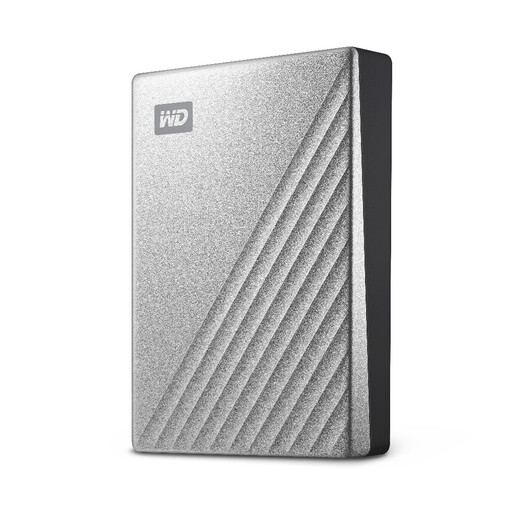
Western Digital My Passport Ultra 4TB portable hard drive, silver
For a separate local archive, establish a regular copying routine and test a restore. Mac use is described as requiring an NTFS driver, so check that setup before relying on the drive across computers.
Joybuy
 No image available
Western Digital My Passport Ultra for Mac 5TB portable hard drive, silver
For a Mac-centred local archive, plan how copies will be made and restored. Windows access is described as needing an HFS+ driver; check the intended cross-platform setup before using it for household backups.
Joybuy
 No image available
Samsung MU-PE1T0S 1TB USB Type-C 3.2 Gen 2 SSD, black
For a portable local copy, check the connection and copying procedure on each device you intend to use. Do not assume that connecting a drive starts an automatic phone backup; arrange a separate copy and test recovery.
Joybuy
 No image available
SanDisk Portable SSD 2TB
For a portable copy of photos and documents, check the drive against each computer or phone you plan to use. If the files are sensitive, confirm the encryption arrangement before carrying the copy, and test that you can restore it.
Joybuy
 No image available
Western Digital Elements portable 4TB USB 3.0 hard drive, black
For a separate local copy of a growing library, check how much space the files occupy and schedule regular backups. Mac or other operating-system use may require reformatting; verify the file-system setup before copying files.
Joybuy
Family backup questions
Is cloud sync alone a backup?
Do not assume that it is. The National Cyber Security Centre describes a backup as a separate copy that can be restored when the original is inaccessible. For important family files, keep an additional independent copy and test recovery with a non-critical file.
Should an external backup drive stay plugged in?
If it is your only additional copy, disconnecting or otherwise isolating it after a completed backup reduces its exposure to the same incident as the computer. The National Cyber Security Centre reports ransomware affecting connected USB and network backups alongside originals.
What should a family check before sharing cloud storage?
Check whether capacity is shared or allocated per person, and whether sharing storage also shares files. Google says family members share a quota while their files remain private unless shared; Microsoft describes its 365 Family storage as 1TB per person for up to six people.
How can we protect an account holding family backups?
Enable 2-step verification on the storage account and its recovery email, then keep recovery methods somewhere accessible without that account. The National Cyber Security Centre recommends 2-step verification for important accounts, including cloud storage.
Should a portable backup drive be encrypted?
Consider encryption if the drive could be lost, stolen or accessed by someone else, and keep its recovery key separately. The Information Commissioner's Office explains that encryption can protect information on USB and backup media from unauthorised access, particularly when a device goes missing; its guidance is principally addressed to organisations.


