Fixed-desk family-calendar households
These households want schedules, reminders and tasks visible from one home-office location without regularly moving the device or managing its charge.


If the family schedule needs to stay visible at one home-office desk, consider a Pixel Tablet with its Charging Speaker Dock or a dedicated digital calendar display. Choose a portable Galaxy Tab S10 FE for handwritten planning, or an iPad (A16) if the household already shares iCloud calendars. Before choosing any setup, check who needs to edit events and which accessories are included.
These households want schedules, reminders and tasks visible from one home-office location without regularly moving the device or managing its charge.
These consumers want to carry a shared calendar between rooms and write school notes, meal plans or household lists by hand.
Families already using iCloud calendars may want a portable iPad on which invited members can be given appropriate editing access.
Decide whether the device will usually stay at the desk or travel around the home, then choose a calendar service everyone who needs to contribute can use.
Choose when: The family uses Google Calendar and wants the tablet to return to one visible, powered desk position.
Bear in mind: The Charging Speaker Dock is a distinct bundle or accessory choice, and Google family-calendar access still needs setting up.
Choose when: A portable Android tablet must also handle handwritten household notes; Samsung lists an S Pen in the box.
Bear in mind: Samsung does not list a travel adaptor in the standard box, so plan the desk charging arrangement separately.
Choose when: The people updating the schedule already use iCloud and want to control who can edit a shared calendar.
Bear in mind: Apple Pencil is an optional accessory, and calendar collaborators need iCloud access.
| Concern | What to check | Who this matters to |
|---|---|---|
| A visible, charged schedule | Check whether a dock or stand is included and how the device will be powered at its intended position. | If I rely on a calendar at the home-office desk, I need it there and ready to read rather than elsewhere in the house. Around 40% of consumers put a fixed, visible schedule first. |
| Handwriting and flexible planning | Check pen compatibility and box contents; consider whether longer administrative tasks also call for a keyboard. | When school notes and household lists need writing alongside appointments, I want to take the device with me. Handwritten, portable planning comes first for around 30% of consumers. |
| Calendar access and sharing | Confirm that intended editors have the required Google or iCloud accounts and review their editing permissions. | I need family members to update the same events without giving everyone unwanted editing access. Around 30% of consumers prioritise calendar compatibility and sharing controls. |
Google Calendar’s Family calendar depends on a Google family group or access permissions. Apple says iCloud calendar sharing is for other iCloud users, with editing access controlled for each person.
Invite the intended contributors to a test calendar and check viewing, editing and notification settings before settling on a calendar system.
A tablet left at one location needs a suitable way to stand or dock and remain powered. Google offers a Charging Speaker Dock for Pixel Tablet; Samsung lists no travel adaptor in the Galaxy Tab S10 FE box, while Apple lists a USB-C cable in the iPad (A16) box.
Check the exact bundle for the dock or stand, power adaptor and any pen or keyboard the household intends to use.
A display intended to be read from across the room has a different placement requirement from a tablet used close to hand, and a larger device needs an appropriate space.
Measure the intended desk position and viewing distance, then decide whether family members will regularly carry the device elsewhere.
Pixel Tablet is relevant to a Google Calendar household planning a shared display at a fixed home-office location.
Galaxy Tab S10 FE suits consideration when the family wants a portable Android tablet for schedules and handwritten notes.
iPad (A16) is relevant to households already using iCloud calendars and Apple accounts.
These dedicated digital calendar displays are options for keeping a family schedule visible in a home office. They are distinct from the portable tablets discussed above; check their calendar-service compatibility and power setup against the way your household plans to use them.
 No image available
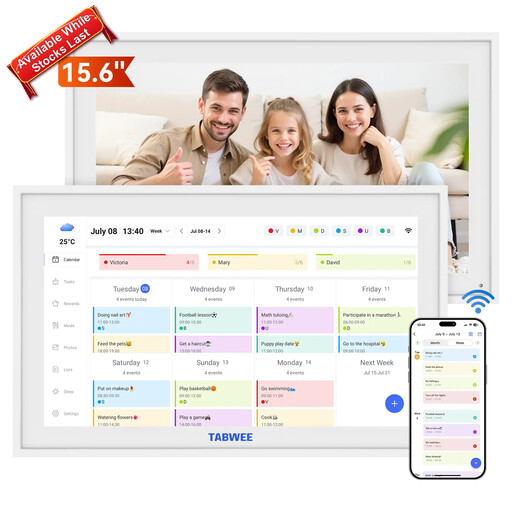
For a family schedule intended to stay visible in the home office, the TABWEE P15 is described as a wall calendar for appointments and meal planning.
Its listed features include a 15.6-inch touchscreen and Wi-Fi. Check the mounting hardware, power supply and supported calendar accounts before choosing a permanent position.
 No image available
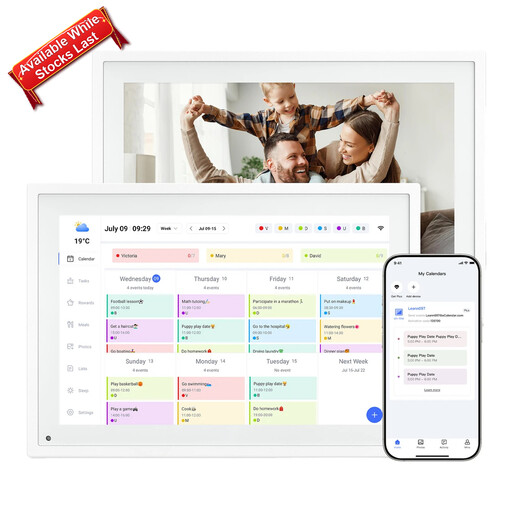
For a family schedule that members want to update through a mobile app, the TABWEE P10 is presented as a digital schedule board.
Its listed features include a 10.1-inch display and Wi-Fi; the product title describes two-way schedule syncing through a mobile app. Check which calendar services the app accepts, along with the stand or mount and power arrangement.
Start with the service that everyone who needs to edit events can access. Google Calendar creates a Family calendar for a Google family group, while Apple says an iCloud calendar can be shared with other iCloud users and editing access set for each person.
No; a dock is most relevant if the tablet will usually stay visible at one desk. Google’s Charging Speaker Dock connects magnetically to Pixel Tablet and is specified for charging at up to 15W; for another device, check its stand and charging arrangement separately.
That depends on the exact model and bundle. Samsung lists an S Pen with Galaxy Tab S10 FE but no travel adaptor; Apple lists a USB-C cable with iPad (A16), and Apple Pencil compatibility does not mean a pencil is included.
For most online orders, GOV.UK says customers can cancel within 14 days of receiving the item. Change-of-mind cancellation is separate from remedies for faulty or misdescribed goods; check the conditions that apply to your order and any additional retailer returns policy.