What should you prioritise when choosing?
For a child’s viewing, games and apps, match the account and app ecosystem to the child’s needs first; then check whether the household needs separate users and review the exact model’s update and subscription terms.
| Concern |
What to check when buying |
Who this matters to |
| Supervised access and screen time |
Check child-profile setup, app permissions, screen-time settings and whether the carer can manage the account on the intended device. |
If I want to manage a child’s screen time and downloads through their own account, I’ll check the controls on the exact device and account I plan to use. Consumers who put supervised access first make up around 31%. |
| Required apps |
List the child’s specific apps and check availability, child-profile access and payment rules in the platform’s store. |
When a child relies on particular video or game apps, I’d confirm they are available and usable on the child’s profile before choosing. Consumers whose primary concern is app access account for around 25%. |
| Separating child and adult use |
Verify additional-user support on the exact model, who controls the administrator profile and how supervision works when switching users. |
If adults and a child will share one tablet, I’ll check whether that model supports separate users and who controls the administrator account. Consumers prioritising distinct adult and child access make up around 25%. |
| Support life and ongoing terms |
Check the security-update commitment for the exact model and variant, alongside any subscription renewal and cancellation terms. |
For a tablet I expect to keep using, I’d verify its model-specific update commitment and whether included content renews after its included period. Consumers focused on support life and ongoing terms account for around 19%. |
Joybuy tablets for child use
Child-focused tablets for a child’s apps, viewing and games, with model-specific checks for account controls and app access.
 No image available
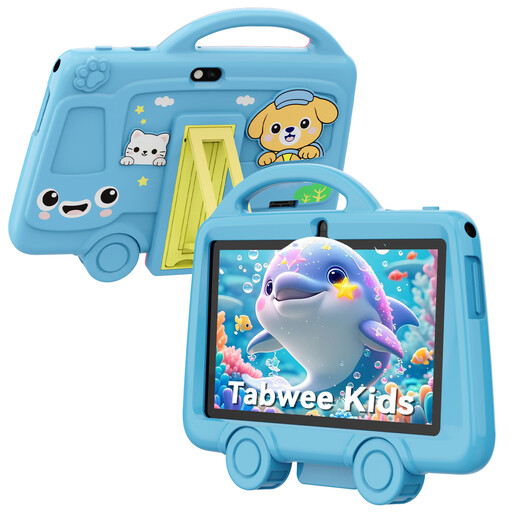
TABWEE K8 Kids’ Tablet, 7-inch, 3 GB RAM, 32 GB storage, Blue
A child-focused named tablet for viewing and games; check the required apps and child-account controls on the exact model before choosing.
7-inch display; 3 GB RAM; 32 GB storage; 2.4 GHz Wi-Fi; Bluetooth 4.2; 3,000 mAh battery. A protective case is listed in the box. The listing says it is not suitable for children under 3 and should be used under adult supervision.
Joybuy
 No image available
TABWEE K8 Kids’ Tablet, 7-inch, 2 GB RAM, 32 GB storage
A child-focused named tablet for households checking a compact option for a child’s viewing and games; confirm the apps and controls needed on this exact model.
7-inch display; 2 GB RAM; 32 GB storage; 2.4 GHz Wi-Fi; Bluetooth 4.2; 3,000 mAh battery. The listing says it is not suitable for children under 3 and should be used under adult supervision.
Joybuy
 No image available
HONOR X8A Kids Tablet, 11-inch, Wi-Fi, 128 GB, Space Grey
A child-oriented 11-inch model for households where that display size suits their viewing setup; check the required apps, child-account controls and update commitment for the exact variant.
11-inch display; Wi-Fi; 128 GB storage; Space Grey.
Joybuy
 No image available
Alldocube Kido Children’s Tablet, 8-inch, Android 15, 3 GB + 32 GB, blue case
An Android 15 tablet with Child Lock identified in the product title; check the lock’s scope and the child’s required apps before relying on it.
8-inch display; Android 15; Unisoc T310; 3 GB RAM + 32 GB storage; 5G Wi-Fi; 5,000 mAh battery; blue protective case. Adapter not included.
Joybuy
Family tablet FAQs
Will Family Link supervise a child’s iPad?
Most Google Family Link supervision tools do not work on iPads. Google For Families Help describes the limits on supported devices, while Apple Support UK documents Screen Time and Family Sharing for iPad controls.
What should I set up before handing a tablet to a child?
Create the appropriate child account or profile, configure the platform’s controls, then test that the intended app and content settings work. UK Government guidance also recommends reviewing controls as a child grows and talking with them about online safety.
Does Family Sharing give an ordinary iPad separate household logins?
No. Apple Support UK says its multi-user Shared iPad feature requires a device-management service and Managed Apple Accounts issued and owned by an organisation; check the exact account arrangement you need before choosing an iPad.
Do UK product-security rules cover every Wi-Fi tablet?
No. UK Government guidance dated 17 March 2025 excludes tablet computers without cellular capability unless, according to the manufacturer’s intended purpose, they are designed exclusively for children under 14; it also notes a Northern Ireland exclusion linked to relevant legislation. Check the product’s intended purpose and jurisdiction before applying the guidance; an exclusion does not establish that updates are unnecessary.
How should I check a tablet’s security-support period?
Check the stated commitment for the exact model and variant, including any conditions and the date from which the period applies. Do not assume that a statement for one device applies to other models from the same brand.


