Choose the account and child-control setup before deciding on screen size or storage. An iPad suits a household prepared to set up separate Apple Accounts; some Android tablets can separate adult and child users if the exact model supports it; and an Amazon Fire tablet may suit families wanting distinct Amazon Kids profiles. Whichever route you consider, check the required apps, video-call service, software support and case fit for the specific tablet.
Who is a shared tablet for?
Parents managing children’s access
If a child will use the tablet independently, downloads, websites, contacts and time limits need an adult-managed setup. Apple, Google, Samsung and Amazon describe different child-account or child-profile tools, so the workable choice depends on the platform and the intended arrangement.
Households sharing between adults and children
Separate access helps keep adult accounts and settings out of a child’s routine tablet use. Apple Family Sharing uses individual Apple Accounts, Amazon offers child profiles on Fire devices, and Google says multiple users are supported on some Android tablets rather than all of them.
Families using media and video calls
The household’s chosen apps and call service need to work on the tablet and within the intended child setup. For everyday use, Which? also identifies screen quality, battery life, speed and ease of setup as useful factors to assess.
What matters when choosing?
For a tablet shared by adults and children, decide how each person will sign in and what a child can access before comparing display and storage specifications.
iPad
Consider it when: Each child can have an Apple Account and an adult is willing to manage Family Sharing and Screen Time.
Check: Apple says the full child-control arrangement needs a Child Account and Family Sharing; available controls can vary with software, device, region and age.
Android tablet
Consider it when: Separate adult and child spaces are important and the exact tablet supports the required users and supervised account.
Check: Google says only some Android tablets support multiple users, and supervision does not automatically protect additional profiles. Samsung Kids offers a child environment on supported Samsung devices, but does not establish multi-user support.
Amazon Fire tablet
Consider it when: Several children need distinct Amazon Kids experiences on one device and category-based controls suit the household.
Check: Amazon describes up to four child profiles per household, but the specific Fire tablet must still support the apps, content and video-call service you need.
| Concern | What to check | Who this matters to |
|---|
| Child access and controls |
Confirm the child-account or profile setup and how an adult approves apps, contacts and content or sets time limits. |
I want my child to explore permitted apps without gaining access to everything on the tablet; around 33% of consumers put child-access controls first. |
| Separate adult and child spaces |
Check whether the exact tablet supports the intended accounts or users, and how the adult space is locked. |
When we take turns using one tablet, I need my accounts and settings kept apart from the child’s space; around 27% of consumers make that separation their primary concern. |
| Media and video calls |
Confirm the required apps and call service; compare screen, battery and speed using like-for-like information for the models considered. |
Films, casual apps and calls need to be straightforward for our household to use; around 20% of consumers prioritise that everyday experience. |
| Handling and case fit |
Match a case to the full tablet model and generation, checking camera, microphone, button and charging access. |
If children will carry the tablet around the home, I want a case that fits without obstructing its everyday use; around 20% of consumers place handling needs first. |
What should you check before buying?
-
Choosing a tablet before checking its accounts
A child-control feature does not necessarily provide a separate adult space. Google says multiple users are available on some Android tablets, and supervision settings do not automatically apply to additional profiles.
Confirm the exact model’s user and child-account options, then protect any adult profile with its own screen lock.
-
Assuming a child profile includes every essential app
Controls over access do not establish that a particular learning app, streaming service or video-call app is available or usable by the child.
List the household’s essential apps and check availability, sign-in requirements and child-profile access on the chosen platform.
-
Treating parental controls as a one-time task
Settings and available features can change with software or app updates. Apple’s child-control arrangements can also depend on compatible software across the family group.
Check update status during setup and review controls after significant updates, particularly before permitting new apps or communication features.
-
Buying a case by screen size alone
Tablets with similar screen sizes can have different camera, button and port positions.
Match the case to the full model and generation, then check its cut-outs and intended stand or handle position.
An ill-fitting case may need replacing before it can serve the household’s intended use.
Relevant brands and their setups
Apple
An iPad setup built around individual Apple Accounts, Family Sharing and Screen Time rather than one account shared by adults and children.
- Apple says Family Sharing lets members keep individual accounts while sharing eligible content and subscriptions; an adult can manage a child’s controls through Screen Time.
- The full child-control arrangement requires the relevant family and child accounts. Check software compatibility and controls for the child’s age, device and region.
Samsung
An Android tablet option for households considering the Samsung Kids child environment alongside Google’s family tools.
- Samsung says Samsung Kids can set playtime limits and restrict access to selected apps and contacts, with a PIN or biometric check to leave the child environment.
- Check the exact Galaxy Tab model’s account and user options and whether required apps work in the intended setup; Samsung Kids alone does not establish either.
Amazon
A Fire tablet setup centred on Amazon Kids child profiles and Parent Dashboard controls.
- Amazon describes customised child profiles on one device, with up to four per household, and controls for categories, bedtime and age filters.
- Check app and content availability, storage and the intended video-call service on the exact Fire model rather than assuming access matches another tablet platform.
Joybuy tablets for children’s use
These Android tablets are presented for children’s learning and entertainment. Before choosing either for a shared household, confirm how its child controls, adult access and essential apps work on the exact model.
 No image available
HONOR X8A Kids, 11-inch WiFi, 128GB, Space Grey
Consider this child-oriented tablet if an 11-inch display and 128GB of storage suit your household’s media and learning use.
Confirm that its child-account controls and your chosen video-call and learning apps work as intended. Check battery runtime and whether the stated age recommendation suits the child who will use it.
View on Joybuy
 No image available
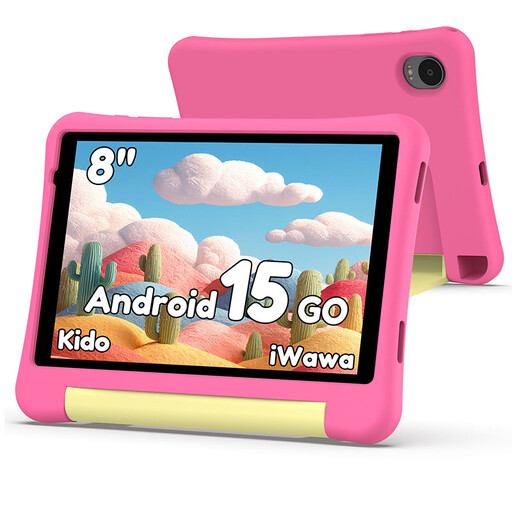
Alldocube Kido, 8-inch Android 15, 3GB+32GB, pink case
Consider this smaller child-oriented tablet if the included protective case and 32GB storage suit the intended apps and media.
The product name specifies an 8-inch display, 3GB of RAM, a 5000mAh battery and no charging adapter. Battery capacity does not establish runtime or case protection; check those needs, multi-user support, child-lock behaviour and video-call app compatibility before purchase.
View on Joybuy
Common questions
Should a child use the adult’s tablet account?
Use a separate child account or profile if the household needs meaningful separation. Apple advises giving a child their own Apple Account; Google says some Android tablets offer separate users, while Amazon offers child profiles on Fire devices. Check which arrangement the exact tablet supports.
Can an adult and a supervised child share an Android tablet?
They can if the exact Android tablet supports the required user arrangement and the adult space is secured. Google notes that Family Link supervision does not automatically extend to additional profiles, so check user switching and set a screen lock on adult profiles.
What should be ready before a child starts using the tablet?
Set up the relevant child account or profile, secure adult credentials and configure the app, content and time controls you intend to use. Then check permitted apps and contacts and test the household’s chosen video-call service within the child setup.


