What to prioritise
Start with the household’s essential apps and account setup, then compare the screen, call hardware and the complete day-to-day package.
| Priority |
What to check |
Your needs |
| Child account and controls |
Check whether the exact platform supports a separate child account or profile; configure content, screen-time and purchase restrictions; confirm which store and payment routes approvals cover. |
I want a child to use a managed space rather than an adult account with unrestricted access. |
| Viewing, games and calls |
Compare stated screen size and resolution, memory and storage for the exact variant; confirm front-camera details and required calling-app availability; compare battery claims only on like-for-like use conditions. |
The tablet needs to stay practical for streaming, learning, games and family video calls. |
| Protection and ongoing needs |
Check whether a case, charging adapter and stylus are included; read warranty or damage-cover terms; for refurbished devices, confirm condition, testing and software support for the exact model. |
I need a setup that can cope with shared handling without overlooking accessories, renewal terms or support. |
Joybuy product options
Joybuy tablet options for shared home viewing, learning, games, calls and parent-managed child use.
 No image available
Samsung Galaxy Tab A11+ 11-inch 128GB WiFi Grey
A general-purpose option for shared video, games, learning and configured child accounts.
Stated 11-inch 1920 × 1200 90Hz display, 6GB RAM, 128GB storage, 5MP front camera, 7,040mAh battery, microSD expansion and 25W charging support.
Add a protective case if needed. The package lists a USB-C cable but not a charging adapter; child-account controls need parent-led setup.
Joybuy
 No image available
DOOGEE U11 PRO 11-inch 256GB Android Tablet
Designed around shared streaming, games, video calls and learning routines.
Stated 11-inch 90Hz IPS display, 256GB storage, 8,580mAh battery, 5MP front camera, Widevine L1, dual-band Wi-Fi and 3.5mm jack.
Check the child-account workflow, purchase controls and required apps before buying; a protective case is not listed.
Joybuy
 No image available
Alldocube Kido 8-inch Children’s Tablet with Blue Case
A child-oriented option for controlled first-tablet use, videos, games and basic calls.
Stated 8-inch screen, Child Lock, Unisoc T310 processor, 3GB RAM, 32GB storage, 5,000mAh battery, dual speakers, 3.5mm socket and 2MP front camera.
A protective case is listed, but no charging adapter is included. Confirm required apps, account controls, screen resolution and expected runtime.
Joybuy
 No image available
HONOR X8A Kids 11-inch WiFi 128GB Space Grey
A child-focused tablet for parent-managed learning, entertainment and shared viewing.
Stated 11-inch Full HD display, 4GB RAM, 128GB storage, child account, time limits, content filtering and parent-approved apps.
Confirm the processor, battery, front-camera details, protection level, required apps and the exact parental-control workflow before buying.
Joybuy
 No image available
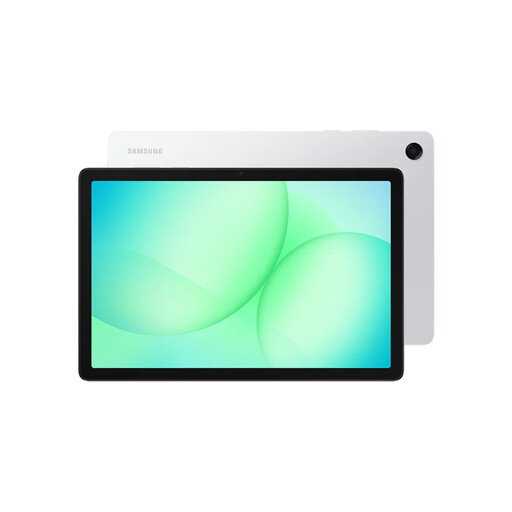
Samsung Galaxy Tab A11+ 5G X236 6GB 128GB Silver
A shared household option where both home Wi-Fi and mobile connectivity may be useful.
Stated 11-inch 1920 × 1200 90Hz display, 6GB RAM, 128GB storage, 5G, 5MP front camera, quad speakers, 7,040mAh battery and microSD expansion.
Check the exact One UI version for child-account eligibility. A case is not listed, and the box listing does not confirm a charging adapter.
Joybuy
Frequently asked questions
Should a shared household tablet use the child’s account or an adult’s account?
Use a child-specific managed account or profile where the platform supports it. Apple requires Family Sharing and a child Apple Account before its parental controls can manage purchases, communications, apps and content; Google Family Link can block apps, set limits and approve applicable Google Play purchases. For Fire tablets, use a child profile for children under 13 rather than relying on an adult profile.
Do app-store purchase approvals cover every purchase a child could make?
No. Google states that Family Link purchase approval applies only to purchases made through Google Play billing. Check payment methods, subscriptions and purchases made outside the relevant app store separately.
What should be checked for video calls before buying?
Check the exact model’s front-camera specification, speaker and microphone arrangement, home Wi-Fi environment and whether the family’s required calling app is available in that platform’s app store. The iPad (A16) lists a landscape 12MP Centre Stage front camera, while the Fire HD 10 Kids and Galaxy Tab A11+ list 5MP front cameras and the Tab M11 lists an 8MP front camera.
What durability and repairability checks are appropriate for a shared family tablet?
Confirm whether a protective case is included, what any guarantee or damage cover actually includes, and the seller’s warranty and return terms. Also check whether the exact model has accessible manufacturer support documentation, repair options or maintenance materials.
Is a refurbished tablet suitable for a child’s shared-home use?
It can be, provided the seller identifies the exact model and condition, explains testing and warranty terms, and the device still meets the household’s app and software-support needs. Apple says its Certified Refurbished iOS devices are functionally tested and include a new battery and outer shell, with a one-year limited warranty.


