Households keeping an ageing TV
If the picture is still satisfactory but the TV no longer gives you the apps you use, check its HDMI inputs before deciding to replace the screen. An external player or stick may provide the app route you need.


If the existing TV has a usable HDMI input and a picture you are happy with, add a streaming stick or media player when missing apps are the main problem; consider a connected TV or Freeview Play recorder when bringing live and catch-up viewing together matters more. For repeated buffering, check the home connection before replacing the screen. Add a soundbar when audio is the remaining issue, after checking the TV’s audio connections and the formats supported throughout the setup.
If the picture is still satisfactory but the TV no longer gives you the apps you use, check its HDMI inputs before deciding to replace the screen. An external player or stick may provide the app route you need.
If your services are available but viewing keeps buffering or dropping out, start with the connection at the TV. Check whether the exact streaming device offers built-in Ethernet or supports a suitable wired adapter before changing other hardware.
If video access is already working, a soundbar is a separate audio decision. Check the TV’s audio output, the soundbar’s required connection and the source settings before expecting a particular surround format.
Identify whether the problem is service access, the connection, the way live and catch-up TV work together, or sound. That points to a more relevant purchase than changing every part of a shared-TV setup.
| Concern | What to check | Who this matters to |
|---|---|---|
| Apps and services | Check the exact device’s UK app availability and whether the current TV has a free HDMI input for an add-on. | If the shared TV no longer opens the services we watch, restoring that access comes before replacing a satisfactory screen. Roughly 31% of consumers would put app and service compatibility first. |
| Connection stability | Check the connection at the TV and whether the exact player has built-in Ethernet or supports a wired adapter; plan the cable route. | When streams repeatedly buffer, I want to address the connection rather than assume a different television will fix it. For roughly 31% of consumers, a stable connection is the primary need. |
| Live and catch-up TV | Check the exact TV or recorder for the desired services, and decide whether pausing or recording live TV is needed. | Keeping live channels and catch-up viewing in one familiar guide matters more to us than adding another app interface. Around 23% of consumers would prioritise that combined viewing route. |
| TV audio | Check the TV’s labelled ARC or eARC port, the soundbar’s connections and the formats supported by the source and content. | Once the programmes play reliably, hearing dialogue or getting the intended audio format becomes my main reason to change equipment. That would be the first concern for roughly 15% of consumers. |
Roku says its 4K streaming players can work with an HDMI TV, but the picture cannot be shown in 4K or HDR unless the television supports the respective format.
Check the TV model, relevant HDMI input settings and the exact player’s format support before choosing equipment for 4K or HDR.
A wired connection is an option for some players, but Roku says Ethernet-adapter support varies by model. It also requires a practical cable route to the network.
Check the connection at the TV location and confirm the exact player’s built-in Ethernet or adapter compatibility before buying a replacement device.
Sonos says the cited home-theatre speakers need an HDMI ARC or eARC connection to play Dolby Atmos content. The TV, source settings and programme format also matter.
Check the soundbar model and the complete audio path, starting with the TV’s labelled ARC or eARC port.
TV Licensing bases the UK requirement on what you watch, not whether you use an aerial, smart TV or streaming stick. Watching live TV or using BBC iPlayer requires a TV Licence.
Before setting up shared viewing, check whether anyone in the household will watch live TV or use BBC iPlayer and ensure the household has the required licence.
Apple TV 4K is a separate media-player option for an HDMI television, particularly if an Ethernet-equipped variant suits the household’s connection plan.
Google TV Streamer (4K) is a media-player route to consider where a built-in wired-network connection is useful.
Roku’s Streaming Stick 4K offers an HDMI add-on route when keeping the existing television makes sense.
Fire TV sticks are another HDMI route for adding apps to a working television.
Sonos home-theatre soundbars belong in this decision when the household already has a satisfactory way to access video but wants to change its TV-audio setup.
These choices cover replacement smart TVs, an HDMI stick for keeping an existing TV, and a soundbar for a setup where audio is the remaining concern. Choose the route that addresses your household’s problem before comparing individual models.
 No image available
Consider this replacement-TV route if your household wants a connected TV rather than an external stick.
The listed variant is 50 inches and names Freely, Fire TV and HDR10+. Check that the services you use are available on this exact model and that your connection suits streaming.
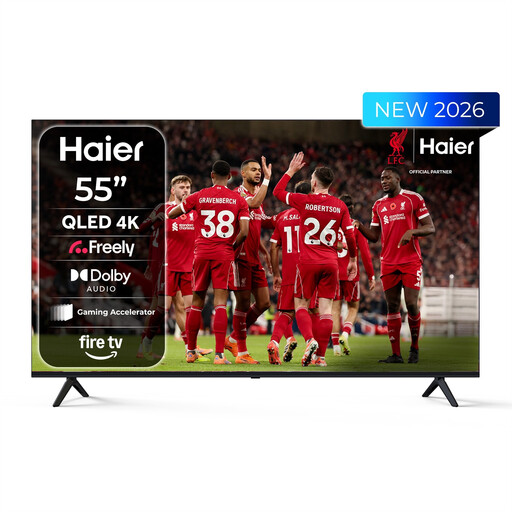 No image available
This is a replacement-TV choice for a household that wants a 55-inch screen with connected viewing.
The title names Freely, Fire TV and HDR10+. Confirm the apps and channels your household uses on this exact model before buying.
 No image available
Consider the 32-inch size if you are choosing a TV for a smaller or secondary viewing space.
Check the panel resolution before buying: the product information describes it as both HD Ready and Full HD. Also confirm that the exact TV supports the services you need.
 No image available
An HDMI stick is worth considering when the existing TV still meets your picture needs but its app access does not.
Roku says 4K output requires a compatible 4K TV, while HDR requires a compatible HDR TV. Check UK availability of your household’s required services on the exact stick.
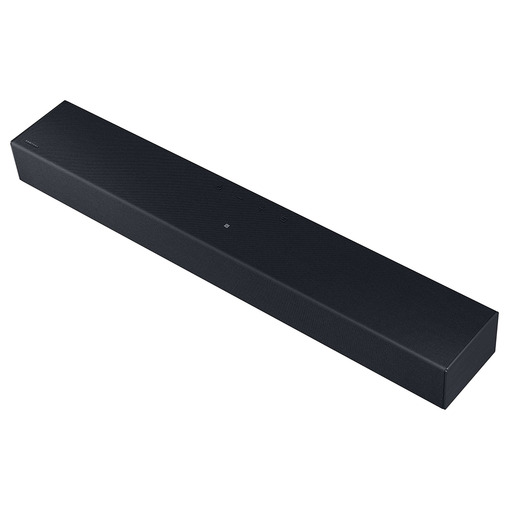 No image available
Consider a soundbar when your video services and connection already work but TV audio is the issue.
This is the 2.0-channel variant. Check its audio connections against your TV before buying; the product information states that ARC is not available.
No. Roku says its 4K streaming players can work with an HDMI television, but displaying 4K requires a compatible 4K TV and displaying HDR requires a compatible HDR TV. Check the television’s specifications and HDMI settings before choosing a stick for those formats.
No. Roku says not every Roku streaming device supports a wired Ethernet adapter. Check the exact player model and adapter requirements, as well as whether a cable can reach the TV location; a player with built-in Ethernet avoids the adapter check but still needs that cable route.
Freeview says a compatible Freeview Play TV or recorder puts supported catch-up services alongside live television in the guide. Its connected functions require internet access; if pausing or recording live TV matters, check the features of a recorder rather than assuming a streaming stick provides them.
Consider a soundbar when the household can already access its programmes reliably and TV audio is the remaining problem. Check the TV and soundbar connections first; Sonos says its cited home-theatre models need HDMI ARC or eARC to play Dolby Atmos content.
No: TV Licensing says the UK requirement depends on viewing activity, not the device. You need a TV Licence to watch live TV or to watch or download programmes on BBC iPlayer; solely watching on-demand programmes on other services does not itself require one, provided you do not watch live TV or use BBC iPlayer.