A relative who mainly calls from home
If calls usually happen in one room, test the home broadband there. A Wi-Fi tablet with one familiar calling route and a small set of contacts may meet the need without a separate mobile connection.


For a relative who mainly calls from home, start by testing the home connection, then consider a Wi-Fi tablet set up around one calling app, familiar contacts and a named family supporter. Cellular connectivity matters more when calls must regularly work away from usable Wi-Fi; whichever tablet you choose, check the family’s calling app, account recovery and update support for the exact model.
The useful starting point is where the calls will happen and who can help keep the tablet ready to use.
If calls usually happen in one room, test the home broadband there. A Wi-Fi tablet with one familiar calling route and a small set of contacts may meet the need without a separate mobile connection.
Someone needs to help with the account, contacts, updates and recovery arrangements. Age UK’s video-calling guidance describes learning with help from family, friends or carers; agree who will provide that help after the first call, too.
If calls regularly happen beyond usable Wi-Fi, consider a cellular-capable tablet and check coverage in the places it will be used. Ofcom notes that video calls use mobile data, so the connection arrangement needs ongoing attention.
Choose the family’s calling method first, test the intended connection, then check whether the person using the tablet can repeat the call with the support available.
| Priority | What to check | Your needs |
|---|---|---|
| Calling method | Agree on one app used by both sides of the call. Check its account requirements and compatibility with the exact tablet; test an incoming and an outgoing call. | I want to reach family through a method they already use, rather than learn several ways to call. |
| Simple navigation | Check whether the chosen interface can show clearly named or pictured actions and put familiar contacts within easy reach. Set it up and practise the same steps together. | The call action needs to be recognisable each time, without searching through a long contact list. |
| Connection | For home use, test Wi-Fi in the intended room at the times calls are likely. For regular calls away from Wi-Fi, check cellular capability and local mobile availability; Ofcom provides broadband and mobile availability checks. | Calls will usually happen at home, or I need them to work in particular places away from home. |
| Account and support | Identify the tablet user’s account, agree who manages contacts and updates, and arrange recovery details securely with the user’s consent. | Someone in the family can help if a sign-in prompt appears or a contact changes, without using the supporter’s personal account as mine. |
| Model and handling | Check the exact model’s software support, the intended app, camera and microphone, and whether the screen, weight and a stable viewing position suit the user. For a refurbished tablet, also check its condition and supplied accessories. | I need to see and hear the caller comfortably, and the person helping me needs a device they can continue to maintain. |
A cellular setup adds a mobile connection to manage, while usable home Wi-Fi may already cover calls in the usual room.
Test a call over home broadband first. Consider cellular if calls regularly need to work away from Wi-Fi or the home connection is not dependable, and check coverage where the tablet will be used.
Choosing between apps or searching for a contact adds steps to a task the relative needs to repeat. Age UK’s video-calling guidance allows for step-by-step learning with family or other support.
Agree on one primary app, add the key contacts, practise making and answering calls, and leave brief written or pictorial instructions beside the tablet.
Unclear account ownership can complicate sign-in and recovery. Apple’s Assistive Access guidance says the Apple Account shown during setup should belong to the person using the iPad.
Agree on an account and recovery arrangement with the user’s consent, and name the person who will help with updates and access problems.
Software support depends on the exact model: Samsung UK describes model-dependent update availability, while Lenovo publishes model-specific upgrade plans and security-maintenance end dates.
Confirm the model number and its support information, then check the installed software, battery condition and supplied charger before choosing a refurbished device.
These are features and support checks to investigate, not a claim that every tablet from a brand works the same way.
Consider an iPad if the family uses FaceTime and a supporter can set up and maintain Assistive Access.
For a Samsung Android tablet, assess the calling app and accessibility setup alongside the exact model’s update information.
Google’s Android tools are relevant if the household can manage a Google Account and wants to test a simpler route to common actions.
Lenovo’s model information can help a family assess an Android tablet, particularly when considering a refurbished one.
These Wi-Fi tablets are options for mainly home-based calls. Before choosing one, check the family’s calling app and the practical setup it will need.
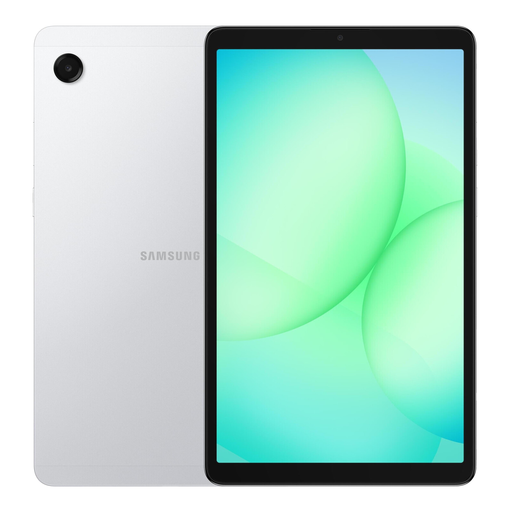 No image available
For calls over home Wi-Fi, the listing states an 8.7-inch screen, a 5 MP front camera and a weight of approximately 335 g. Confirm the built-in microphone, the family’s calling app and the update-support claim for this exact variant before buying.
 No image available
For a home setup where screen size matters, the listing states an 11-inch display, 480 g weight, 5 MP front camera, built-in microphone and speakers. Check the chosen calling app and exact-model update support; the listing says a compatible charging adapter is sold separately.
 No image available
For home Wi-Fi use, the listing states an 11.2-inch screen, 485 g weight, an 8 MP secondary camera and four stereo speakers. Confirm the built-in microphone, compatibility with the family’s calling app and exact-model update support before choosing it for video calls.
A Wi-Fi-only tablet is a sensible starting point when calls mainly happen at home and broadband works reliably in the room where the tablet will sit. Test calls at the times it is likely to be used; Ofcom notes that other activities on a shared home connection can affect the bandwidth available.
Consider cellular connectivity when calls regularly need to work away from usable Wi-Fi or home broadband is unreliable for the intended calls. Ofcom identifies video calling as a mobile-data activity and provides a checker for mobile and broadband availability; check the relevant locations before arranging a mobile connection.
Set up one agreed calling app, add familiar contacts, test both an incoming and an outgoing call, and agree who will help with updates and account recovery. If using Apple’s Assistive Access, its setup guidance notes that a trusted supporter may need the user’s Apple Account information or iPad passcode.
Google’s Action Blocks can place a named or pictured action on an Android home screen, including an action to call a loved one. Check the intended tablet and account against Google’s requirements for Android 5.0 or later, Google Assistant, the Google app and internet access; Google says the feature is not available for children’s Google Accounts.