For a large collection kept mainly on one computer, start with an external hard drive or SSD that has room for the files you intend to protect, then make copying and checking those files a routine. An HDD suits a capacity-led local copy; an SSD is worth considering when you carry it or copy large files often, while cloud storage adds an off-device destination and NAS can serve several household devices. None replaces the need for a separate, recoverable copy: the National Cyber Security Centre warns that connected backup storage can be affected during an incident.
Who is this for?
Households with large file libraries
You have years of photos, videos and documents on one computer and want enough space for a separate local copy without depending mainly on uploads. Microsoft Support identifies external or network storage as useful when there are many files or internet access is unavailable.
Households that carry a copy
You move files between locations or devices, so the storage device's size, connector and practical transfer speed matter alongside its capacity.
Families using several devices
More than one person or device needs access to the files. A cloud service or managed network-attached storage (NAS) system may fit that arrangement better than a drive used at just one computer.
What matters when choosing backup storage?
Choose the destination around the size of your library and how you will keep a usable copy separate from the computer. Then check whether portability, internet access or sharing across devices changes the route that works for your household.
External hard drive
Consider it when: A large library needs a local copy and the drive will usually stay at home.
Bear in mind: It is not automatically an off-site copy; check the computer connection and file format, and disconnect a manual backup drive when practical.
Portable SSD
Consider it when: You carry the copy or transfer large photo and video folders frequently.
Bear in mind: Maximum advertised speeds depend on the computer and cable, and an SSD remains one local copy unless you use another destination too.
High-capacity USB flash drive
Consider it when: Selected files fit on a small device you want to carry between compatible computers.
Bear in mind: Measure the files first and do not make an easily misplaced flash drive the only recoverable copy.
Cloud storage alongside a local copy
Consider it when: You want an off-device destination and access across devices, with the option to automate copying.
Bear in mind: Uploads need a workable internet connection; check the plan's capacity and protect account access.
Network-attached storage
Consider it when: Several household devices need a shared local photo and document location.
Bear in mind: NAS needs compatible drives and ongoing setup, and a network-connected system still needs a separate recovery copy.
| Concern |
What to check |
Who this matters to |
| Capacity for a growing library |
Measure the folders to be copied, include videos if needed, and leave room for new files and any backup history. |
If years of family files already fill much of my computer, I need the destination to hold the collection as it grows. Around 36% of consumers put capacity first. |
| Portability and connection |
Match USB-A or USB-C connections, cables and file-system requirements to the computers you use; check host requirements for quoted speeds. |
When I take a copy between locations or transfer files regularly, I need a device that is convenient to connect and carry. Portability and copying time come first for around 29% of consumers. |
| Recoverable copies |
Check which folders are copied, how often copies update, where they are kept and whether you can restore a test file. |
If the computer fails or a connected copy is affected, I need another current version I can retrieve. Around 21% of consumers make recovery and separation their primary concern. |
| Shared household access |
Check which devices need access, who will manage permissions and whether the shared location has its own separate backup. |
With files spread across several household devices, I want a manageable shared library rather than relying on one computer. For around 14% of consumers, sharing is the first priority. |
Backup storage mistakes to avoid
-
Choosing capacity before checking the files
A drive that fills quickly can interrupt regular copying. A flash drive suitable for selected documents may not have enough room for a larger photo and video library.
Check the used space of every folder you intend to protect, then allow room for growth and for backup history if your software keeps earlier versions.
-
Expecting the advertised SSD speed on every laptop
Samsung says the T7 Shield's maximum transfer figures depend on a compatible USB 3.2 Gen 2 host, cable and UASP mode.
Check your laptop's port specification and the cable you will use before treating a maximum speed as a reason to choose that SSD.
-
Leaving the only backup permanently connected
The National Cyber Security Centre has reported ransomware incidents affecting original files and connected USB or network backup drives. Cloud copies also need protected account access.
Keep at least one recoverable copy offline or otherwise separated, update it on a routine and try restoring a small file.
-
Assuming a NAS enclosure is ready to store files
Synology says the DS223j needs at least one compatible SATA drive. Installing a drive that already contains data formats and erases it.
Choose compatible drives, copy any existing data elsewhere before installation and plan a backup destination separate from the NAS.
Someone in the household will also need to set up and maintain the shared storage.
Relevant brands and product lines
Toshiba
The Canvio Basics portable HDD range is a reference point for a capacity-led local copy.
- Toshiba lists 1 TB, 2 TB and 4 TB versions, USB 3.2 Gen 1 with USB 2.0 compatibility, and a two-year warranty.
- The cited version is formatted NTFS for Windows and requires reformatting for macOS; decide how the drive will be used before putting files on it.
Samsung
The T7 Shield portable SSD line is relevant when a household carries its copy or transfers large files repeatedly.
- Samsung lists 1 TB, 2 TB and 4 TB configurations and USB 3.2 Gen 2 connectivity.
- Samsung's maximum sequential speeds of 1,050 MB/s read and 1,000 MB/s write depend on the host, cable and UASP mode. Its IP65 and drop-resistance statements come from controlled internal tests; relevant physical damage is not covered under its stated warranty terms.
Kingston
DataTraveler Max USB-C is a compact option for selected files or an additional portable copy.
- Kingston lists 256 GB, 512 GB and 1 TB capacities, USB 3.2 Gen 2 and a five-year warranty.
- Usable capacity is below the labelled amount, and transfer speed varies with the host, software and use. Check that the files fit before choosing a flash drive for this role.
Synology
The DS223j NAS is relevant to a household that wants a shared local library and managed PC-folder backup.
- Synology describes scheduled or real-time PC-folder backup and access from common computer and mobile platforms.
- The enclosure requires at least one separately purchased compatible 3.5-inch or 2.5-inch SATA drive. Installation erases existing data on a drive placed in it, and the NAS still needs a separate backup.
Microsoft
OneDrive is a cloud-storage route for households that want an off-device copy accessible across their devices.
- Microsoft's UK plan information lists 100 GB of storage with Microsoft 365 Basic and 1 TB with Microsoft 365 Personal.
- Match the plan's capacity to the folders you intend to protect, and account for internet access and secure account recovery in the backup routine.
Local and portable storage choices on Joybuy
These drives cover local copies on external hard drives, a portable SSD and a USB flash drive for selected files. Choose the capacity and connection around your own folders and computer, then keep another recoverable copy separate from the device you use every day.
 No image available
Western Digital My Passport Ultra for Mac 5TB, Silver
A portable local-copy option for a Mac household with a large photo and document collection, provided 5TB covers the folders and future growth.
The product listing describes USB-C connectivity and included USB-C-to-C and USB-C-to-A cables. Check the required setup before using it with Windows, and confirm the applicable warranty terms before purchase.
View on Joybuy
 No image available
Western Digital Elements Portable 4TB, Black
This external HDD suits a local copy of a sizeable collection if 4TB leaves enough room for the files you plan to add.
The listing specifies USB 3.2 Gen 1 and a USB-A cable. Check the file-system setup before using it with a Mac or another operating system that may require reformatting.
View on Joybuy
 No image available
Samsung T7 Shield Portable SSD 1TB, Blue
A portable copy for a collection that fits within 1TB, particularly if files are moved between locations regularly.
The listing specifies USB Type-C and USB 3.2 Gen 2. Samsung's stated maximum read and write speeds of 1,050 and 1,000 MB/s depend on a compatible host, cable and UASP mode.
View on Joybuy
 No image available
Western Digital My Passport 2TB, Black
This portable HDD is a local-copy option when the folders to be protected, plus room for growth, fit within 2TB.
The listing describes USB 3.2 Gen 1, an included USB-A-to-Micro-B cable and a scheduled-backup utility. It describes NTFS formatting for Windows and a downloadable driver for macOS, so check the setup needed for your computers.
View on Joybuy
 No image available
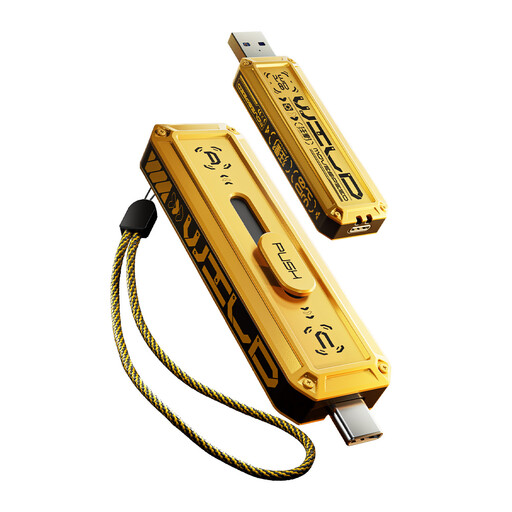
MOVESPEED YSUWD10-1TSY 1TB USB Flash Drive, Yellow
A compact choice for selected files or an additional portable copy if the collection fits within 1TB; do not rely on it as the only recoverable copy.
The listing describes USB-A and USB Type-C interfaces with USB 3.2 Gen 2×1. Check connection compatibility and practical transfer performance on the devices you intend to use.
View on Joybuy
Frequently asked questions
Is copying files to an external drive once enough?
No: a one-off copy can help if the computer fails, but it becomes outdated as you add files. Keep the copy separate, update it regularly and test that you can restore files; the National Cyber Security Centre defines a backup as a copy kept in a separate safe location.
Should I leave a backup drive connected all the time?
A manual backup drive does not need to stay connected after copying. The National Cyber Security Centre warns that connected USB and network drives can be affected in ransomware incidents, so disconnecting a drive when practical can help keep a recovery copy separate.
Can I use a Windows-ready Toshiba Canvio Basics drive with a Mac?
Yes, but Toshiba says the cited Canvio Basics version is formatted NTFS for Windows and requires reformatting for macOS. Reformatting erases files already on the drive, so move any files elsewhere first and decide whether the drive must also work with Windows.
Does a NAS remove the need for another backup?
No. A NAS can provide shared storage and backup features, but it remains a local, network-connected system, so keep a separate recovery copy. Synology also says the DS223j requires at least one compatible SATA drive before it can store files.


