What matters when choosing?
Decide whether you will usually share the built-in screen or connect a desk monitor, then check software compatibility, file storage and privacy controls on the exact configuration.
| Concern | What to check | Who this matters to |
|---|
| Shared viewing area |
Compare the screen size and resolution of the exact 15- or 16-inch model. For a smaller laptop, confirm its display output and the monitor’s input. |
When we review branches and records side by side, I want us both to read the tree without crowding a small screen. Around 40% of consumers put shared viewing first. |
| Privacy and collaboration |
Check the tree service’s viewing and editing permissions separately from device features such as sign-in controls or a webcam shutter. |
If relatives contribute names or photos, I need to decide who can access that information, not just who can see my screen. Roughly 30% of consumers make controlled sharing their primary concern. |
| Software and files |
Confirm the operating-system version against your application’s requirements, and compare SSD capacity with the files you intend to retain. |
I want my desktop tree, photographs and documents to remain usable as the collection grows. Around 20% of consumers put software and file organisation first. |
| Portability and docking |
Check the exact model’s stated weight, display-output support and compatibility with any planned dock or charging setup. |
I carry the laptop away from the desk but want to reconnect to a larger view when I return. About 10% of consumers prioritise that portable setup. |
Joybuy laptops for a shared desk
These 15- and 16-inch Windows and Mac laptops are options for sharing a family tree on the built-in screen. Their configurations differ considerably; choose the screen and operating system that suit your work before deciding how much memory or storage you need.
 No image available
ASUS ProArt P16 H7606WW-SE006W, 16-inch 4K OLED touchscreen
Consider this Windows laptop if you want a 16-inch built-in screen for reviewing a tree together and substantial space for local files.
The listed configuration has an AMD Ryzen AI 9 HX 370, NVIDIA GeForce RTX 5080 16GB, 64GB RAM, a 2TB SSD and Windows 11 Home. Its graphics specification is not a requirement established by the family-tree task.
If you plan to add a monitor, confirm the intended connection and cable against this exact model before buying accessories.
View on Joybuy
 No image available
MSI Summit 16 AI Evo, 16-inch QHD+ 165Hz touchscreen, 32GB/1TB
The 16-inch screen is an option for viewing records together on the laptop, while the listed 32GB RAM and 1TB SSD give you a configuration to compare with your local archive needs.
The product name specifies an Intel Core Ultra 7 255H and Intel Arc graphics. Check this model’s ports and external-display support if a monitor or dock will form part of your desk setup.
View on Joybuy
 No image available
HP OmniBook X Flip 16-as0004na, 16-inch touchscreen
This 16-inch convertible is an option if you want a large built-in touchscreen at the shared desk and prefer Windows.
The product name lists an Intel Core Ultra 5 226V, 16GB RAM, a 512GB SSD and Windows 11 Home. Confirm the exact port and external-display capabilities before planning a monitor or dock around it.
View on Joybuy
 No image available
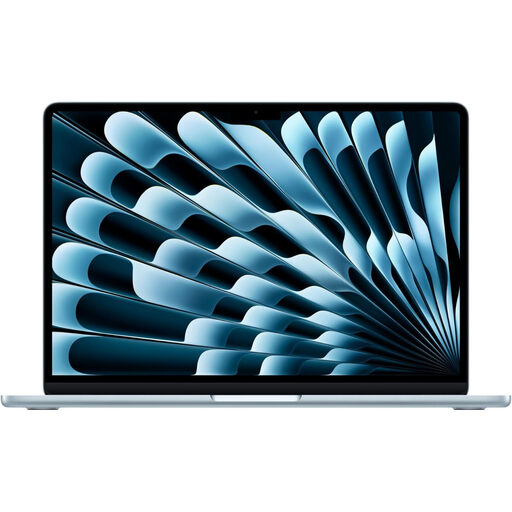
Apple 15-inch MacBook Air (2026), M5, 16GB/1TB, Sky Blue
Choose the Mac route if you prefer macOS and want a 15-inch built-in display for looking over a tree with someone beside you.
This variant’s product name specifies an M5 chip with a 10-core CPU and 10-core GPU, 16GB memory and a 1TB SSD. Check the installed macOS version against your intended software, and confirm this SKU’s display connections if you will use a monitor or dock.
View on Joybuy
 No image available
Acer Aspire Go 15 AG15-21P, 15.6-inch Full HD, 8GB/256GB
The 15.6-inch built-in screen offers a way to review a tree together without making an external monitor part of the initial setup.
The product name lists a 1920 × 1080 display, AMD Ryzen 3 7320U, 8GB RAM and a 256GB SSD. Compare that storage with your photo and document collection. Confirm the delivered model and configuration, and check its display-output capability before buying a monitor or dock.
View on Joybuy
Questions about family-tree laptops
Do I need a gaming laptop for Family Tree Maker?
Family Tree Maker 2024’s published minimum requirements do not, by themselves, call for a gaming laptop. Software MacKiev lists Windows 10 x64 or later with at least 2GB RAM, or macOS Big Sur 11 or later with at least 4GB RAM; choose the screen, memory and storage for the records and other applications you expect to use alongside it.
Can I use Family Tree Maker on a MacBook?
Yes, if the MacBook meets the requirements for the version you intend to run. Software MacKiev lists macOS Big Sur 11 or later for Family Tree Maker 2024 and says its online features require internet access. Check the laptop’s installed macOS version before relying on compatibility.
Can I share a family tree without making it public?
Yes, on Ancestry you can choose a private tree and invite the people who need access. Ancestry says private trees are visible to their owner and invited people. Review the tree’s current settings before sharing; laptop sign-in controls do not determine who can see information in your online account.
Will an older browser work for online genealogy?
Do not rely on an outdated browser for every feature. Ancestry warns that some features may work less well or not at all in an outdated browser. Check that the laptop can run an up-to-date browser supported by the service you use.
What should I check before buying a laptop online in the UK?
Check the exact configuration, delivery information and cancellation terms before ordering. GOV.UK says consumers in a UK distance sale can normally cancel up to 14 days after delivery, subject to applicable exceptions. That change-of-mind cancellation is separate from remedies if goods are faulty or misdescribed.


