Choose a controller that works with your gaming platform and the particular farming game before comparing extra features. An Xbox-style controller is a documented option for some Windows PC games, while Switch and PS5 players should look for compatibility with their own console. At a small desk, check how the controller connects, where you will store it and whether charging or a cable will occupy the space you need.
Who is this for?
Windows PC players with limited desk space
If your keyboard and mouse already occupy the desk, you need a workable connection as well as game support. ConcernedApe names Xbox One and Xbox 360 controllers in its Stardew Valley PC support information; check other games individually.
Switch players who want a full-size controller
If you play on Nintendo Switch in TV or tabletop mode, a separate controller may suit you better than using the Joy-Con pair. Nintendo presents its Switch Pro Controller as a traditional wireless option for those modes; allow somewhere to put it between sessions.
PS5 players who also use a computer
If PS5 is your main platform, PlayStation documents USB-C and Bluetooth connections for DualSense on supported Windows PCs and Macs. Some functions depend on the game and connection, so check the features you intend to use.
What matters when choosing?
Settle platform and game compatibility first. Then choose a connection and storage arrangement that works around the space already taken by your computer or console setup.
Windows PC
Consider this route: ConcernedApe specifically names Xbox One and Xbox 360 controllers for Stardew Valley on PC, while Xbox and 8BitDo document Windows options for their respective controllers.
Keep in mind: Check the exact game and connection method; Windows compatibility alone does not establish Switch support or support for every controller feature.
Nintendo Switch
Consider this route: Nintendo's Switch Pro Controller is a wireless, full-size option for Switch TV or tabletop play.
Keep in mind: Its stated battery life varies with use, and a full-size controller still needs storage space.
PS5
Consider this route: DualSense suits players choosing for PS5 first who also want documented connections to supported PC or Mac games.
Keep in mind: PlayStation says PC haptic feedback requires USB and game support; do not assume the same features work over every connection.
| Concern |
What to check |
Who this matters to |
| Platform and game compatibility |
Match the exact controller to your device, then check controller support for your game's platform edition. |
If my farming game cannot use the controller, its layout will not help me. Around 36% of consumers would put that platform-and-game match first. |
| Desk space and connections |
Compare controller dimensions with your storage space, and check the connection method and available ports. |
I need to put the controller away without disturbing my keyboard or leaving a cable across the desk; about 29% of consumers would make space and connection management their priority. |
| Controls and remapping |
Check whether the exact model offers mapping on your platform and whether the game recognises the intended inputs. |
Repeated movement, menu and tool actions make the default layout awkward for me. Roughly 21% of consumers would prioritise adaptable controls. |
| Charging and handling |
Check the maker's battery and charging information, and compare the controller's size with where you will keep it. |
I want the controller ready for a longer session and somewhere practical to leave it afterwards; around 14% of consumers would put charging and handling first. |
Buying pitfalls
-
Assuming a familiar button layout guarantees compatibility
Controllers with similar layouts can support different devices. For example, 8BitDo documents Windows and Android use for its Ultimate 2C Wireless Controller, while Nintendo positions its Switch Pro Controller for Switch.
Check the controller model, your device and the particular game together before ordering.
-
Expecting wireless play to need no desk-side equipment
A wireless connection may remove the cable during play, but a USB receiver can occupy a port and rechargeable controllers still need charging access. Bluetooth also needs support from the device you play on.
Identify your available ports and where a receiver or charging cable would go before choosing a connection method.
-
Treating a battery figure as guaranteed play time
Nintendo says the Switch Pro Controller's approximately 40-hour battery life varies with usage conditions. A published figure is useful for planning, not a promise for every session.
Check the charging method and keep it practical for your usual playing routine.
-
Waiting until after purchase to read the return terms
For ordinary UK online-goods purchases, GOV.UK guidance says sellers must tell customers about cancellation up to 14 days after delivery. The seller's instructions and any applicable exceptions still matter.
Read the retailer's cancellation and return instructions before ordering, and check the controller's fit and connection promptly when it arrives.
Brands to consider for this setup
Xbox
The Xbox Wireless Controller is relevant to Xbox-console and Windows PC players considering a familiar controller layout.
- Xbox documents Xbox-console and Windows PC compatibility, Bluetooth and Xbox Wireless connections, and button mapping.
- Check your PC's available connection method and your game's controller support; those specifications do not establish Nintendo Switch compatibility.
Nintendo
Nintendo's Switch Pro Controller is a full-size wireless option for Switch TV or tabletop play.
- Nintendo lists dimensions of 106 × 152 × 60 mm and approximately 40 hours of battery life, giving you figures to compare with storage space and charging habits.
- Nintendo says battery life varies with use and charging takes approximately six hours; choose it for Switch use rather than assuming compatibility elsewhere.
8BitDo
The Ultimate 2C Wireless Controller is relevant to Windows PC players considering a receiver or wired connection.
- 8BitDo documents Windows 10 and later compatibility, USB-A 2.4G wireless and wired Windows use, and a 147 × 103 × 61.4 mm body.
- Its documented platforms do not include Nintendo Switch; a receiver also needs an accessible USB-A port.
PlayStation
DualSense is relevant to PS5 players who may also play compatible games on a Windows PC or Mac.
- PlayStation documents USB-C and Bluetooth connections for supported devices and lists an approximate width of 160 mm for the controller.
- Feature support depends on the game and connection; PlayStation says PC haptic feedback requires USB.
Joybuy controller choices
These choices cover Xbox-style controllers for Windows PC or Xbox setups and controllers labelled for Nintendo Switch. Use the connection and storage checks above alongside support information for your particular farming game.
 No image available
Xbox Wireless Controller – Robot White
Consider this model for an Xbox-style Windows PC setup or Xbox-console play. Confirm that your farming game supports the controller and that your device has a suitable connection method.
View on Joybuy
 No image available
Turtle Beach PDP Victrix Pro BFG Wireless Controller – Black
A wireless option labelled for Xbox Series X|S, Xbox One and Windows 10/11 PC. Check how you would connect it to your device and whether your farming game recognises the intended controls.
View on Joybuy
 No image available
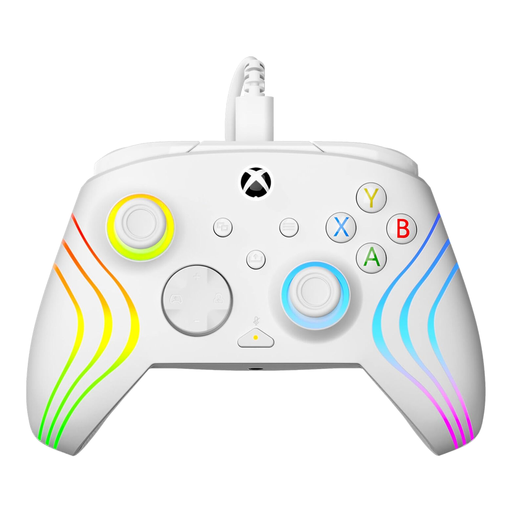
Turtle Beach PDP Afterglow Wave Wired Controller – White
Consider this Xbox and Xbox Series model if a wired controller suits your setup. Plan a clear cable route, then check its connection and your game's controller support before ordering.
View on Joybuy
 No image available
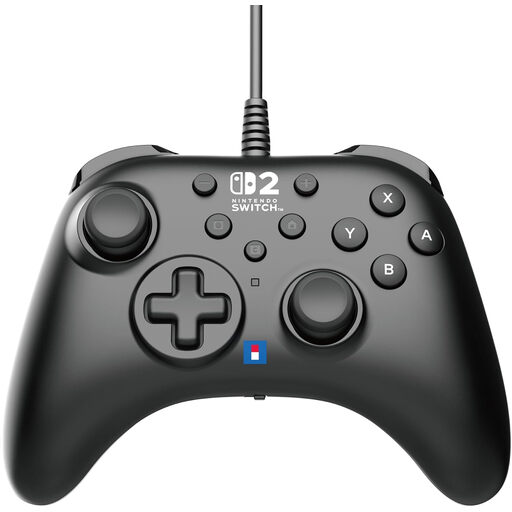
HORI HORIPAD Turbo Wired Controller – Black (Nintendo Switch)
A wired Nintendo Switch choice if you have a practical place for the cable. Check the required connection for your Switch setup and support in the farming game you play.
View on Joybuy
 No image available
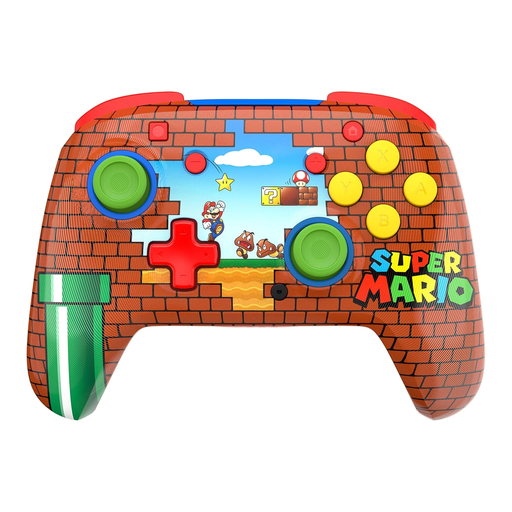
Turtle Beach Rematch Wireless Controller – Mario Bricks Reveal (Nintendo Switch)
A wireless Nintendo Switch option if you want to avoid a cable across the desk during play. Check its charging arrangement, storage fit and support in your particular game.
View on Joybuy
Frequently asked questions
Do farming games support controllers on PC?
Some do, but support depends on the game and its PC edition. ConcernedApe names Xbox One and Xbox 360 controllers for Stardew Valley on PC; check the support information for the game you plan to play.
Is Bluetooth the right choice for a small desk?
Bluetooth can keep a play cable off the desk when both your controller and gaming device support it. A receiver-based or wired connection may also work if you have an accessible port and room to route any cable.
Can I use a DualSense controller wirelessly on a PC?
Yes, PlayStation documents Bluetooth connection to supported Windows PCs. It says PC haptic feedback requires USB and game support, so check whether the features you want work with your game and chosen connection.
Can I cancel an online controller order in the UK?
For an ordinary UK online-goods purchase, GOV.UK guidance says sellers must tell customers they can cancel up to 14 days after delivery. Check the seller's instructions and any applicable exceptions before ordering; cancellation for a change of mind is distinct from remedies if goods are faulty or misdescribed.


