
24/7 Customer Support

Free returns

Same-day & Next-day Delivery

Quality Guaranteed

Unlock Your Welcome Offers: FREE Delivery | Up to 80% OFF | Free 30-day JoyPlus trial
Download the APP
Waiting for your phone to charge feels like a relic of the past, yet many of us still find ourselves tethered to a slow wall plug. If you've invested in a modern smartphone, tablet or laptop, using the old, low-power brick that came in the box (if you got one at all) means you are not getting the performance you paid for. The market for fast chargers is crowded, and it is easy to make a purchase you will later regret.
As the Joybuy Product Recommendation Officer, my role is to help you navigate this landscape. We will look past the marketing buzz and focus on the practical details that determine a good charger. This guide will highlight common purchasing pitfalls and clarify the essential specifications you need to check, ensuring your next charger is a lasting and efficient investment.
Many chargers on the market make bold claims, but not all deliver. Here are three common traps that UK consumers fall into:
To choose the right fast charger UK residents can rely on, focus on these core parameters instead of marketing jargon.
Wattage measures the power output. Your goal is to match the charger's wattage to your device's maximum charging capability.
The most important protocol today is USB Power Delivery (PD). It is the universal standard for fast charging over a USB C charger port and is used by Apple, Google and most laptop manufacturers. For recent Samsung devices, look for chargers that also support PPS, a variant of PD that allows for more precise voltage adjustments for even more efficient charging.
You will increasingly see GaN charger on product descriptions. Gallium Nitride is a material that is replacing traditional silicon in charging components. The practical benefit for you is simple: GaN chargers are significantly smaller, lighter and more power-efficient. They generate less heat, which contributes to a longer lifespan and safer operation, all while fitting more easily into your bag or pocket.
The future of charging is USB-C. This versatile, reversible port supports high-power protocols like PD. When selecting a charger, prioritise models with at least one USB-C port. If you need to power multiple devices, a multi-port USB charger with a combination of USB-C and older USB-A ports offers great flexibility. Just remember to check how the power is distributed between the ports when used simultaneously.
We have matched some charging solutions to different user needs, focusing on how they solve the common problems discussed.
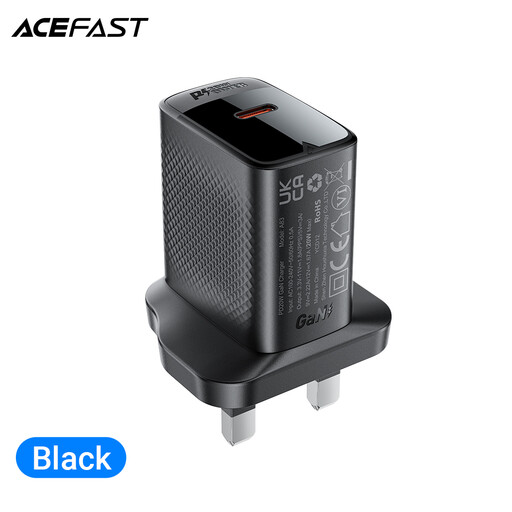
Why This Fits Their Persona: Perfect for someone who needs a reliable, compact charger for their primary device, like an iPhone fast charger. Its small size makes it ideal for carrying in a handbag or pocket for top-ups at the office or a café.
It avoids the "vague fast-charging" trap by clearly specifying support for PD 20W, the exact standard needed for fast-charging modern iPhones. It is also UKCA certified for safety.
Its GaN technology ensures a smaller size and faster, cooler charging compared to older silicon chargers. It supports multiple protocols, including QC4+, for wider compatibility.
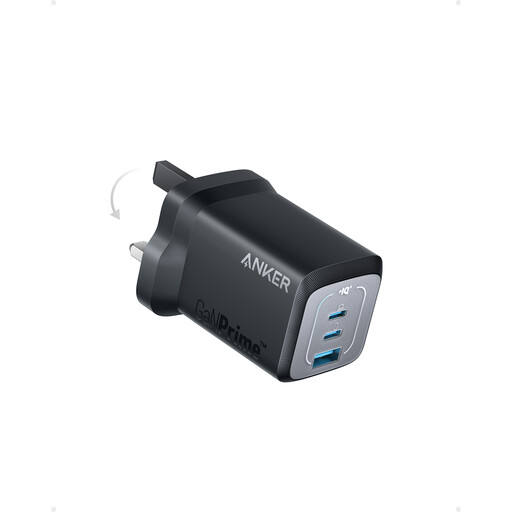
Why This Fits Their Persona: For the user juggling a work laptop, personal phone and tablet. This single plug can power a notebook and other devices simultaneously, decluttering the desk or travel bag.
It directly addresses the "misleading wattage" trap by clearly stating its power distribution: up to 67W from a single port for a laptop, or a combined 65W when using two ports.
Features two USB-C ports and one USB-A for maximum compatibility. The ActiveShield 2.0 safety system provides an extra layer of protection by monitoring temperature.
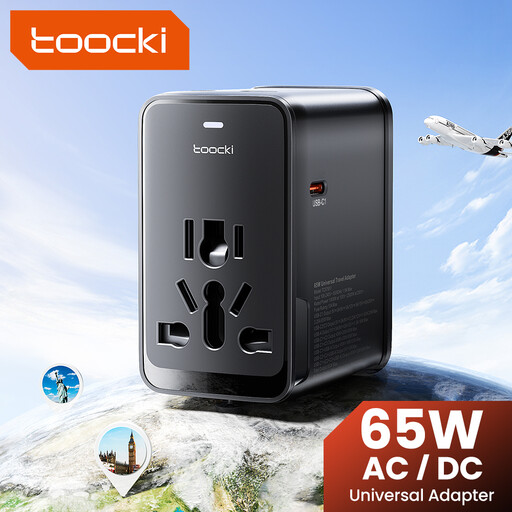
Why This Fits Their Persona: This is the ultimate all-in-one solution for international travel. It combines a travel adapter UK plug with EU, US and AUS sliders, plus a powerful 65W GaN charger with multiple USB ports.
It prevents the need to buy separate, potentially uncertified adapters abroad. The integrated 65W PD GaN charger is powerful enough for a laptop, solving the problem of underpowered hotel plugs.
Consolidates an international adapter and a multi-port fast charger into one compact unit. Features three USB-C ports and one USB-A port to charge up to four devices at once.
We have compiled a complete, real-time list of products that fully satisfy these strict selection criteria and UK safety regulations.
Yes, it is perfectly safe. A core feature of modern charging standards like USB Power Delivery is communication. The charger and your device "talk" to each other to determine the maximum power the device can safely accept. If your device doesn't support fast charging, the charger will simply default to a standard, slower charging speed.
Think of it this way: all PD chargers use a USB-C port, but not all USB-C chargers are PD chargers. USB-C is the physical connector shape. PD (Power Delivery) is the smart charging technology that runs over that connector, enabling higher power and intelligent negotiation. For true fast charging of laptops and modern phones, you need a charger that explicitly states it supports PD.
Yes, the cable is just as important as the charger. To get the full benefit of a fast charger, especially for outputs above 60W, you need a USB-C to USB-C cable that is rated to handle that power. A low-quality or underrated cable can limit charging speed and even be a safety hazard. As a general rule, the cable that came with your device is a good starting point, but for a high-power 65W laptop charger, ensure your cable is rated for 65W or 100W.