
24/7 Customer Support

Free returns

Same-day & Next-day Delivery

Quality Guaranteed

Unlock Your Welcome Offers: FREE Delivery | Up to 80% OFF | Free 30-day JoyPlus trial
Download the APP
A slow or broken charging cable is a modern-day frustration we can all do without. Yet, navigating the market for a replacement can feel like a minefield of technical jargon and exaggerated claims. A cable that promises lightning speed might barely trickle-charge your device, and one that looks sturdy can start fraying within weeks.
As the Joybuy Product Recommendation Officer, my role is to help you sidestep these common issues. Before you spend your money, let's look at the three most common pitfalls when buying a fast charging cable and how to avoid them.
To ensure you get a cable that is both fast and durable, focus on these three core parameters.
This is the first and most crucial check. Your cable's connectors must match your device and your power adapter.
Wattage determines charging speed. A PD charger cable is designed to work with a Power Delivery adapter to negotiate the fastest possible charge for your device.
Your device will only draw the power it needs, so using a 100W cable on a 20W phone is safe, but it offers no speed benefit. The key is to ensure your cable's wattage rating meets or exceeds the requirements of your most demanding device.
A cable's lifespan is determined by its materials.
Regardless of the material, always check for reinforced moulding around the connector head—this is the hallmark of a well-made cable.
Instead of a generic list, we've matched specific cables to the people who need them most.
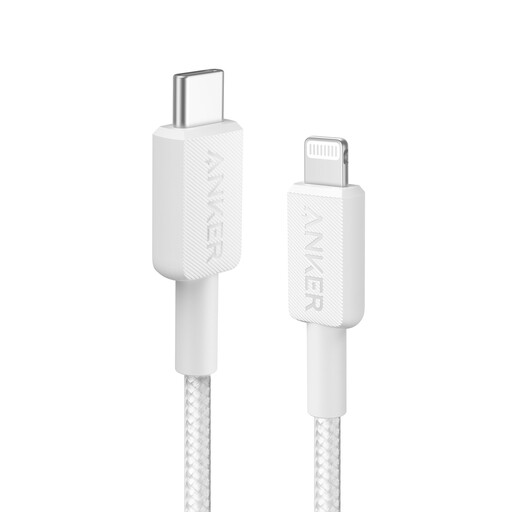
Why This Fits Their Persona: For the UK professional who needs a reliable charge at their desk or on the train, this Anker charging cable offers peace of mind. It's built for daily use and provides a consistent, fast charge for iPhones and iPads without fuss.
It is MFi certified by Apple, which guarantees it will deliver the correct power and data sync without error messages, sidestepping the "fake fast charge" pitfall. Its durable construction is designed to resist fraying.
Apple MFi Certification: Ensures flawless compatibility and safe, optimised charging for all Lightning devices. Supports Power Delivery for high-speed charging.
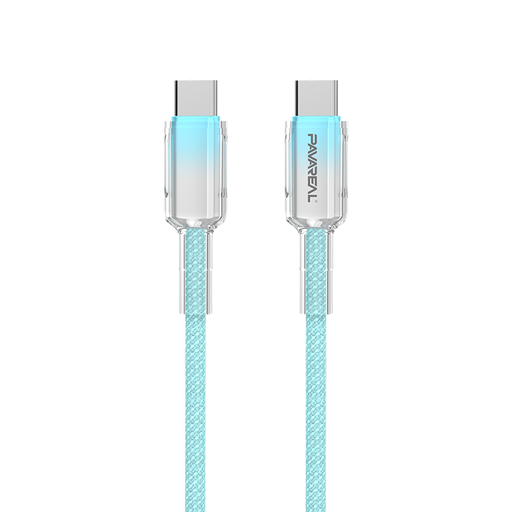
Why This Fits Their Persona: For the power user juggling a MacBook, an Android phone and other USB-C peripherals, this cable is a workhorse. It delivers the high wattage needed for a laptop while being versatile enough for all other modern gadgets.
Its clear 100W rating eliminates wattage confusion. The ballistic nylon braid and zinc alloy connectors are built for longevity, directly countering the flimsy build quality of lesser cables.
High Power Output: The 100W capacity can fast-charge demanding devices like a MacBook Pro. Durable Build: Ballistic nylon and metal connectors provide superior durability.
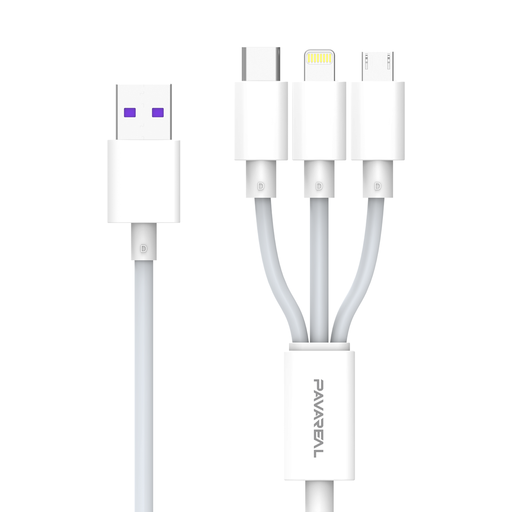
Why This Fits Their Persona: Ideal for families, travellers or anyone who carries devices with different ports (e.g., an iPhone, an Android tablet and a Micro-USB power bank). This cable consolidates charging needs into one tidy solution.
This 3 in 1 charging cable directly solves the "mismatched connector" problem. An integrated smart chip manages power distribution, ensuring each device gets a safe and appropriate charge.
Ultimate Convenience: Charges USB-C, Lightning and Micro-USB devices simultaneously from a single cable. High Total Output: The shared power is suitable for charging multiple devices at once.
For those who need power on the move, pairing your new cable with a fast charging power bank is an excellent solution. Models like the ochama 22.5W Intelligent Fast Charge Power Bank come with built-in cables and enough capacity to recharge your phone multiple times, ensuring you're never caught with a dead battery.
We have compiled a complete, real-time list of products that fully satisfy these strict selection criteria and UK safety regulations.
The easiest way is to check the specifications on your device manufacturer's website for terms like "Power Delivery," "PD" or "Quick Charge." You can also look at the original power adapter that came with your device—if its output is 18W or higher, it supports a form of fast charging.
No. Modern smart devices and certified PD chargers communicate with each other to determine the correct amount of power to deliver. The cable acts as a conduit, and your phone will only draw the wattage it is designed to handle. A higher-wattage cable is simply more capable, not more forceful.
Most modern fast charging cables, including all the ones mentioned here, also support data transfer. The standard speed is typically USB 2.0 (480Mbps), which is perfectly adequate for syncing photos and music. If you frequently transfer very large files, you may want to look for a cable that specifies USB 3.0 or higher transfer speeds, but for most users, a standard fast charging cable is all you need.