What to check before buying
Start by identifying the actual limitation: fibre connection compatibility, Wi-Fi reach, wired-port capacity, or provider-managed services. That prevents buying a new router when an add-on would solve the problem.
| Priority |
What to check |
Your needs |
| Fibre and ISP compatibility |
Check the hand-off from the ONT or external modem; confirm the required WAN interface, connection method, authentication and any VLAN settings. Do not copy settings from another provider. |
I need the replacement to connect to my fibre equipment and use my provider’s actual login requirements. |
| Whole-home Wi-Fi coverage |
Look for a mesh system that can work with the existing gateway where required. The primary mesh unit needs an Ethernet connection in the TP-Link topology described by TP-Link UK; wired backhaul is useful where Ethernet runs already exist. |
My broadband works, but rooms far from the router need a stronger and more consistent connection. |
| Wired connections |
Count fixed devices and reserve one switch port for the uplink. Match port speed to the relevant router, switch and device links, rather than assuming every switch is gigabit. |
I want to connect desktops, TVs, consoles, access points or mesh nodes without replacing a working router. |
| Support and digital voice |
Confirm how fault support, the broadband phone, adapters, stored contacts and any connected alarm equipment will work. Ask about backup-power arrangements if the landline is important during a power cut. |
I need a clear support route and do not want to disrupt a broadband-delivered phone or connected essential equipment. |
Joybuy product options
These Joybuy options cover mesh systems for extending Wi-Fi coverage and a wired switch for homes that mainly need additional Ethernet ports.
 No image available
TP-Link Deco BE22 BE3600 Mesh Wi-Fi 7 System, 3-Pack
A three-node option for extending coverage where the existing provider router remains in use.
Stated features include Wi-Fi 7, two 1Gbps Ethernet ports per unit, and combined wired and wireless backhaul. Confirm access-point mode for this exact BE22 variant before buying.
Joybuy
 No image available
NETGEAR Orbi 370 RBE373 Wi-Fi 7 Mesh System, 3-Pack
Designed for multi-room mesh coverage, with a router and two satellites.
The listing states 2.5Gbps WAN/LAN on the router and 2.5Gbps LAN on each satellite. Check whether this exact model supports access-point mode if the provider router will remain the gateway.
Joybuy
 No image available
TP-Link Deco BE25 Mesh Wi-Fi 7 System, 3-Pack
A three-node mesh option for rooms that are poorly served by the supplied router’s Wi-Fi.
The listing states Wi-Fi 7, roaming functions and 2.5Gbps Ethernet ports. Confirm the number and WAN/LAN assignment of those ports, plus access-point mode for this variant.
Joybuy
 No image available
TP-Link Deco BE65 BE9300 Tri-Band Mesh Wi-Fi 7 System, 3-Pack
A three-node mesh option to consider when whole-home coverage is the main concern.
The product name identifies a tri-band Wi-Fi 7 mesh system. Check access-point mode, wired-backhaul support, Ethernet ports and their WAN/LAN roles for this exact three-pack.
Joybuy
 No image available
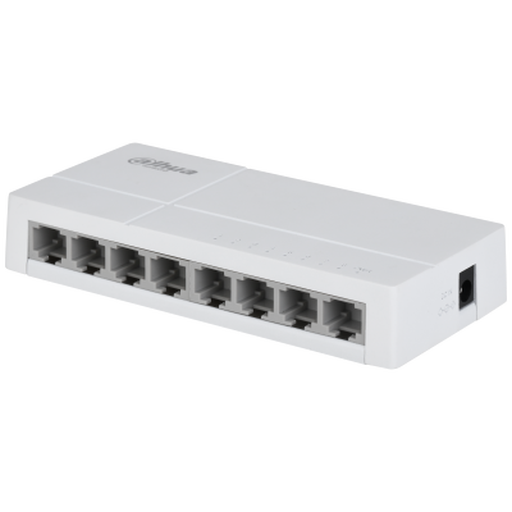
Dahua 8-Port Unmanaged Switch
A wired expansion option when Wi-Fi is satisfactory but the active router has too few LAN ports.
The listing states eight unmanaged 10/100Mbps Ethernet ports. It adds wired connections only and may not suit devices or local links that need more than 100Mbps per connection.
Joybuy
Frequently asked questions
Can I plug any new router directly into my fibre ONT?
No. Check whether your provider expects an Ethernet-connected router, a particular connection method such as PPPoE, and any VLAN setting. Plusnet publishes PPPoE and VLAN 101 settings for its fibre service, while BT Business specifies PPPoE capability and an Ethernet WAN port for routers used with an Openreach modem; these are provider-specific examples, not universal UK settings.
When is an Ethernet switch enough?
A switch is enough when broadband and Wi-Fi already work satisfactorily but there are not enough wired LAN ports. Connect it downstream of the router or the primary mesh LAN side; it expands wired connections but does not replace WAN login, NAT, firewall or Wi-Fi functions.
Can I keep the provider router and add mesh Wi-Fi?
Yes, if the mesh system supports an appropriate access-point mode for the setup. The existing router then remains responsible for routing and IP address assignment; TP-Link UK says the primary Deco unit needs a physical Ethernet connection to the router, modem or internet cable rather than a wireless repeater-style connection.
Should I put the provider router into bridge or modem mode before using a new router?
Only when the provider equipment and service support that mode, and the new router is intended to become the primary gateway. TP-Link recommends bridge mode for a combined modem-router when using Deco in router mode to avoid double NAT, but each provider hub and service needs its own confirmation.
What happens to a digital landline if I replace the provider hub?
Treat this as a compatibility check before purchase. Ofcom says digital landlines work over broadband and connect to the broadband router, while BT says its Digital Voice service uses its hub and may involve provider equipment such as a Digital Voice Adapter. Ask the provider how phone service, adapters, emergency-call arrangements and connected alarms will work with a third-party router.


