For editing field recordings beside a bright window, start with a screen you can position to avoid reflections, then check its surface finish and whether the editing interface is comfortable to read. A 27-inch 4K monitor is one option for a compact, detailed workspace; USB-C charging matters if you edit on a compatible laptop, while colour-calibration features are chiefly relevant if the same screen also handles colour-sensitive visual work. Neither a matte finish nor a brightness figure replaces controlling the light at the desk.
Who this advice is for
Bright-room field-recording editors
If you spend long sessions viewing waveforms and timelines near a window, screen position and reflections deserve attention before gaming or HDR features. The Health and Safety Executive advises arranging screens and lighting to avoid reflections and glare.
Laptop-based location editors
If you bring a laptop back from recording sessions, a monitor with suitable USB-C video, charging and peripheral connections could simplify the desk. Check those connections against your laptop and the equipment you actually use.
Audio editors who also make visual work
If the same screen is used for photography, video or artwork, colour modes and calibration may matter alongside the audio-editing workspace. ASUS and EIZO describe such features for specific ProArt and ColorEdge models; they do not make them necessary for audio-only editing.
What to check when choosing
Check what the window reflects in your intended screen position before comparing resolution and laptop connections. Add colour-management requirements only if your visual work calls for them.
| Concern |
What to check |
Who this matters to |
| Window reflections |
Check the screen finish, usable brightness controls and whether the stand or mount lets you change the screen angle. |
If window light falls across my editing view, I need to position the screen so reflections do not obscure it; around 36% of consumers put reflection control first. |
| Editing workspace |
Compare screen size and native resolution, then check text and timeline readability at a comfortable scaling setting. |
With waveforms, tracks and files open together, I want enough room without making labels difficult to read; roughly 29% of consumers prioritise workspace clarity. |
| Laptop connection |
Confirm USB-C video support, the laptop's charging requirement and the ports needed for your peripherals. |
When I move my recording laptop to the desk, I want to reconnect it without rebuilding the setup; about 21% of consumers make laptop integration their main concern. |
| Visual colour work |
For colour-sensitive work, check the specific model's colour modes and calibration method. |
If I also prepare video or artwork, I need repeatable colour rather than audio-editing features alone; around 14% of consumers put colour-managed work first. |
Buying pitfalls
-
Treating a brightness or HDR figure as a glare fix
A bright window can cause reflections that a brightness specification alone does not resolve. The Health and Safety Executive advises arranging screens and lighting to avoid glare.
Look at the screen from your normal seat, adjust its angle and control the window light where possible. Compare screen finishes and typical brightness without assuming either guarantees comfort at your desk.
-
Buying colour features for audio-only editing
Wide-gamut claims and calibration tools address visual-colour workflows; they do not inherently improve a waveform edit or remove window reflections.
Decide whether this monitor will also be used for colour-sensitive video, photography or artwork before making calibration a purchasing priority.
-
Assuming every USB-C monitor will charge your laptop
A monitor's power-delivery rating does not establish that your laptop can receive video and sufficient charging through the intended cable.
Check the laptop's USB-C video capability and charging requirement, the monitor's power-delivery rating and the cable and ports you plan to use.
Brands to consider
These model lines illustrate different features to compare, not a judgement about every monitor from each brand or their current availability.
BenQ
The Creative Pro PD2706UA is a reference for a 27-inch 4K desktop screen with positioning options for a bright-window desk.
- BenQ specifies a matte surface, 350-nit typical brightness, 150 mm height adjustment and USB-C power delivery up to 90 W for the PD2706UA.
- Those specifications do not establish how comfortable the screen will be with a reflection in your particular window layout.
ASUS
The ProArt PA279CRV is relevant when a laptop editing desk also supports visual-colour work.
- ASUS specifies a 27-inch 4K IPS panel, an adjustable stand and 96 W USB-C power delivery; its colour-coverage and factory-calibration figures are manufacturer claims.
- Confirm laptop video and charging compatibility, and weigh the colour features against whether you make colour-sensitive visual material.
Dell
The UltraSharp U2723QE provides a specification reference for a 4K USB-C hub monitor at a laptop desk.
- Dell lists an anti-glare coating, USB hub, LAN connection, adjustable stand and USB-C power delivery up to 90 W for this model.
- Dell UK labels the U2723QE unavailable, so check current listings rather than treating it as a ready-to-buy option.
EIZO
The ColorEdge CS2731 is a different route when the editing monitor also serves a managed visual-colour workflow.
- EIZO describes hardware calibration through the monitor's lookup table using ColorNavigator software.
- The CS2731 has a 2560 × 1440 resolution rather than 4K; its calibration workflow is not inherently useful for audio-only editing.
Joybuy monitors for this setup
These monitors offer different screen sizes, finishes and laptop-connection options for a field-recording edit desk. Check each model against the reflections and connections in your own setup; the order below does not establish which will be most comfortable beside your window.
 No image available
ASUS ProArt PA27DCE-K OLED 4K UHD
Consider this 4K OLED model if you also need a screen for visual work, but assess it in your intended window position. If you want a one-cable laptop setup, confirm USB-C video and charging compatibility before buying.
View on Joybuy
 No image available
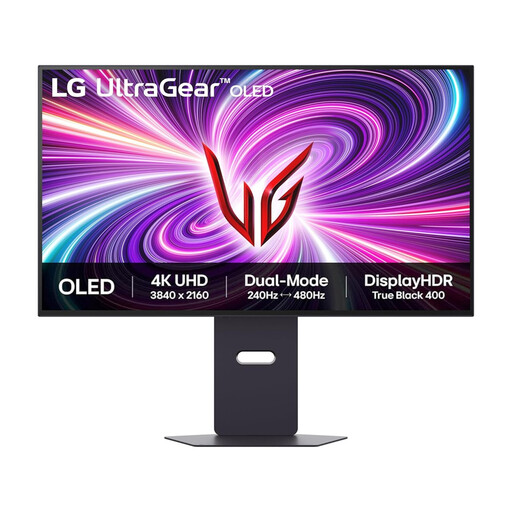
LG UltraGear 32GS95UV-B 32-inch 4K OLED
This larger 4K screen is an option if you have desk space for a 32-inch monitor; its gaming refresh-rate features are not a requirement for editing audio. For an interface with persistent toolbars and timelines, consider the stated OLED image-retention risk.
View on Joybuy
 No image available
iiyama ProLite XUB2792UHSU-B6 27-inch 4K
The 27-inch 4K configuration is worth considering for timelines and text on a compact desk. Its Matte Black name describes the product colour, so confirm the screen coating separately if reflections are your main concern; also check laptop charging requirements if you intend to use USB-C.
View on Joybuy
 No image available
BenQ MA270UP Nano Glossy 27-inch 4K
This Mac-oriented IPS model lists USB-C and an adjustable stand, but its Nano Glossy surface needs particular attention beside a bright window. Check for reflections from your normal seat and confirm charging and video compatibility with your laptop.
View on Joybuy
 No image available
MSI MD272UPSW Smart 27-inch 4K with Google TV
This IPS model combines a 27-inch 4K screen with USB-C rated at 65 W. If the laptop connection matters to you, check its video output and charging requirement; for the window-side desk, confirm the screen finish and assess the display in the intended position.
View on Joybuy
Frequently asked questions
Will a brighter monitor solve glare from the window?
No: brightness alone will not remove a reflection. The Health and Safety Executive advises arranging screens and lighting to avoid reflections and glare, so check the screen angle and window light as well as the monitor's finish.
Do I need 4K to edit field recordings?
No: 4K is a workspace choice, not an audio-quality requirement. Check whether your editing software remains comfortable to read at your preferred screen size, viewing distance and scaling setting.
What should I check for a one-cable laptop setup?
Confirm that your laptop outputs video over USB-C and that the monitor's power delivery meets its charging needs. Also check the cable and the ports required for your storage drives, audio interface and other desk equipment.
Does a higher-specification monitor replace a workplace assessment?
No. For workers who use display screen equipment daily as part of normal work, continuously for an hour or more, the Health and Safety Executive says employers must carry out a workstation assessment; choosing a monitor addresses only part of that setup.


