What matters when buying?
Check platform and headphone routing before choosing a control layout. A controller’s connection to the console or PC and your headset’s connection are separate parts of that decision.
Standard gamepad
Choose it when: You prefer familiar D-pad or thumbstick controls and want a pad with a documented headset jack for your platform.
Bear in mind: It does not provide a lever or all-button layout. PlayStation says the DualSense headset jack needs a wired controller connection on PC and Mac.
Lever arcade stick
Choose it when: You deliberately want joystick-and-button controls. Nacon documents a headset jack on the PS5, PS4 and PC Daija; 8BitDo documents one on its Arcade Stick for Xbox.
Bear in mind: A stick takes more space than a pad, and the controls available for other games depend on the model.
All-button controller
Choose it when: Button-based movement is the layout you want to learn or use; Razer positions the Kitsune for fighting games on PS5 and PC.
Bear in mind: Changing directional input takes adjustment. Confirm where your headphones will connect rather than assuming the controller provides a headset jack.
| Concern |
What to check |
Who this matters to |
| Platform and headphone route |
Match the exact controller to your console or PC, then check whether your headset connection works in the intended wired or wireless mode. |
I need my headset and controller to work together on the system I use, not just a visible 3.5mm socket. Around 36% of consumers put platform-and-headphone compatibility first. |
| Movement and button layout |
Choose between a D-pad, joystick lever and four movement buttons; check that the game accepts the controls on the model. |
If I am changing how I enter moves, the physical layout matters more to me than extra settings. Around 29% of consumers place control layout first. |
| Customisation and comfort |
Check platform-specific button mapping and the physical features you want, such as a palm rest or button lock. |
For repeated sessions, I want controls I can arrange and a surface that suits my hands. Around 21% of consumers prioritise customisation and comfort. |
| Portability and setup |
Check cable type, whether it detaches and how much space the controller needs where you play. |
I move my setup or have limited space, so storing and connecting the controller easily comes first. Around 14% of consumers give portability and setup priority. |
Joybuy product choices for conventional controls
This DualSense option is for players considering a conventional gamepad, particularly for PS5. Check your fighting game and planned headphone connection before deciding whether it suits your setup.
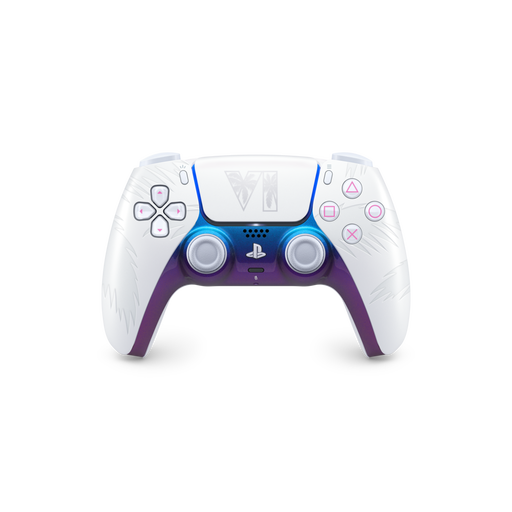 Image unavailable
PlayStation DualSense Wireless Controller, Grand Theft Auto VI White Limited Edition
Consider this conventional gamepad if you prefer pad controls for fighting games on PS5; check that your particular game supports the controls you need.
The product name lists PS5, PC, Mac and mobile. PlayStation says using the DualSense headset jack on PC or Mac requires a wired controller connection, so do not rely on Bluetooth pairing for that audio route.
View on Joybuy
Frequently asked questions
Can I plug a wired headset into a fighting-game controller?
Yes, if the exact controller has a suitable jack and supports that connection on your platform. Microsoft documents a 3.5mm stereo-headset jack on the Xbox Wireless Controller, and Nacon documents a 3.5mm headset jack on the Daija; do not assume the same feature exists on every fight stick or all-button controller.
Will the DualSense headset jack work over Bluetooth on PC?
Do not plan on controller-jack audio over Bluetooth on PC. PlayStation says the DualSense headset-jack feature requires a wired controller connection with PC and Mac, so arrange another headphone output if you intend to use Bluetooth for the controller.
Will an arcade stick work with every game on its supported console?
No: supported-console compatibility does not establish support for every game or mode. Nacon’s Daija manual warns that some games requiring a controller with two analogue sticks are incompatible. Check your game’s control requirements against the exact stick’s available controls.
Can I cancel an online controller purchase in the UK?
For an online purchase, GOV.UK says customers who want to cancel must tell the seller within 14 days of receiving the item. This change-of-mind route is distinct from remedies for faulty or misdescribed goods; check the applicable return instructions before sending a controller back.


