Choose a console that matches your intended tournament’s game, platform and controller rules before comparing display features. For practice in a dark room, check the game and display requirements for high-refresh play, and use room lighting and breaks rather than relying on screen settings alone.
Who is choosing?
Tournament entrants matching an event setup
If you are entering an offline bracket, the organiser’s game version, platform and controller policy determine what you can use. Evo, for example, requires entrants to bring their own controller; check the rules for your particular event rather than assuming they are the same.
Players practising in a dim room
If you practise for long sessions, separate the console’s output capabilities from the game, display and room conditions needed to use them. A high-refresh specification does not, by itself, establish the mode available in your fighting game.
Players practising away from a main TV
If you want handheld or tabletop practice, Nintendo Switch 2 offers a built-in screen as well as TV output. Check that your intended game is available on it and that the event accepts that platform before treating portability as the deciding factor.
What matters when choosing?
PlayStation 5 Disc Console
Consider it when: Your event specifies PS5, your game and controller are compatible, or you want to use compatible physical game discs.
Keep in mind: A PS5 event setup cannot be assumed for every tournament. PlayStation’s 120 Hz output also requires a supported game and display.
Xbox Series X
Consider it when: Your intended game and event setup support Xbox Series X, particularly if you already have a compatible Xbox game and controller.
Keep in mind: Xbox Support says its 4K/120 Hz setup requires an Ultra High Speed HDMI cable supporting HDMI 2.1 and an HDMI 2.1 TV, as well as the Series X.
Nintendo Switch 2
Consider it when: Your event uses Switch 2, or handheld and tabletop practice matter alongside play on a TV.
Keep in mind: Nintendo lists TV-mode support for 120 fps at 1080p or 1440p, subject to software and display support; maximum 4K output is 60 fps.
| Concern | What to check | Who this matters to |
|---|
| Event and controller match |
Confirm the organiser’s game version, platform, permitted controllers and adapter rules. Evo’s published rules require entrants to bring their own controller. |
If I am entering a bracket, I need equipment the organiser will accept, regardless of which console’s specifications appeal to me. Around 36% of consumers would put that event match first. |
| Display setup |
Check the game’s supported modes, the display’s refresh rate and game mode, and the required HDMI connection. Xbox Support specifies an HDMI 2.1 TV and suitable cable for Series X at 4K/120 Hz. |
For regular practice on a TV or monitor, I want to know which modes my whole setup can use rather than relying on the console’s headline output. Around 29% of consumers would make display compatibility their primary concern. |
| Room and viewing conditions |
Plan for ambient lighting, a suitable viewing distance and breaks. PlayStation’s UK health warning advises a well-lit environment and generally recommends a 15-minute break each hour. |
During long sessions, I need a room setup I can use comfortably; a brighter screen is not a substitute for lighting the room. For around 21% of consumers, viewing conditions would come first. |
| Practice away from a TV |
Check handheld or tabletop play, the intended game and the event platform. Nintendo Switch 2 has a built-in 7.9-inch screen, but portability does not change an organiser’s rules. |
If I practise away from my main TV, being able to take the game to another spot matters most, provided I can still use the right version for my event. Around 14% of consumers would prioritise that flexibility. |
Common buying mistakes
-
Assuming cross-play means a console is accepted at the event
An offline bracket can specify its own platform and controller rules. Evo, for example, requires entrants to bring a controller and restricts hardware-assisted inputs.
Check the current organiser rules for the exact game version, console, controller and any adapter you intend to use.
-
Expecting 120 Hz from the console alone
A console output setting does not mean a particular fighting game supports that frame rate. The display and connection must support the intended mode too.
Check the game’s modes and your display’s ports and refresh-rate support. For Xbox Series X at 4K/120 Hz, Xbox Support also specifies an Ultra High Speed HDMI cable supporting HDMI 2.1 and an HDMI 2.1 TV.
-
Treating screen settings as a substitute for room lighting
HDR or brightness settings do not replace a suitable viewing environment. PlayStation’s UK health warning advises playing in a well-lit room, keeping a safe distance from the TV and taking breaks.
Use some ambient lighting for practice. If flashing or flickering images raise a concern because of epilepsy or a seizure history, follow the manufacturer’s warning and seek medical advice before play.
-
Overlooking how you will access the game
Disc and digital console variants offer different ways to access games. PlayStation also states that online multiplayer may require a PlayStation Plus subscription.
Confirm the game format you intend to use, the event’s controller rules and any online access needed for practice before choosing a variant.
Brands to consider for these console routes
PlayStation
Consider a PS5 when your fighting game and event setup call for it. The PS5 Disc Console also offers a disc drive for compatible physical games.
- PlayStation documents a 120 Hz output setting for supported games and displays.
- Neither that setting nor the PS5 name establishes acceptance at a particular event; confirm its platform and controller rules.
Xbox
Consider Xbox when the intended fighting game, existing library and event setup are compatible with the specific Xbox model you choose.
- Xbox describes Series X as supporting 4K gaming at up to 120 fps.
- Xbox Support specifies additional cable and TV requirements for Series X at 4K/120 Hz. Do not apply those Series X specifications to Series S.
Nintendo
Consider Nintendo Switch 2 for a Switch 2 event or when handheld and tabletop practice matter to you.
- Nintendo lists a 7.9-inch built-in screen and TV-mode support for 120 fps at 1080p or 1440p, where supported.
- Software and display support affect available modes, and a portable console cannot replace an event’s designated platform without the organiser’s approval.
Joybuy console options
These Switch 2, PS5 and Xbox Series S options serve different game-access and practice needs. Match any console to your intended tournament before choosing between a built-in screen, disc or digital game access, or a particular controller bundle.
 No image available
Nintendo Switch 2 Console (UK Version)
Consider it for handheld practice or an event that specifies Switch 2; check the game version and controller rules first.
Nintendo lists a 7.9-inch built-in screen. Supported refresh-rate modes depend on the software and, for TV play, the display.
View on Joybuy
 No image available
Sony PlayStation 5 Disc Edition Slim
Consider this PS5 variant if your event uses PS5 and you want the option of compatible physical game discs; confirm the permitted controller.
It is the Disc Edition. PlayStation’s 120 Hz output setting requires a supported game and display.
View on Joybuy
 No image available
Xbox Series S 512GB Console, White
Consider this model if your game and event accept Xbox Series S; confirm the controller policy and how you will access the game.
This is the 512GB white Series S, not the Series X. Check game and display support before relying on a high-refresh mode.
View on Joybuy
 No image available
Sony PlayStation 5 Digital Edition Slim
Consider this PS5 variant for digital game access if the intended event uses PS5; check its game version and controller rules.
The Digital Edition has no disc drive. PlayStation’s 120 Hz output depends on the game and display.
View on Joybuy
 No image available
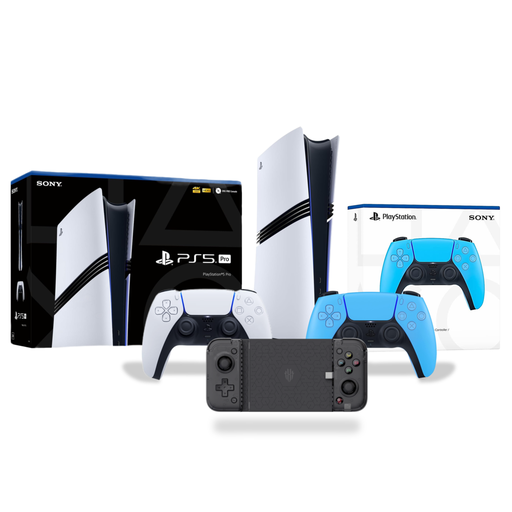
PlayStation 5 Pro Console + DualSense Edge Wireless Starlight Blue Controller + REDMAGIC Shadow Blade Gamepad Bundle
Consider this PS5 Pro bundle only after confirming that your game and event use PS5 and that the organiser permits the controllers you intend to bring.
The named bundle includes a DualSense Edge Wireless Starlight Blue Controller and a REDMAGIC Shadow Blade Gamepad. Check the specific game and display before relying on a high-refresh mode.
View on Joybuy
Questions about tournament consoles
Should I choose the console with the highest specifications?
Choose the console that matches your tournament’s specified game and platform first. Evo’s rules also require players to bring their own controller and restrict certain hardware-assisted inputs, so check your organiser’s current controller policy.
What do I need for 4K at 120 Hz on Xbox Series X?
Xbox Support specifies a Series X, an Ultra High Speed HDMI cable supporting HDMI 2.1 and an HDMI 2.1 TV. The fighting game must support the mode you intend to use; do not assume that a console’s output capability establishes its frame rate in that game.
Will PS5 or Switch 2 always run my fighting game at 120 Hz?
No: the available mode depends on the game and the connected display. PlayStation says PS5’s 120 Hz output is for supported TVs and games; Nintendo says Switch 2 software affects frame-rate support, with TV-mode 120 fps available at 1080p or 1440p where supported.
Should I practise in a completely dark room?
Use some room lighting rather than treating darkness as a console requirement. PlayStation’s UK health warning advises a well-lit environment, a safe distance from the TV and, generally, a 15-minute break each hour; it also gives precautions for people with epilepsy or a seizure history.


