
24/7 Customer Support

Free returns

Same-day & Next-day Delivery

Quality Guaranteed

Unlock Your Welcome Offers: FREE Delivery | Up to 80% OFF | Free 30-day JoyPlus trial
Download the APP
A small desktop can save valuable desk space, but compact size alone does not guarantee a useful computer. Buyers comparing the FIREBAT F1 Mini PC often focus on processor names, memory figures and display claims while overlooking cooling, upgrade limitations and connection requirements.
For home-office professionals, students, business users and casual gamers, three common buying traps deserve attention:
The right choice depends on how you work, what you connect and whether you expect to expand storage or memory later.
The AMD Ryzen 5 7640HS mini PC configuration in the FIREBAT F1 uses a 6-core/12-thread processor with Radeon 760M graphics. This combination is designed for a broad range of everyday workloads, including office applications, web-based systems, video calls, study software and casual gaming.
Integrated graphics share system resources rather than using a separate graphics card. That makes the computer smaller and generally simpler to install, but demanding modern games may require sensible graphics settings. Check the software developer’s requirements rather than relying only on the processor name.
For users comparing compact gaming systems, the graphics model matters as much as the CPU. Radeon 760M is a specific integrated graphics solution, while similarly priced mini desktops may use older graphics hardware with different performance characteristics.
The F1 includes 24GB LPDDR5 RAM, which gives useful capacity for browser tabs, office applications, communication tools and light creative work running together. LPDDR5 is a fast memory type commonly used in compact systems, but buyers should confirm whether it is soldered and non-upgradable on the product page before purchase.
The included 512GB PCIe 4.0 SSD uses a fast storage interface and provides space for Windows, applications and personal files. However, usable capacity will be lower after system software is installed. If you keep large video files, game libraries or business archives locally, check whether the mini desktop has an accessible M.2 slot or plan to use external storage.
A specification such as “512GB” describes capacity, not a guarantee of a particular sustained speed under every workload. It is sensible to review the complete listing for operating system details, drive configuration and any expansion options.
The F1 is listed with USB4, HDMI 2.1, support for 4K triple-screen output, 2.5G Ethernet, Wi-Fi 6E and Bluetooth 5.2. These features are particularly relevant to hybrid workers and multi-monitor home offices.
Before ordering, count the ports you will actually use:
For a stable business setup, wired Ethernet may be preferable where a router is close by. Wi-Fi is more convenient for a clean desk, while Bluetooth is useful for keyboards, mice, headsets and other accessories.
The following recommendations focus on practical use rather than promotional labels. Always confirm current price, included accessories, operating system and delivery information on the product page before ordering.
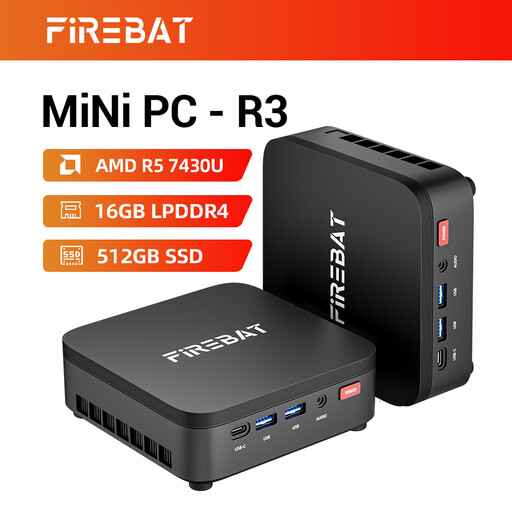
Why This Fits Their Persona: Its 16GB LPDDR4 RAM, 512GB SSD and compact format suit students, basic home-office tasks and everyday browsing where a modest, tidy desktop is the priority.
The listing identifies the processor, memory and storage clearly, helping buyers compare the actual configuration rather than relying on vague “mini gaming PC” wording.
6-core/12-thread Ryzen 5 7430U; supports 4K triple-screen output and includes Wi-Fi 6 and Bluetooth 5.2.
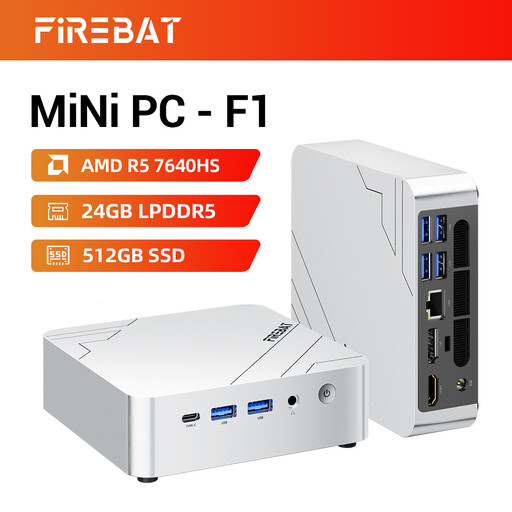
Why This Fits Their Persona: This configuration is suited to buyers wanting a compact, quiet desktop with substantial memory, modern connectivity and enough flexibility for work, entertainment and casual gaming.
Its stated 24GB LPDDR5 configuration and named Radeon 760M graphics make the specification easier to assess than an unspecified memory or graphics claim.
24GB LPDDR5 RAM and 512GB PCIe 4.0 SSD; USB4, HDMI 2.1, 2.5G Ethernet and Wi-Fi 6E are listed.
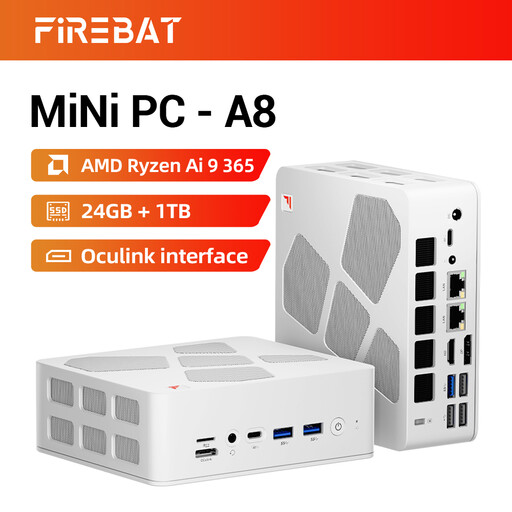
Why This Fits Their Persona: Users handling heavier multitasking, larger software workloads or demanding display setups may prefer its higher listed specification and additional expansion-focused connections.
The listing specifies 24GB DDR5, a 1TB PCIe 4.0 SSD and Radeon 880M graphics, so buyers can compare capacity and hardware rather than just the word “gaming”.
1TB storage and Radeon 880M graphics; includes USB4, OCuLink and support for 4K quad-display output.
We have compiled a complete, real-time list of products that fully satisfy these strict selection criteria and UK safety regulations.
Place the mini desktop on a firm, unobstructed surface rather than inside a tight cupboard. Compact computers still need airflow around their vents, particularly during extended gaming, video rendering or large file transfers. A wired keyboard, mouse and monitor can be connected during initial setup, while Wi-Fi and Bluetooth reduce cable clutter afterwards.
Check the following before completing your purchase:
Running cost depends on workload, power settings, usage hours and electricity tariff. A mini PC generally occupies less physical space than a tower, but its actual energy use should be judged from manufacturer power information or measured consumption rather than appearance alone.
The listed configuration supports 4K triple-screen output. You should still check the specific output combination, cables and monitor requirements before purchase, especially if all three displays must run at 4K simultaneously.
For office work, study, browsing, streaming and casual gaming, the F1’s Ryzen 5 7640HS, 24GB LPDDR5 RAM and 512GB PCIe 4.0 SSD provide a compact desktop configuration. A full-size desktop remains more suitable if you need a dedicated graphics card, extensive internal expansion or specialist PCIe hardware.
Lifespan varies with workload, ventilation, software support and component condition. Keeping vents clear, installing system updates and avoiding unnecessary heat can support reliable use. Before ordering, check whether the memory is upgradeable and whether storage can be replaced, as these details affect long-term flexibility.