Start with a phone if your account can use your chosen platform’s mobile streaming route, or a computer and USB webcam for a seated desk stream. Check speech, stable framing, front lighting and upload capacity before upgrading the camera; a dedicated camera may also require model-specific connections, capture equipment or an encoder.
Which setup describes you?
Starting with a phone
You want to stream from a phone or tablet and add a secure mount, light or compatible microphone only where needed. Check that your account can use the mobile route first: YouTube Help sets channel requirements for mobile livestreaming.
Streaming from a desk
You have a laptop or desktop and want to position a webcam and manage your voice without setting up camera capture hardware. YouTube Help describes a computer-based webcam route that does not require separate livestream encoding software.
Using a dedicated camera
You already own a camera, or have a specific reason to use one, and can check its connection, power and capture requirements against your computer and streaming route. An encoder-based setup offers more production options but is not a prerequisite for every first stream.
What should you check first?
Phone
Choose it when: Your platform and account support mobile streaming and you can mount the device securely.
Bear in mind: Account eligibility can rule out an immediate mobile stream on YouTube, even if the phone itself works.
Computer and USB webcam
Choose it when: You stream seated at a computer and want a direct webcam connection.
Bear in mind: You still need to check camera position and lighting in the room where you will stream.
Dedicated camera
Choose it when: You need camera-specific features or a more configurable production setup.
Bear in mind: USB webcam operation, HDMI capture, power and encoder requirements depend on the exact equipment.
| Concern | What to check | Who this matters to |
|---|
| Streaming route |
Check the platform’s mobile, webcam or encoder route against your account and current device before buying route-specific accessories. |
If my account cannot go live from my phone, a phone mount will not get my first stream started. Around 31% of consumers would put route compatibility first. |
| Speech |
Check the microphone connection and whether its placement will suit your desk, phone or camera. |
I need people to understand me when I speak in my usual room, so my first addition may be a microphone or headset. For around 31% of consumers, clear speech would be the primary need. |
| Image and framing |
Preview your face in the intended position; check front lighting and whether a mount holds the device securely. |
A camera upgrade is less useful to me if I am poorly lit or cannot keep the shot steady. Stable framing and a usable image would come first for around 23% of consumers. |
| Connection readiness |
Test upload capacity during normal household use and check the ports needed for your chosen setup. |
Before adding equipment, I need to know that my connection and host device can sustain the stream. Around 15% of consumers would make that their first concern. |
Purchases to think through
-
Buying a dedicated camera before choosing the streaming route
YouTube Help distinguishes its straightforward computer-webcam route from encoder streaming with additional production hardware. A dedicated camera is not automatically a USB webcam.
Check whether your existing phone or a USB webcam meets the need first. For a dedicated camera, confirm the exact model’s USB webcam or HDMI capture path before buying accessories.
A camera-based route may also call for a capture device, compatible cables, a power arrangement and more setup time.
-
Looking at download speed instead of upload capacity
A stream sends video and audio from your home. YouTube Help advises leaving upload headroom above the selected stream bitrate; a different camera will not resolve an inadequate connection.
Test upload performance where and when you expect to stream, with your usual household devices in use.
-
Assuming every USB microphone connects the same way
Computer and mobile connections can require different cables or adapters. RØDE’s guidance for the NT-USB Mini, for example, distinguishes supported PCs and Macs from connections to mobile devices.
Check your host device’s port, the exact microphone connector, the supplied cable and any adapter or power requirement.
-
Relying on automatic light correction alone
A model-specific camera feature cannot secure a mount or determine how your face will look in a dim or backlit position. Logitech describes automatic light correction on the Brio 300, but room placement still matters.
Preview the shot from your actual streaming position before deciding whether a light, mount or different camera addresses the problem.
Relevant brands to consider
Logitech
A reference point for the computer-and-webcam route.
- Logitech lists webcams for streaming and recording; it describes the Brio 300 as a 1080p model with automatic light correction.
- Check the connector, mounting method and operating-system support of the particular webcam rather than treating those Brio 300 features as range-wide.
Elgato
Relevant if you want to explore webcam, lighting and capture components for different stages of a setup.
- Elgato describes Facecam Neo as a 1080p60 USB webcam and lists lighting and capture products separately.
- Elgato’s Facecam Neo guide calls for a direct USB-C connection to a PC or Mac rather than a hub; capture requirements for a dedicated camera need their own check.
RØDE
A reference point for a computer-centred USB microphone.
- RØDE specifies class-compliant USB-C operation for the NT-USB Mini with PCs and Macs that support class-compliant audio.
- Mobile connections can call for different cables or adapters. Check microphone placement and surrounding noise in your intended room.
Joybuy products for home streaming
These webcams and microphones address computer-based video and speech, with a wireless microphone option to assess for a compatible mobile setup. Choose the streaming route and check connections before adding either type of device.
 No image available
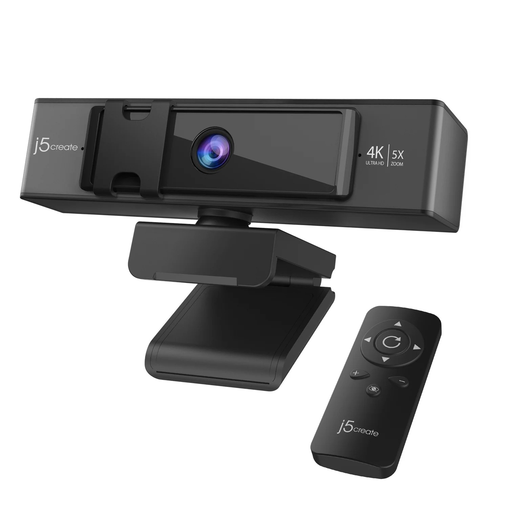
j5create JVCU435 USB 4K webcam with remote
Consider this for a computer-based stream if remote framing controls matter to you.
The named variant has 4K video and 5x digital zoom. Confirm that your computer and streaming app can use the webcam and its microphone before purchase.
Joybuy
 No image available
FIFINE AM8 USB/XLR dynamic microphone with desktop stand
Consider this for spoken audio at a desk when you have room to position a separate microphone.
The title identifies USB and XLR connections, a mute button and a headphone jack. If you plan to use XLR, check the cable and audio equipment your setup requires.
Joybuy
 No image available
EMEET all-in-one 4K USB webcam with four-microphone array
Consider this if you want a computer webcam with microphones in the same device.
The named model has fixed focus and an adjustable 98° field of view. Check its connector, computer and streaming-app compatibility, and whether fixed focus suits your seating distance.
Joybuy
 No image available
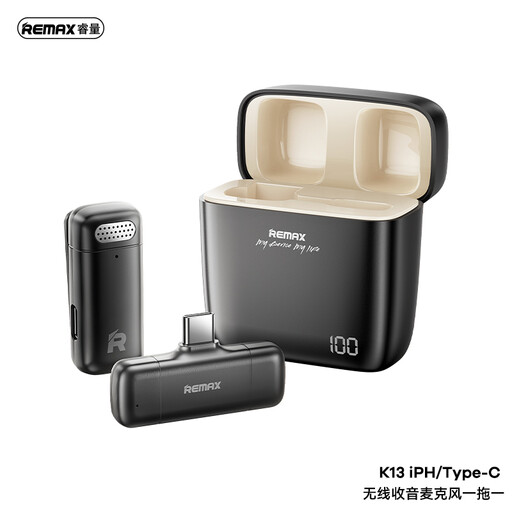
REMAX K13 1-to-1 USB-C wireless microphone, black
Consider this for a less desk-bound stream only after checking the audio-input route on your intended device and app.
It is a USB-C wireless microphone. Confirm host compatibility, the connection arrangement and the accessories needed for your planned session.
Joybuy
 No image available
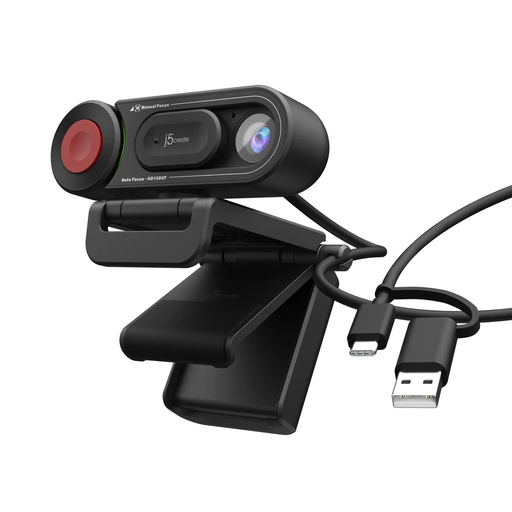
j5create JVU250 HD webcam with auto/manual focus switch
Consider this for a computer-based first stream if you want a webcam with a choice of focus modes.
Check that the HD image suits your intended stream and that your computer and streaming app recognise the camera and its microphone.
Joybuy
Common questions
Do I need a capture card to stream with a webcam on YouTube?
No capture card is needed for YouTube’s computer-based webcam route when your webcam works with the computer and you can use livestreaming on your channel. YouTube Help says this route does not require separate livestream encoding software; it does not mean a dedicated camera will work as a webcam without additional equipment.
Can I use my phone for a first livestream?
Yes, if your chosen platform and account support mobile streaming. YouTube Help requires at least 50 subscribers and no livestreaming restrictions in the previous 90 days for its mobile route; check its current device and channel requirements before buying a phone mount or microphone. Twitch also identifies its mobile app as a streaming option.
What should I test before buying a dedicated camera?
Test your existing phone or webcam in the intended room, checking speech, lighting, framing and upload capacity. YouTube Help advises keeping the stream bitrate within available upload bandwidth. Then identify the specific limitation a different camera would address and check that camera’s connection and power requirements.
What should I check when buying a powered light for use in Great Britain?
Check that its plug, power supply and voltage information suit your intended connection before using it. GOV.UK’s guidance on the Electrical Equipment (Safety) Regulations 2016 addresses requirements for businesses placing relevant electrical equipment on the Great Britain market; it is not a substitute for checking the particular light and its supplied power components.


