Who is this for?

First-time essential-service users

Adults who want to manage messages, video calls, banking, public services or appointments but find setup, passwords or unfamiliar online steps difficult. Ofcom identifies low digital confidence as one of several barriers to using online services.

People who need adaptable controls

Adults for whom text size, contrast, spoken feedback, captions or the choice between touch and keyboard input affects everyday use. The useful test is whether they can complete their own tasks with the settings on the device they are considering.

Learners and job seekers watching affordability

Adults completing forms, learning activities or work tasks who may consider a refurbished device. Continuing security updates, usable account access and a source of setup help matter alongside obtaining the device.

What matters when choosing?

Smartphone

Consider it when: calls, messages, account verification and a few familiar apps are the main tasks.

Trade-off: a small screen and touch keyboard may make lengthy forms or sustained reading difficult for the intended user.

Tablet

Consider it when: the person wants touch-based browsing, reading or video calls on a larger display.

Trade-off: they still need to learn touch navigation, and frequent typing may call for a compatible keyboard.

Laptop or Chromebook

Consider it when: long forms, documents, learning or work make a physical keyboard central to the routine.

Trade-off: file, account and update routines need attention; for a Chromebook, check the exact model’s final automatic-update date and required apps.

ConcernWhat to checkWho this matters to
Setup and ongoing help Identify who can help with the first essential tasks, account recovery and subsequent questions. If I am unsure how to get online or recover a password, I need someone I can ask after the device is handed over. Around 33% of consumers put setup and follow-up help first.
Usable interaction Try the required display, speech, caption or input controls on the exact device and software version. When small controls or unfamiliar gestures get in my way, I need an interface I can adjust and practise using. Usable interaction is the primary concern for around 27% of consumers.
Affordability and supported refurbishment For a refurbished device, confirm the exact model’s security-update support, condition, account-reset status and included accessories. If obtaining a device is the main hurdle, I need a refurbished option that can still be used securely, not just one that is available now. Around 20% of consumers prioritise affordability with continuing support.
Typing and longer tasks Test a real form or document; check whether a physical keyboard and the required websites or apps work for the person. If I regularly write applications or complete coursework, I need to know whether touch typing will slow me down. Keyboard-led tasks come first for around 20% of consumers.

Mistakes to avoid

  • Choosing specifications before essential tasks

    A capable device may still introduce more steps, passwords and notifications than the person can comfortably manage. Ofcom’s UK research describes confidence and unsuitable devices alongside other barriers to getting online.

    Write down the first three tasks the person needs to complete, then try them on the proposed device, including unlocking it and getting help when a step goes wrong.

  • Assuming accessibility settings are identical across models

    Available controls can vary by device, software version and app; a feature name alone does not establish that its navigation method suits the person.

    Let the intended user try the exact display, speech, caption or input settings they need while they can still reconsider the purchase.

  • Overlooking updates on a refurbished device

    The National Cyber Security Centre warns that devices without manufacturer security updates are easier to compromise.

    Confirm support for the exact model before buying. Before using a second-hand device, ensure it has been reset, then enable automatic updates and a screen lock.

  • Assuming a local scheme has a device ready

    Good Things Foundation’s National Device Bank works through local organisations rather than supplying devices directly to individuals. A nearby support hub is not a promise of a device or connectivity.

    Contact the local organisation to ask about eligibility, current availability and help with setup before making plans around it.

Brands to consider for specific device routes

Apple

An iPhone, iPad or Mac may be worth trying when the person wants to use Apple’s interaction settings across device types.

  • Apple documents VoiceOver navigation using touch, a trackpad or a Bluetooth keyboard.
  • Try the preferred navigation method and required apps on the actual device; account setup and recovery still need a plan.

Google

Android phones and tablets offer configurable interaction, while Chromebooks are a separate option for browser-centred tasks.

  • Google documents Android TalkBack and display controls, and provides Chromebook update schedules.
  • Android controls can vary by device; check a Chromebook’s final automatic-update date for its exact model.

Microsoft

Windows is relevant when regular keyboard work, documents or web-based learning point towards a laptop.

  • Microsoft documents Windows features including Magnifier, Narrator, live captions and an on-screen keyboard.
  • Check the proposed laptop’s support status and whether its keyboard, screen and required software suit the person’s tasks.

Samsung

Galaxy phones and tablets are an Android route for people considering adjustable display and interaction settings.

  • Samsung UK describes TalkBack, contrast options and enlarged keyboards on applicable Galaxy devices.
  • Samsung notes that availability varies by model specification, so try the required controls on the exact device.

Lenovo

A laptop or tablet brand to consider when a keyboard-led route is needed and device-specific documentation can guide the choice.

  • Lenovo publishes accessibility-feature documentation for several product families.
  • Check that documentation against the specific model rather than assuming the same controls or support period across the range.

Joybuy phone options

This phone is an option to assess if calls and everyday apps are the main tasks. Its foldable design makes trying both screens and the intended user’s navigation steps particularly important; the tablet and keyboard-led routes remain separate choices.
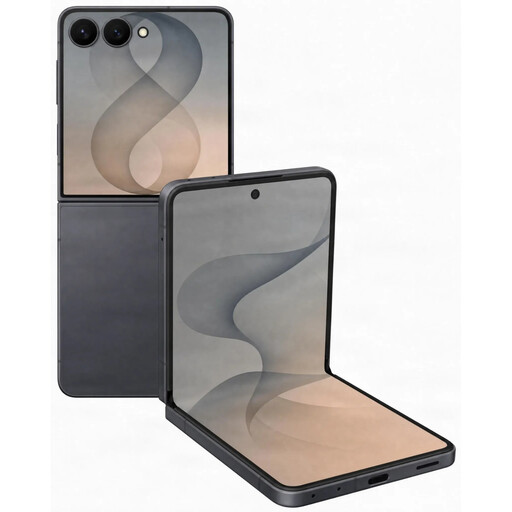
Samsung Galaxy Z Flip 8 5G 256GB Graphite

Samsung Galaxy Z Flip 8 5G 256GB Graphite

Consider this phone for calls and everyday apps if the intended user can comfortably manage its foldable screens and navigation.

The named variant has 5G connectivity and 256GB storage. Try any required accessibility settings on the exact model, and check whether a compatible charger and help with account setup are needed.

View on Joybuy

Questions about a first device

Should I arrange help before buying the device?

Yes, if setup or unfamiliar steps are likely to prevent the person using it. AbilityNet says its volunteers can help with equipment and settings, while Good Things Foundation points people towards local Digital Inclusion Hubs; ask the relevant organisation what help is currently available.

Can a refurbished device work as a first internet device?

Yes, provided the exact model still receives manufacturer security updates and the person can complete their essential tasks on it. Follow National Cyber Security Centre guidance to reset second-hand equipment before use and enable automatic updates and a screen lock.

How do I check whether a Chromebook will keep receiving updates?

Check the final-update date for the exact Chromebook model before buying, particularly if it is refurbished. Google provides this in the device’s update schedule; the purchase date alone does not tell you how much update support remains.

Should age or a diagnosis determine which device to buy?

No. Choose around the person’s actual tasks and preferred ways of reading, hearing and entering information, then let them try those tasks on the proposed device. A usable setting or form factor is an individual fit question, not a medical assessment.