Solo self-recording beginners
If you film without another operator, look for a screen you can see from your recording position and framing that works at your intended distance. A simpler setup may matter more to you than building a lens collection.


If you are still working out what you want to film, start with your current smartphone before buying a camera. For a dedicated setup, choose a compact camera for straightforward self-recording, a pocket gimbal camera for moving handheld footage, or a mirrorless system if still photos and lens choice matter; consider a DSLR for a specific body and lens package, and check your audio and editing needs before adding accessories.
If you film without another operator, look for a screen you can see from your recording position and framing that works at your intended distance. A simpler setup may matter more to you than building a lens collection.
If walking shots and travel clips are central to your plans, consider what you can comfortably carry and how you will hold the camera. DJI’s Osmo Pocket 3, for example, has a three-axis mechanical gimbal, but its fixed lens makes it a different choice from an interchangeable-lens system.
If still images matter alongside video, consider whether you want to change lenses and connect an external microphone. Canon’s EOS R50 illustrates this route with interchangeable lenses, a vari-angle screen and a 3.5 mm microphone jack.
Choose your starting route around the filming obstacle that matters most to you, then check whether the whole setup—not just the camera body—fits your recordings.
Choose it when: You want to test a posting routine before committing to new equipment; YouTube’s live-streaming guidance identifies mobile devices as an option for vlogging and quick updates.
Check first: Storage, microphone compatibility and the framing your particular phone allows.
Choose it when: You mainly record yourself and want a dedicated camera without selecting interchangeable lenses.
Trade-off: A fixed lens keeps the kit simpler but cannot be swapped if your framing needs change.
Choose it when: Walking footage and a small carry load are central to your videos.
Trade-off: The DJI Osmo Pocket 3 combines mechanical stabilisation with a fixed lens and requires microSD storage.
Choose it when: You want still photos and video from one system and expect lens choice to matter.
Trade-off: The lens, storage and support equipment you choose affect the size and complexity of the finished kit.
Choose it when: An optical viewfinder and a particular available body-and-lens package suit the way you shoot.
Check first: Confirm the exact kit’s condition and availability; Canon UK Store marks its listed EOS 250D kit discontinued and permanently unavailable.
| Concern | What to check | Who this matters to |
|---|---|---|
| Solo framing and portability | Can you see the screen while recording, and does the lens frame you at your usual shooting distance? Consider the weight of the complete kit. | If I film alone and carry my setup regularly, I need to frame a shot without another person and be willing to take the kit with me. Around 31% of consumers put easy solo filming first. |
| Spoken audio | Check the exact camera or phone’s microphone connection, plus the cables and mounting method needed for your chosen accessory. | For speech-led videos, I do not want an incompatible microphone to disrupt an otherwise workable setup. Clear spoken audio is the primary need for around 25% of consumers. |
| Photo and video flexibility | Confirm whether a lens is included, which lenses fit the mount and whether the available video modes suit your plans. | If I also want to develop my still photography, I may prefer a system whose lenses I can change as my subjects change. Around 25% of consumers prioritise that photo-and-video flexibility. |
| Editing workload | Check the recording format, required storage and whether your editor can handle the frame rate and orientation you intend to use. | I want footage I can edit and publish with the devices I already use, rather than choosing demanding modes for their labels alone. A manageable recording workflow comes first for around 19% of consumers. |
Slow-motion modes serve particular shots, not every talking-head video. YouTube recommends uploading at the frame rate used for recording and gives higher suggested bitrates for 4K than for 1080p.
Decide whether you will make vertical clips, horizontal videos or slow-motion sequences, then check the formats your editor can export.
Higher-resolution footage can demand more storage, upload time and editing capacity.
Speech recorded outdoors or away from the camera can make the audio route more important to your choice. Microphone connections, cables and mounting arrangements differ.
If speech is central to your videos, check the exact device’s supported audio connections before choosing a microphone or wireless setup.
A body-only mirrorless camera and a fixed-lens camera are not equivalent packages. The lens, recording media, audio equipment and support you need depend on what you plan to shoot.
List what comes with each exact bundle, then identify any lens, card, tripod or grip, power accessory and adapter your planned recordings require.
Canon documents the EOS 250D’s optical viewfinder, movable screen and 4K recording, but Canon UK Store labels its listed EOS 250D kit discontinued and permanently unavailable.
Check the seller’s current listing, the exact lens supplied and the camera’s condition rather than treating a model information page as confirmation of a particular kit.
These brands illustrate different camera routes; the relevant model and package matter more than a brand name on its own.
The Sony ZV-1 II illustrates the fixed-lens compact route for self-recorded video.
Canon’s EOS R50 and R50 V illustrate mirrorless options, while the EOS 250D illustrates DSLR handling.
The Osmo Pocket 3 illustrates the small pocket-gimbal route for handheld video.
These choices cover dedicated cameras for solo or mobile video and a mirrorless option for people also building a still-photography setup. Compare each exact package with the screen, audio and editing requirements of your own videos.
 No image available
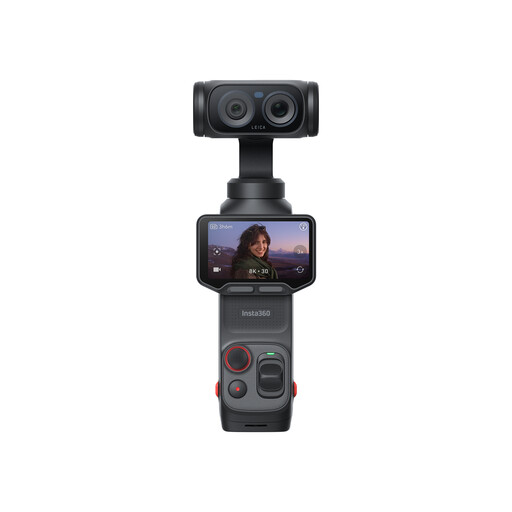
Consider this compact video setup if you plan to record yourself or film while moving.
The listing names a 1-inch CMOS sensor, 4K video and three-axis stabilisation, and identifies this variant as the Creator Combo. Check the included microphone and the connection options against your intended audio setup, as well as the lens framing for your shots.
 No image available
Consider this bundle if remotely checking your framing is important when you record alone.
Confirm which components come with the Standard Bundle, how you will record audio and what storage your planned video formats require before choosing it for your workflow.
 No image available
This action-camera format is worth considering if you film yourself during active outings.
The title specifies a 154° wide-angle lens, 4K recording, dual touchscreens and six-axis electronic image stabilisation. Check whether the handle and auxiliary battery needed for the stated extended recording duration are included, and confirm the audio route if you will record speech. Underwater use requires the waterproof case to be securely closed.
 No image available
Consider this mirrorless package if you want a camera for still images as well as video and want to start with a supplied zoom lens.
The title identifies a full-frame body and 28–70 mm lens. If you normally film yourself, confirm that the screen works from your recording position; also check the microphone connection and video modes needed for your setup.
No: using your current smartphone can help you establish what and how often you want to record before choosing new equipment. YouTube identifies mobile devices as an option for vlogging and quick updates in its live-streaming guidance; that does not mean every phone will meet every filming or audio need.
Choose a format your storage, editor and publishing workflow can handle consistently. YouTube recommends uploading at the frame rate used to record and gives higher suggested bitrates for 4K than 1080p, so check the extra file and processing demands before choosing 4K for a specific filming purpose.
Not automatically; it becomes more relevant when speech is central or wind, background noise or distance from the camera affects your recordings. Check the connection on the exact device and the microphone’s cable and mounting requirements: Canon lists a 3.5 mm microphone jack on the EOS R50, while RØDE supplies camera and smartphone cables with the VideoMicro II.
Check the contents of the exact package against the videos you intend to make. A mirrorless body may need a separately chosen lens, while any route may call for suitable recording media, a microphone, a tripod or grip, power accessories or a compatible adapter.