Choose an on-watch interval timer if you mainly need to set repeated work and recovery periods shortly before training; choose a structured-workout system if you plan warm-ups, repeated blocks and intensity targets in advance. Check the exact watch model and sport profile before buying, because the available controls can differ by device and activity.
Who needs which interval workflow?
Runners who want a quick repeat timer
If you set up efforts and recoveries just before a run, look for work and rest controls you can operate on the watch. COROS documents time-, distance- and manually ended running intervals; the available controls still need checking on the watch you intend to buy.
People following structured sessions
If your plan has a warm-up, repeated blocks, recoveries and targets such as pace or heart rate, a workout builder matters more than a simple countdown. Garmin Support documents step-based workouts with optional intensity targets, while noting that options vary by device.
People training across several activities
Check intervals in the sport profile you will actually use, not just in the watch’s general feature list. Apple Support excludes Multisport and Open Water Swim from its custom-workout feature, while Suunto describes interval controls tied to sport modes.
What should you check when buying?
Start with how each work and recovery period should end, then check whether your planned targets and sport profile work on the exact device.
| Concern |
What to check |
Who this matters to |
| Quick work and recovery timing |
Check for separate work and recovery periods, repeat counts and the time- or distance-based endings you need. |
I want to start a repeat session without building a detailed workout beforehand. Around 36% of consumers put quick work and recovery timing first. |
| Structured steps and targets |
Check repeat blocks, warm-up and cooldown steps, and support for your chosen pace, heart-rate or power target. |
My session has several stages, and I need the watch to guide me through the plan rather than just count down. For around 29% of consumers, structured programming is the primary need. |
| Sport-profile coverage |
Check interval controls in your intended activity; distance-based steps need a mode that measures distance. |
If I alternate between activities, an interval feature in running alone may not cover my training. Sport-profile support comes first for around 21% of consumers. |
| Model and setup compatibility |
Check the exact model’s instructions and whether you create workouts on the watch, in an app or through both. |
I want to know that my chosen watch and setup can run the session I have planned. Around 14% of consumers prioritise that compatibility check. |
Interval-watch buying pitfalls
-
Assuming every watch from a brand has the same builder
A brand’s workout instructions do not establish that every model has the same controls. Garmin Support explicitly says workout features and options vary by device.
Check the manual for the exact model against your intended workout type and target metrics.
-
Choosing a countdown when you need distance or targets
A time-based repeat timer will not, by itself, guide a session whose steps end by distance or use pace or heart-rate targets. COROS and Garmin document different interval and workout controls.
List how each work and recovery step should end, then check those controls in the device instructions.
-
Assuming intervals work in every sport profile
Apple Support says custom workouts are unavailable for Multisport and Open Water Swim. Suunto also ties its documented interval setup to sport modes.
Check the activity you use most often rather than relying on a general interval-workout description.
-
Putting an old rechargeable tracker in household rubbish
GOV.UK advises against putting unwanted batteries and electrical products in household rubbish.
Use an appropriate battery or electrical-product recycling collection route when the device reaches the end of its useful life.
Relevant brands to consider
Garmin
Garmin Connect is worth considering if you plan step-by-step sessions before training and transfer them to a compatible watch.
- Garmin Support documents workout steps with durations and optional intensity targets, including pace, cadence, heart-rate-zone and power-zone targets.
- Garmin says not every workout option is available on every device; check the intended model and activity.
Apple
Apple Watch suits a preference for creating custom sessions directly in the Workout app, subject to the chosen workout type.
- Apple Support documents repeating work and recovery intervals, warm-up and cooldown periods, and time-, distance- or open-ended steps.
- Apple says custom workouts are unavailable for Multisport and Open Water Swim.
COROS
COROS documents a running-focused setup for repeated work and rest periods.
- COROS Help Center describes time-, distance- and open-ended running intervals with repeat controls.
- An open interval continues until you press the BACK/LAP button, so it requires manual input to advance.
Suunto
Suunto documents on-watch interval planning for specified watch families and sport modes.
- Suunto Support describes repeat counts and time- or distance-based work and recovery segments.
- Distance intervals require a sport mode that measures distance; a customised sport mode may need an interval display added in the Suunto app.
Joybuy choices for interval sessions
This Apple Watch option is relevant if you want to plan custom workouts and check interval controls within your chosen activity. Confirm the exact workflow you need before deciding on the watch.
 No image available
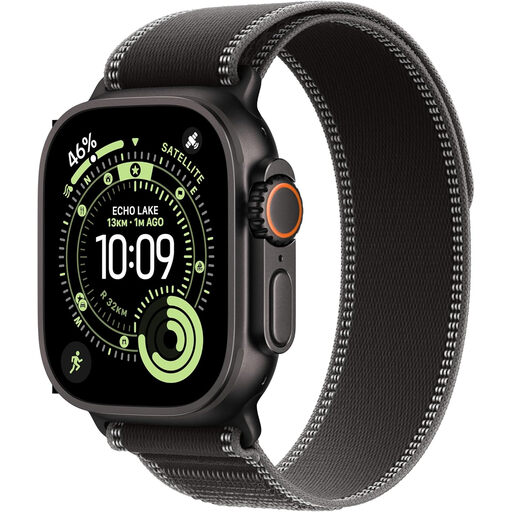
Apple Watch Ultra 3 GPS + Cellular, 49mm Black Titanium, Black/Charcoal Trail Loop (S/M)
Consider this watch for planned sessions if Apple’s custom-workout approach suits the activity you train in. The listing describes custom workouts and requires an iPhone for pairing and setup.
Apple Support documents repeating work and recovery intervals in supported custom workouts, but excludes Multisport and Open Water Swim. Check the interval steps and prompts you need for this exact watch and sport profile.
View on Joybuy
Frequently asked questions
Do I need GPS to time intervals?
Not for intervals that end by time alone. If you want distance-based steps, check how the chosen watch measures distance in your activity; Suunto Support says its distance intervals require a sport mode that measures distance.
Can I set up intervals on the watch instead of a phone?
Yes, on watches and activities with the relevant on-watch controls. Apple Support documents custom-workout creation in the Apple Watch Workout app, Garmin Support describes Quick Workout on select watches, and Suunto Support documents on-watch setup for specified watch families; check the exact model and sport profile.
What should I do with an old rechargeable tracker?
Take it to an appropriate battery or electrical-product recycling collection route rather than putting it in household rubbish, in line with GOV.UK guidance for unwanted batteries and electrical products.


