Players sharing a busy connection
If play is disrupted when others stream, download or make video calls, traffic-priority settings are more relevant to investigate than a coverage-only upgrade.


Check whether the problem starts with the broadband line, console settings, shared traffic or the gaming device’s Wi-Fi connection before replacing equipment. If a safe cable route is practical, assess that first; use a router with suitable traffic-priority controls when other household activity disrupts play, or consider mesh when the gaming location has a weak Wi-Fi connection. Neither option can make the broadband service faster than the underlying line.
If play is disrupted when others stream, download or make video calls, traffic-priority settings are more relevant to investigate than a coverage-only upgrade.
If a console or PC can connect safely to the router, assess that wired route before replacing Wi-Fi equipment. A switch is worth considering when the router needs more wired ports.
If walls or distance weaken Wi-Fi at the gaming position, consider placement or a mesh connection after checking that the broadband line itself is not the bottleneck. Ofcom notes that Wi-Fi cannot outperform the broadband service.
Separate competition for bandwidth from a weak local connection or a line and configuration problem; each points to a different purchase, or possibly no new equipment.
| Concern | What to check | Who this matters to |
|---|---|---|
| Shared-traffic congestion | Check whether the exact router offers usable device or application priorities, including the upload and download controls you need. Test the connection while other household devices are active. | When downloads or calls coincide with play, I need to manage competing traffic rather than just extend Wi-Fi range; around 33% of consumers would put congestion control first. |
| A wired route to the gaming device | Count available router ports and check the device’s Ethernet connection, cable route and required switch ports. | If my console or PC stays in one place, I would rather connect it by cable than depend on its Wi-Fi link; roughly 25% of consumers would prioritise a wired route. |
| A distant gaming position | Compare the connection near the main router with the gaming position. For mesh, check the required nodes, Ethernet ports and backhaul support on the exact system. | When the connection weakens where I play, I need to address that location without assuming the broadband line will improve; about 25% of consumers would focus on placement first. |
| Broadband and NAT diagnosis | Test the line at different times and check the console’s NAT result. Confirm how a replacement router would work with the existing ISP gateway. | If matchmaking fails or slowdowns follow the time of day, I want to identify the cause before buying hardware; around 17% of consumers would make diagnosis their primary concern. |
Ofcom identifies time of day and simultaneous household use among factors that can affect broadband performance. A router replacement will not repair a problem with the underlying service.
Test the connection at different times, compare the results with your provider’s service information and contact the provider if the line appears to be the bottleneck.
Traffic-priority settings allocate the bandwidth available to the household; the controls differ by router. A gaming label alone does not establish that you can prioritise your device or manage competing downloads.
Inspect the exact model’s quality-of-service (QoS) settings for device and application priorities and the upload or download controls your setup needs. ASUS describes such controls in its own router guidance, but their availability depends on the model and configuration.
A mesh node can address a weak connection at a distant position, but Ofcom notes that Wi-Fi cannot outperform the broadband service. A direct cable may be simpler when one can safely reach the gaming device.
Test nearer the main router first. If the location calls for mesh, check whether the exact kit supports the Ethernet backhaul and node ports you intend to use.
A good local connection does not rule out a multiplayer or party-chat configuration issue. Xbox Support directs players troubleshooting NAT errors to check results such as Double NAT detected or UPnP not successful.
Check the console’s network result and the routers or gateways in the connection path, then follow the platform and provider’s guidance before buying a replacement.
The Archer GE650 is a gaming-focused router to examine if wired-port capacity and model-specific game controls matter to your household.
Consider an ASUS or ROG router when configurable traffic management is more important than a gaming-branded appearance.
Orbi mesh is relevant when the gaming position is far from the main router and a satellite could provide a better local connection.
These choices cover extra wired ports, a Wi-Fi router and a mesh system for a distant gaming position. Choose the route that matches the problem you have identified; a switch, router and mesh kit do different jobs.
 No image available
Consider this switch when a practical cable route exists but the router needs more wired ports. It is an eight-port Gigabit unmanaged switch, not a router or a way to fix a broadband or NAT problem.
 No image available
Consider this router if you are assessing a wireless-network upgrade for a shared home. Check the exact model’s QoS controls and WAN and LAN ports before choosing it for traffic prioritisation or a wired gaming setup; using its 6GHz band also requires a compatible device.
 No image available
This three-pack is a route to assess when the gaming position is distant from the main router. It is a dual-band BE3600 system with 2.5Gbps Ethernet listed for this variant; confirm Ethernet-backhaul support and the required node ports before planning a wired mesh layout.
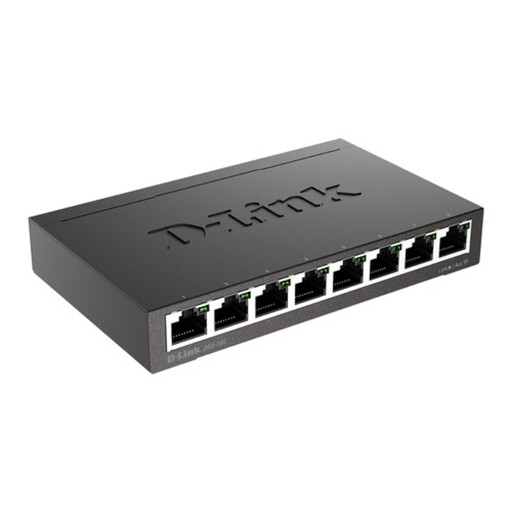 No image available
Consider this eight-port Gigabit switch if several devices need wired connections and a cable can reach the router. Check whether you also need its stated PoE-enabled ports for compatible equipment; the switch itself does not replace a router or increase broadband capacity.
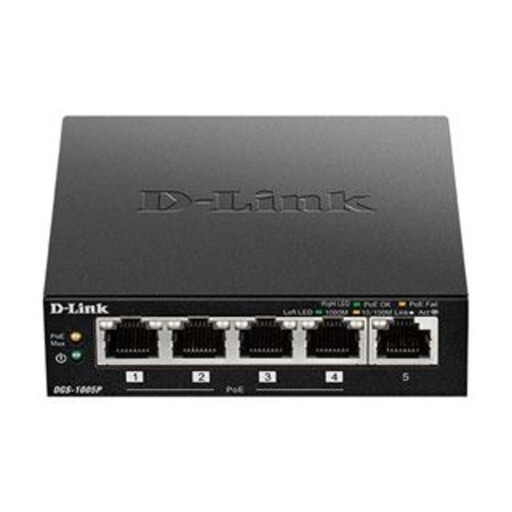 No image available
This five-port Gigabit switch is worth considering when fewer extra wired ports are needed and compatible PoE+ equipment is also part of the setup. A gaming device does not need PoE+ simply to use Ethernet; you still need a cable route and a router connection.
Yes: test at different times and while other household devices are active before attributing poor play to the router. Ofcom notes that time of day and simultaneous use can affect broadband performance, and changing the router cannot make Wi-Fi outperform the underlying service.
Assess Ethernet first if the gaming device is stationary and a cable can be routed safely to the router. It removes that device’s local Wi-Fi link from the setup; add a switch only if more wired ports are needed, and do not expect either purchase to resolve a broadband-line or NAT fault.
Not necessarily: check the Xbox network result before replacing the router. Xbox Support advises checking NAT errors, including Double NAT detected and UPnP not successful; the existing gateway and router configuration may need attention instead.
Check that the product’s conformity information and documentation apply to the market where it will be supplied. GOV.UK’s Office for Product Safety and Standards describes the Radio Equipment Regulations 2017 for Great Britain; for Northern Ireland, check the applicable requirements separately rather than assuming Great Britain information covers the purchase.