Choose a controller that supports the PC or console where you play: the Xbox Wireless Controller is an option for Windows and Xbox, DualSense covers PS5 and supported PCs, and the 8BitDo Ultimate 2C Wireless offers receiver-based or wired use on Windows. For a home-office desk, decide how you want to connect it, then check your football game before choosing a controller for features such as PC haptics or extra controls.
Who these controllers suit
Windows football-game players
If you play on a home-office PC, confirm both Windows support and the connection available at your desk before choosing between wireless and wired models. Microsoft, PlayStation and 8BitDo document different PC connection options for their controllers.
PS5 owners who also play on PC
DualSense supports PS5 and PC use, but PlayStation says haptic feedback on PC needs both USB and a supporting game. Basic controller compatibility does not establish that a particular football game uses those features.
Players who customise controls
If you already know which platform you use, consider whether extra buttons, saved profiles or adjustable sticks would change your control setup. 8BitDo and Microsoft list different customisation options, so check the exact model rather than assuming every controller has them.
What matters when choosing
Start with the device and football game you actually use, then choose a desk-friendly connection. Consider specialised features only after those essentials are settled.
| Concern | What to check | Who this matters to |
|---|
| Platform and game input |
Match the controller to your exact PC or console, then check the football game’s controller settings. |
If I switch between a PC and console, I need to know the controller works on the device I will actually use. Around 42% of consumers put platform and game-input compatibility first. |
| Desk connection |
Check for Bluetooth, an available USB port for a receiver or cable, and any cable needed for your chosen setup. |
I want to play without a cable across my desk, while still having a connection my PC can use. For around 25% of consumers, a desk-friendly connection is the main concern. |
| DualSense features on PC |
Check the game’s feature support; PlayStation says PC haptics require USB and a supported game. |
If I use one DualSense on PS5 and PC, I want to know which features my football game can use on each device. Around 25% of consumers make that their primary consideration. |
| Extra controls |
Identify the button, profile or stick adjustment you intend to use, and check its availability on the exact model. |
I would change my control layout rather than leave the extra settings untouched. For around 8% of consumers, customisation takes priority. |
Mistakes to avoid
-
Assuming PC compatibility includes wireless haptics
PlayStation says DualSense haptic feedback on PC requires USB and a supporting game; adaptive triggers also depend on game support.
Check your football game’s feature information before choosing DualSense for those effects. If PC haptics matter, plan for a USB connection.
A USB Type-C data cable may be needed; check the contents of the exact bundle.
-
Choosing a PC controller for a console without checking support
8BitDo specifies Windows and Android use for the Ultimate 2C Wireless. Its PC connection options do not establish PS5 or Xbox compatibility.
For console play, check that the official information for the exact controller lists your console.
-
Choosing premium controls without a use for them
Microsoft lists adjustable-tension sticks and interchangeable components for the Xbox Elite Wireless Controller Series 2. Those options are distinct from the basic task of connecting a controller to play.
Decide whether you would use its adjustments or profiles before choosing it over a standard Xbox controller.
-
Putting an old controller or battery in household rubbish
GOV.UK advises taking unwanted electrical products and batteries to an appropriate recycling collection point rather than putting them in household rubbish.
Use a suitable electrical-waste or battery collection point when the controller or its removable batteries reach the end of their use.
Relevant controller brands
Xbox / Microsoft
Microsoft lists the standard Xbox Wireless Controller for Xbox consoles and Windows PCs, with Bluetooth, Xbox Wireless, a hybrid D-pad and button mapping.
- The Elite Series 2 adds adjustable-tension sticks and interchangeable components for players who intend to customise their controls.
- Check how you will connect the chosen model to your PC and whether you need the Elite model’s additional adjustments.
PlayStation / Sony
PlayStation lists DualSense for PS5 and supported PCs, Macs and mobile devices.
- A PS5 owner can also connect DualSense to a supported PC through Bluetooth or USB Type-C.
- PlayStation says PC haptics require USB and a supported game, while adaptive triggers depend on game support. Check cable contents for the bundle you choose.
8BitDo
8BitDo specifies the Ultimate 2C Wireless for Windows through a 2.4 GHz receiver or wired connection, and for Android through Bluetooth.
- The manufacturer lists Hall Effect sticks and triggers and additional R4/L4 bumpers for this model.
- The stated platform list does not establish PS5 or Xbox console compatibility.
Controllers on Joybuy
These controllers cover Windows or Xbox desk setups and a DualSense option for PS5 owners who also play on PC. Choose by your actual platform and preferred connection; the model-specific conditions below still matter for your football game.
 No image available
Xbox Wireless Controller — Robot White
Consider this model for Windows PC or Xbox play if you want an official Xbox controller. Microsoft lists Bluetooth, Xbox Wireless, a hybrid D-pad and button mapping for the standard controller; check the connection available on your PC and the game’s controller settings.
View on Joybuy
 No image available
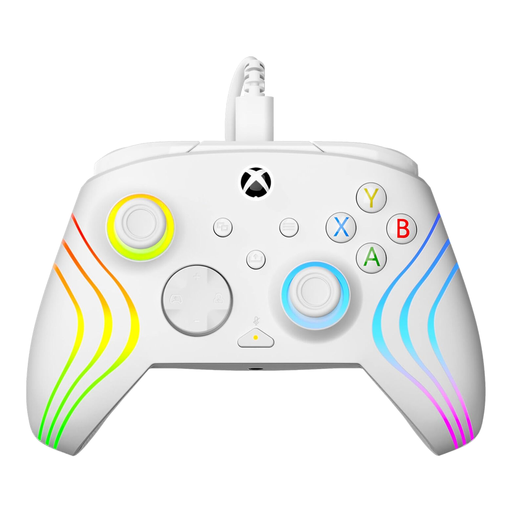
Turtle Beach PDP Afterglow Wave Wired Controller — White
This Xbox and Xbox Series model suits a desk where you intend to use a wired controller. If you play on a PC, confirm support for your Windows setup and football game before buying; choose another connection type if cable-free play is essential.
View on Joybuy
 No image available
Hyperkin DuchesS Wired Controller — White, Xbox Series X|S/One and Windows 10/11
Consider this wired model if your desk setup uses one of the platforms named in its title. Check that a cable suits the distance to your PC or console, and confirm your football game’s controller settings.
View on Joybuy
 No image available
Microsoft Xbox Elite Wireless Controller Series 2
Consider the Elite Series 2 if you intend to use its adjustable-tension sticks or interchangeable components, which Microsoft lists for this model. The product information gives conflicting platform details, so confirm compatibility with your exact Xbox or PC before buying.
View on Joybuy
 No image available
Sony DualSense Wireless Controller — HYPERPOP Remix Green
This PS5, PC, Mac and mobile variant suits a PS5 owner who also wants to use DualSense on another supported device. PlayStation says PC haptics need USB and a supported game, while adaptive triggers depend on game support; check your football game and the bundle’s cable contents.
View on Joybuy
Common questions
Will any controller work with football games on my PC?
No: choose a controller that supports your operating system, then check the exact game’s input settings. Microsoft lists Windows support for the Xbox Wireless Controller, PlayStation lists supported Windows versions for DualSense, and 8BitDo lists Windows 10 and later for the Ultimate 2C Wireless. Electronic Arts also notes that FC 27 Division Rivals uses the last-used input device saved to your profile.
Can I use DualSense wirelessly on PC and still get haptic feedback?
You can connect DualSense to a supported PC through Bluetooth, but PlayStation says its haptic feedback on PC requires USB and a supporting game. Adaptive triggers also depend on game support, so check the football game’s features separately.
Is a USB cable included with a DualSense controller?
Check the exact bundle: PlayStation’s standard UK DualSense listing says a cable is not included. If you need USB for PC haptics or charging, confirm the box contents before choosing a particular variant.
What should I do with an old controller or its batteries?
In the UK, take unwanted electrical products and batteries to an appropriate recycling collection point rather than putting them in household rubbish, as GOV.UK advises. Check the collection point’s instructions for any removable batteries.


