Players working with a small desk
If your monitor shares a desk with study equipment and a console or PC, its stand dimensions matter alongside screen size. AOC’s 23.8-inch 24G4X illustrates the compact Full HD route.


A compact 23.8- to 24-inch Full HD monitor is a practical starting point when desk space is tight; choose compact QHD if you want more detail without moving to a larger screen, or 27-inch QHD if the desk can accommodate it. Whichever size you choose, check the resolution and refresh rate supported by the monitor’s input and the mode your console or PC actually detects—its advertised maximum refresh rate alone does not establish that.
If your monitor shares a desk with study equipment and a console or PC, its stand dimensions matter alongside screen size. AOC’s 23.8-inch 24G4X illustrates the compact Full HD route.
If you play on PS5 or Xbox, choose around the video mode your console can use over HDMI. PlayStation and Xbox both provide ways to check available output settings; a monitor’s maximum panel refresh rate is not the answer on its own.
If QHD detail matters for coursework as well as football games, you can consider either a compact 23.8-inch model or a 27-inch screen. Check desk fit and whether your connected device offers the QHD mode you want.
Start with the device you play on and the space available for the monitor and its stand. Then decide whether compact Full HD, compact QHD or a larger QHD screen better fits how you will use the desk.
| Concern | What to check | Who this matters to |
|---|---|---|
| Device compatibility | Check the monitor’s HDMI modes and the resolution, refresh rate and variable refresh rate (VRR) detected by your console or PC. | If I mainly play on a console, I need to know whether it can use the display mode I am buying the monitor for. Around 31% of consumers put that compatibility question first. |
| Desk fit | Measure usable width and depth, then compare the monitor’s dimensions with its stand attached. | When books, a keyboard and a console share my desk, the stand must fit without crowding them. For around 25% of consumers, that footprint is the primary concern. |
| Motion during play | Compare stated refresh rates and response-time measures, then check the refresh rate available from your device. | Frequent camera movement makes me pay particular attention to how motion looks in the mode I can use. Around 25% of consumers prioritise this aspect of play. |
| QHD detail | Compare screen size and resolution, and confirm that your chosen input supports the QHD mode you need. | If one screen serves coursework and games, I may favour QHD detail while still needing a workable desk layout. This is the leading need for around 19% of consumers. |
The available mode depends on the connected display and input. PlayStation provides detected video-output information and a 1440p test; Xbox sets out separate requirements for 4K at 120 Hz.
Connect your own console and inspect its resolution, refresh-rate and VRR options while you can still assess whether the monitor suits your setup.
BenQ specifies both 4 ms grey-to-grey (GtG) and 1 ms moving picture response time (MPRT) for the EX240N. Those figures describe different measures, so comparing its MPRT number directly with another monitor’s GtG number would mislead.
Read the measurement label as well as the number, and assess input compatibility separately.
A compact screen can still take up substantial desk depth. BenQ lists the 23.8-inch EX240N at 540 mm wide and 182.6 mm deep with its stand.
Measure the usable surface and leave space for cables, keyboard movement and any console before choosing a screen size.
GOV.UK’s electrical-waste guidance describes retailer take-back of waste equipment of the same type as a newly purchased item.
Ask the seller how its take-back arrangement works for your order before deciding what to do with the old monitor.
AOC’s 23.8-inch 24G4X is a Full HD Fast IPS model specified at 180 Hz; its 23.8-inch Q24G4RE offers QHD at a stated 180 Hz.
Samsung’s 27-inch Odyssey G5 G50F is a QHD Fast IPS monitor specified at 180 Hz and 1 ms GtG.
BenQ’s 23.8-inch Full HD EX240N lists a 165 Hz VA panel, HDMI 2.0, two 2.5 W speakers and 100 × 100 mm VESA mounting.
Dell’s 27-inch QHD G2725D provides a useful example of why input-specific refresh rates matter.
These choices cover a compact Full HD monitor and larger 27-inch QHD monitors for a student-room gaming setup. Check desk dimensions and your device’s supported input modes before choosing between them.
 No image available
Consider this larger WQHD screen if your desk can accommodate a 27-inch monitor alongside your study and gaming equipment.
The title specifies Rapid IPS, a 180 Hz refresh rate, Adaptive Sync and a 0.5 ms response-time figure; compare response-time claims only when their measurement basis is clear. Confirm the input mode your device will use.
 No image available
This is the compact Full HD choice in the list if fitting a gaming screen onto a shared desk is your priority.
The title specifies a 1500R curved VA screen, 1080p resolution, 180 Hz refresh rate, Adaptive Sync and VESA compatibility. Confirm the HDMI port count and the output modes available to your device before buying.
 No image available
Consider this 27-inch option for games and coursework if a larger monitor fits your desk.
The title specifies a 2560 × 1440 Fast IPS display and a 220 Hz refresh rate. Check the monitor’s actual footprint and the resolution and refresh rate supported through the input you intend to use.
 No image available
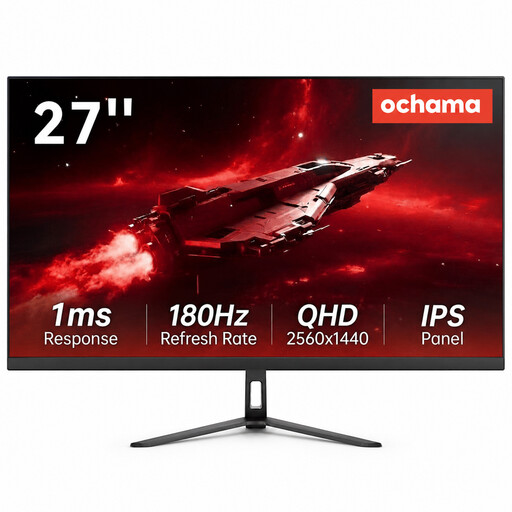
This is another larger-screen route if you have room for a 27-inch monitor.
The title describes a QHD IPS display with a 180 Hz refresh rate. Confirm the exact pixel resolution, physical dimensions, HDMI modes and whether the listed gift keyboard is included in your order.
No: the PS5 must detect a compatible output mode, and the game must support 120 Hz. PlayStation advises checking Video Output information in the console settings and provides a 1440p test for supported resolution, refresh-rate and VRR combinations.
Microsoft specifies an Xbox Series X, an Ultra High Speed HDMI cable supporting HDMI 2.1 and a display supporting HDMI 2.1 for 4K gaming at 120 Hz. If that 4K mode is unavailable, check whether your display offers 120 Hz at a lower resolution.
Choose only after measuring the space the complete monitor and stand can occupy. For a compact reference, BenQ lists its 23.8-inch EX240N at 540 mm wide and 182.6 mm deep with the stand; check the dimensions of the exact model you intend to buy.
Ask the seller about its electrical-waste take-back arrangements when buying the replacement. GOV.UK describes retailer take-back of waste equipment of the same type as the newly purchased item; confirm how to use the arrangement for your order.