1080p football-game players
If you play on a 1080p screen, start with the requirements for your chosen game and settings rather than paying for a 4K target you will not use. EA Help lists a distinct 1080p Medium recommended tier for EA SPORTS FC 27.


Choose a gaming PC around the football game, your screen resolution and the settings you want, rather than the word ‘gaming’ in its name. EA SPORTS FC 27 has different stated targets for 1080p Medium, 1440p High and 4K Ultra; before buying, also check how your headset and preferred controller connect.
If you play on a 1080p screen, start with the requirements for your chosen game and settings rather than paying for a 4K target you will not use. EA Help lists a distinct 1080p Medium recommended tier for EA SPORTS FC 27.
A higher-resolution display or a preference for higher visual settings changes the specification to check. EA Help sets out separate 1440p High and 4K Ultra targets for FC 27; neither target promises that every game will reach your monitor’s maximum refresh rate.
Private audio, voice chat and controller play make connections part of the PC decision. PlayStation Support UK says its PULSE Elite headset uses a USB adapter with compatible Windows PCs, while the developers of eFootball recommend a controller, according to its Steam listing. Check the requirements of your own peripherals and game.
Set your game, screen resolution and desired settings first. Then check the headset and controller connections you will need at the same time.
| Concern | What to check | Who this matters to |
|---|---|---|
| Graphics and display fit | Compare the complete PC configuration with the intended game’s requirements for your resolution and settings. Check the screen’s resolution and refresh rate separately from any stated gameplay target. | If I mainly play at 1080p, I want a PC suited to that target; if I move to 1440p or 4K, the requirements change. Around 42% of consumers put graphics and display fit first. |
| Headset and chat connection | Identify whether the headset uses a 3.5 mm plug, USB, Bluetooth or its own wireless adapter; confirm the PC has the required connection and a free port. | For private audio and online chat, I need my particular headset and microphone to connect as intended. Headset compatibility is the primary concern for about 33% of consumers. |
| Controller and online play | Check controller support for the exact game and the controller’s USB, Bluetooth or receiver requirements. Check the intended online mode’s connection requirements. | If I prefer playing with a controller online, I do not want its connection or the game’s support to be an afterthought. Roughly 25% of consumers prioritise controller and online-play readiness. |
A category label does not tell you which game settings a configuration can meet. EA Help gives FC 27 different recommended hardware targets for 1080p Medium, 1440p High and 4K Ultra.
Write down the exact game, resolution, graphics preset and gameplay target, then compare the full CPU, GPU, memory and storage configuration with that game’s current requirements.
Some headsets connect through their own USB audio adapter. PlayStation Support UK specifies a USB Type-A connection for the adapter used with PULSE Elite on compatible Windows PCs; other headsets can use different connections.
Check your headset’s PC instructions and leave room for its connection alongside any controller or other USB peripherals.
Graphics specifications cannot tell you whether your preferred controller will work with the intended game. The developers of eFootball recommend controller play, according to its Steam listing.
Check that game’s controller support and whether your controller needs USB, Bluetooth or a separate wireless receiver.
Lenovo Legion desktop towers are relevant if you want to compare prebuilt gaming PCs with NVIDIA or AMD graphics options.
Acer Nitro desktops span different tower sizes and hardware configurations, including a compact Nitro 20 option.
ASUS ROG desktops are relevant when tower size, cooling layout and room for expansion affect where and how you will use the PC.
These Joybuy laptops and desktop bundle offer built-in Full HD or QHD screens, or a bundled monitor, for different football-game setups. Match each exact configuration to your game and settings, and check your headset connection before choosing.
 No image available
Consider this laptop if you want a built-in Full HD screen for your football-game setup.
Its stated configuration includes an AMD Ryzen 7 170, GeForce RTX 5050, 16 GB RAM, a 1 TB SSD and a 15.6-inch Full HD 144 Hz display.
Check game-specific performance at your chosen settings and confirm that your headset’s connector matches the laptop’s available connections.
 No image available
Consider this desktop bundle if you also need a monitor and headset for the setup.
It is listed with an AMD Ryzen 5 7500F, GeForce RTX 5060 8 GB, 16 GB DDR5 RAM and a 1 TB NVMe SSD. The bundle names a monitor, keyboard, mouse, headset and mousepad.
Confirm the supplied monitor’s resolution and refresh rate, the headset’s connection type and game-specific performance before buying.
 No image available
Consider this laptop if a built-in QHD+ screen is part of your intended setup.
It is listed with an AMD Ryzen 7 7745HX, GeForce RTX 5060, 16 GB DDR5 RAM, a 1 TB SSD and a 16-inch QHD+ 240 Hz display.
The display’s refresh rate is not a promise of matching game frame rates. Check performance for your chosen game and confirm the audio connection suits your headset.
 No image available
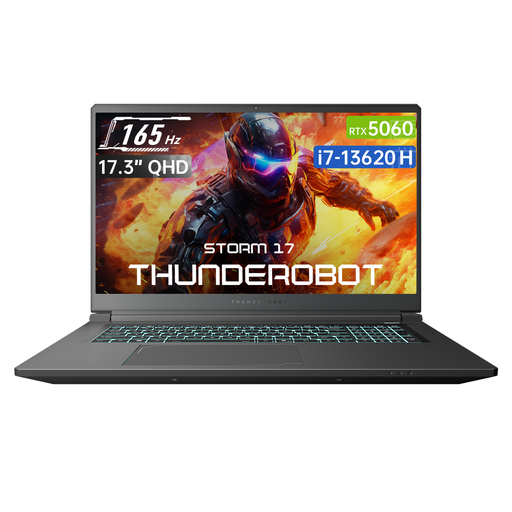
Consider this model if you want a larger built-in QHD screen rather than a separate monitor.
It is listed with an Intel Core i7-13620H, GeForce RTX 5060, 16 GB DDR5 RAM, a 1 TB SSD and a 17.3-inch QHD 165 Hz display.
Check game-specific performance at QHD settings and verify the audio-port connector against your headset.
 No image available
Consider this model if you want a larger built-in Full HD screen for football games.
It is listed with an AMD Ryzen AI 7 350, RTX 5060, 16 GB RAM, a 1 TB SSD and a 17.3-inch Full HD display.
Check performance at your intended settings and confirm which available connection will work with your headset.
For EA Help’s stated 1080p Medium recommended tier, check for at least a GeForce GTX 1660 or Radeon RX 5600 XT, 12 GB dual-channel RAM and 100 GB SSD storage. EA states a target of 60 FPS during gameplay and 30 FPS in cutscenes for this tier; check the requirements separately if you plan to play another game or use different settings.
Not for every game, but check controller support if that is how you want to play. The developers of eFootball recommend a controller, according to its Steam listing; also check how your particular controller connects to the PC.
Match the headset’s specified PC connection method to the PC’s available connections. For instance, PlayStation Support UK says PULSE Elite connects to compatible Windows PCs through its USB audio adapter, which uses a USB Type-A port; other headsets may have different requirements.
For an eligible online order, GOV.UK guidance says customers can cancel up to 14 days after delivery without giving a reason. Check the applicable exceptions and the seller’s cancellation instructions before ordering. Remedies for faulty, damaged or misdescribed goods are separate from changing your mind.