What should you check before buying?
Decide whether you want a Freely TV-style experience or separate broadcaster apps, then check the exact device and the connection at its intended position.
Freely TV or streaming device
Choose it when: You want live and on-demand viewing through a Freely-compatible TV, or want to add that route to a TV with HDMI.
Trade-off: You need compatible hardware, and channel, player and feature availability can vary.
Individual broadcaster apps
Choose it when: You are content to open separate apps on a supported smart TV or general streaming player.
Trade-off: Basic app availability does not establish that every live or regional feature works on the same device.
| Concern |
What to check |
Who this matters to |
| Aerial-free live TV |
Confirm that the TV has Freely built in or that an external Freely device can use an available HDMI input. Check the channels and players you intend to watch. |
If I want familiar live channels alongside catch-up viewing, I would rather choose the viewing platform before choosing a screen. Around 36% of consumers would put that combined live-TV route first. |
| Apps and live features |
Check the exact device and current software against ITVX and Channel 4 support; verify ITVX regional-live availability separately if you need it. |
When local news or a particular catch-up service matters, I need its live features to work on the device I buy. App and feature support would be the first concern for around 29% of consumers. |
| Connection at the screen |
Test Wi-Fi at the planned TV position. Freely and ITVX recommend at least 10 Mbps for streaming; assess a wired alternative only if its installation is feasible. |
A connection that works near my router may still interrupt viewing at the TV. Stable playback at that position would take priority for around 21% of consumers. |
| Keeping your TV |
Check for a spare HDMI input, the player’s required connections and support for the services you want. |
If my current screen works, I would prefer to add a suitable player rather than replace the display just to get internet TV. Around 14% of consumers would make reuse their primary concern. |
Joybuy product choices
These choices cover TVs with Freely for an integrated aerial-free setup, a Google TV for checking an app-based route, and an HDMI player for keeping an existing screen. Check the services you want and Wi-Fi at the installation position before choosing among them.
 No image available
Haier H43S80GUF 43-inch QLED TV with Freely and Fire TV
Consider this replacement TV if you want Freely built into the screen for aerial-free viewing over Wi-Fi.
The listed variant has a 43-inch 4K Ultra HD QLED display and Fire TV. Freely viewing requires internet access; check channel availability and the connection at the TV position.
View on Joybuy
 No image available
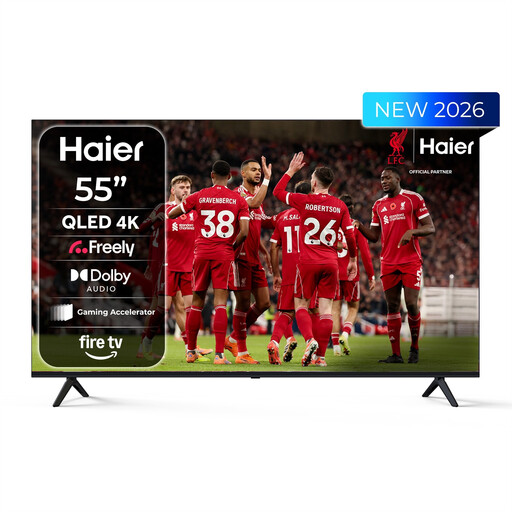
Haier H55S80GUF 55-inch QLED TV with Freely and Fire TV
This variant provides the same built-in Freely route to consider when replacing a TV and choosing a 55-inch screen.
Its listed display is 4K Ultra HD QLED, with Fire TV also named in the product title. Confirm the Freely channels you want and test Wi-Fi where the TV will stand.
View on Joybuy
 No image available
Coocaa 40CTQH38ZUK 40-inch QLED TV with Freely and TiVo
Consider this 40-inch TV if you want a built-in Freely route without adding an external player.
The title identifies a Full HD QLED display and TiVo smart-TV platform. Internet access is needed for Freely; check current channels and Wi-Fi stability at the screen.
View on Joybuy
 No image available
TCL 55V6C 55-inch 4K Google TV
This is a replacement-TV option for viewers willing to use individual apps rather than choosing a built-in Freely route.
The title identifies a 55-inch 4K display and Google TV. ITV lists Google TV among ITVX platforms, but check ITVX, Channel 4 and the live features you need on this exact model and software version.
View on Joybuy
 No image available
Roku Streaming Stick 4K
Consider this HDMI player if your existing TV works and you would rather add an app-based streaming route than replace the display.
It needs an available HDMI input and a usable Wi-Fi connection at the TV. Check current ITVX and Channel 4 support, including any live features you want, for the device and its software.
View on Joybuy
Frequently asked questions
Can I watch live UK TV over Wi-Fi without an aerial?
Yes, Freely says a Freely-enabled TV or streaming device can provide live and on-demand viewing over Wi-Fi without an aerial. Supported broadcaster apps offer another route, but their channels and live features vary by platform; check what you want to watch on the exact device.
What connection speed should I check at the TV?
Freely recommends at least 10 Mbps broadband, and ITVX recommends 10 Mbps or more for stable streaming. Test at the intended TV position or on the TV or player where possible: speed and signal elsewhere in the home may not represent that location.
Will ITVX regional live programmes work on any device with ITVX?
No. ITV lists regional live content for selected platforms, including Roku streaming players, and lists other connected-TV platforms where that feature is unavailable. Check ITV’s current regional-live support for the exact platform rather than relying on basic ITVX app availability.
Can powerline equipment help if Wi-Fi is weak at the TV?
It may provide a network route if a pair of adapters can use sockets on the same electrical circuit. TP-Link says adapters on different circuits will not communicate; follow its wall-socket guidance and test the link at the TV before relying on it.


