What to check before buying
Start with the connection already available at the main TV position, then check the exact model for the live-TV platform and catch-up apps you rely on.
| Priority |
What to check |
Your needs |
| Home connection |
Check whether you have reliable broadband, a working terrestrial aerial or a usable satellite dish and cabling. Freely recommends at least 10Mbps for live internet channels and on-demand viewing; Freeview needs an aerial for live TV through its guide, while Freesat needs a satellite dish. |
I want to choose a route that works with the connections already available, rather than arranging an aerial or dish after buying the TV. |
| Broadcaster apps |
Check the exact UK model for BBC iPlayer, ITVX, Channel 4 and Channel 5 or 5. Player availability can vary by device model and may change over time. |
The catch-up services my household watches need to be available from the setup we choose, not only on another device. |
| Keeping the current TV |
For a streaming device, confirm that the television has a usable HDMI input and that Wi-Fi or Ethernet reaches the TV position. For a Freesat box, check the satellite connection as well. |
Our existing screen still works, so adding a box or streamer may make more sense than replacing the television. |
| Ongoing support |
Check the manufacturer’s current software and security-support information for the exact model, especially for older, clearance or refurbished connected devices. Also confirm current app support before purchase. |
I do not want to assume that an app or connected-TV feature will remain available simply because it is present today. |
Joybuy TV options
These Joybuy options cover compact connected TVs for Freely or Freeview-based arrangements, with one model also listing Freesat reception. Match the television to the broadband, aerial or satellite connections available in your home.
 No image available
Coocaa 40CTQH38ZUK QLED Freely TiVo Smart TV
For replacing the screen with a built-in Freely route where broadband is preferred over an aerial or dish.
40-inch FHD QLED TV with HDR10, Dolby Audio, Wi-Fi, LAN, two HDMI inputs and DVB-T2/C/S2 tuner support.
Verify BBC iPlayer, ITVX, Channel 4 and Channel 5 availability for this exact UK model. Freely recommends at least 10Mbps for live channels and on-demand viewing.
Joybuy
 No image available
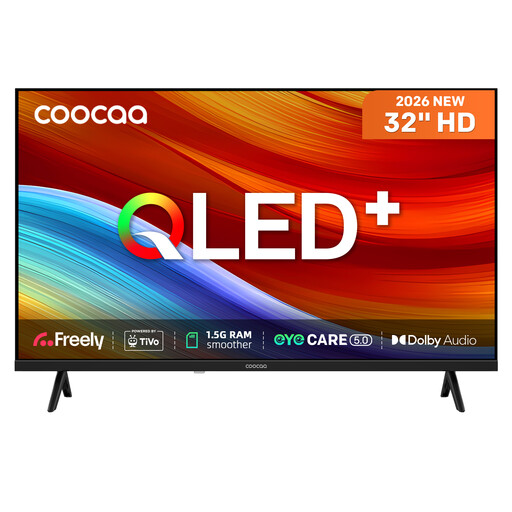
Coocaa 32CTQH38ZUK QLED Freely TiVo Smart TV
A compact replacement TV for broadband-led Freely viewing in a smaller room.
32-inch HD QLED TV with HDR10, Dolby Audio, Wi-Fi, LAN, HDMI, USB and DVB-T2/C/S2 tuner support.
Confirm current UK broadcaster-player availability for this model before purchase, and make sure broadband reaches the TV position.
Joybuy
 No image available
VISPERA Rx32T1 32-inch Freeview HD Roku TV
Suitable for a smaller room where a working terrestrial aerial is already in place and Freeview Play is the intended route.
32-inch HD Ready smart TV with Roku OS, Freeview Play, BBC iPlayer, RF input, Wi-Fi, Ethernet and HDMI.
Freeview says an aerial is required for live TV through its guide. Check current ITVX, Channel 4 and Channel 5 support for this exact UK model.
Joybuy
 No image available
Toshiba 32WV2553DB 32-inch Freely VIDAA TV
A compact connected-TV choice for broadband-based Freely viewing without adding a separate box.
32-inch HD Ready TV with VIDAA OS, Freely, HDR10, Wi-Fi, Ethernet and two HDMI inputs.
Check current broadcaster-app availability for the exact UK model. Freely’s stated broadband recommendation is at least 10Mbps for live and on-demand viewing.
Joybuy
 No image available
LG 32LQ63006LA 32-inch Freeview HD Smart TV
For a small-room replacement where Freeview Play is the main route, with Freesat HD also listed as a possible satellite option.
32-inch HD Ready webOS TV with Freeview Play, Freesat HD, Wi-Fi, Ethernet, HDMI and DVB-T2/C/S2 tuner support.
For Freeview, check that the home aerial works; for Freesat, confirm a suitable dish and cabling. Verify current app and software support for this exact model.
Joybuy
Frequently asked questions
Can Freely be used without an aerial or satellite dish?
Yes, on a Freely-enabled TV or Freely streaming device connected to broadband. Freely says its service streams live and on-demand TV over Wi-Fi without an aerial or dish, and recommends at least 10Mbps for live internet channels and on-demand viewing.
Do I still need an aerial for Freeview Play?
Yes, for live Freeview TV through the TV Guide. A Freeview Play TV or recorder also needs broadband for catch-up and on-demand services; Freeview states a minimum speed of 2Mbps for that internet-based viewing.
Can a former Sky dish be used for Freesat?
It can be used when the satellite cables connect to a compatible Freesat 4K TV box, according to Freesat. Check that the dish has an unobstructed view of the satellite, and remember that broadband is still needed for on-demand services.
Which broadcaster apps should I check before buying?
Check the exact device for BBC iPlayer, ITVX, Channel 4 and Channel 5 or 5. Freely and Freeview list these services across their platforms, while Freesat says available players can vary by box or TV model.
How should I maintain a connected free-to-air setup?
Keep the TV, streamer or set-top box updated and check the current support position for the exact model before buying. This is especially important for older connected equipment, as app availability and security maintenance can change during a device’s lifetime.


