Keep a satisfactory TV and add a compatible HDMI device if you mainly want internet-delivered programmes; consider a new TV if the screen or its connections also need replacing. Choose between separate broadcaster apps and a supported Freely guide, then check the exact model’s connectivity, apps, remote and accessibility features. Free-to-air viewing does not mean that optional paid apps or broadband data are necessarily free.
Who this setup suits
Households keeping their current TV
If your Freeview screen still suits you, an external device may add internet viewing without replacing it. Check the TV’s HDMI input and the exact apps or guide you want; the Department for Culture, Media and Sport’s audience research describes households combining internet-based TV with traditional services.
Households putting live TV first
If you want familiar live channels alongside catch-up, decide whether separate broadcaster apps are enough or whether you want a Freely-enabled guide. Freely describes its live and on-demand service as using broadband.
Households needing accessible controls
If navigation, subtitles, audio description or usable controls affect your choice, check the exact device and the player apps you plan to use. Freely says subtitles in player apps are controlled within those apps, so do not assume every feature works identically across the guide and each service.
What to check before choosing
If your existing screen works well, compare the services and connections you need before deciding whether to add a device or replace the TV. Freely access, separate broadcaster apps and optional subscriptions are distinct parts of the decision.
| Concern |
What to check when buying |
Who this matters to |
| Programmes and guide |
List the channels and apps you need, then check support on the exact device. A streaming stick should not be assumed to include Freely’s integrated guide. |
If I want particular free-to-air programmes and a single guide, I would check Freely support on the exact model. Around 29% of consumers put programme access and the guide first. |
| Keeping the current screen |
Check the TV’s picture, available HDMI input, space around the port and the device’s power needs before deciding to replace the screen. |
If my current TV is still suitable, I would rather add internet viewing than buy another screen. Around 29% of consumers put keeping their existing TV first. |
| Broadband and connections |
Check the connection at the TV’s location and confirm whether the specific device has Ethernet. Freely recommends at least 10 Mbps for its service. |
If Wi-Fi is unreliable where the TV sits, I would check whether the chosen model can use a wired connection and whether broadband is suitable. Around 24% of consumers put connection feasibility first. |
| Controls and accessibility |
Try the supplied remote and confirm required features in both the TV guide and essential player apps. |
If I need particular controls, subtitles or audio description, I would check them in the services I actually use. Around 18% of consumers put accessible viewing and navigation first. |
Buying pitfalls
-
Assuming every streaming stick includes Freely
Freely support depends on the exact device. Roku identifies certain supported Roku TVs, rather than Roku sticks generally, as offering Freely.
Check for explicit Freely support on the model you are considering; if it is not essential, check that the separate apps you need are available instead.
-
Overlooking HDMI space or power
A stick needs an available HDMI input, and some TV USB ports may not supply enough power for a Roku device.
Check the port’s position, nearby space and the device’s power arrangements before choosing a stick.
If a Roku setup displays a power warning, Roku advises using a 5V 1A USB power adaptor.
-
Treating a subscription bundle as part of free-to-air access
Freely access does not require a subscription, but a device bundle can include separate subscription features. The Freely listing for Netgem PLEIO describes 12 months of included subscription features.
Check the bundle’s renewal and cancellation terms, and separate the channels you want from optional extras.
-
Assuming accessibility controls work the same in every app
Freely says subtitles in player apps are controlled within those apps, so an option in one part of the setup may not carry over to another.
Check the actual remote and test required features in the guide and the player apps you plan to use.
Relevant brands for internet TV
Roku
Roku streaming sticks can add supported apps to an existing HDMI TV; Freely is available on certain supported Roku TVs.
- Roku provides setup guidance and describes TV-control options for compatible equipment.
- Roku warns that some TV USB ports cannot power its devices and that remote-control compatibility varies.
Manhattan
Manhattan presents the Aero 4K as an external Freely streamer for an existing TV.
- Manhattan describes a supplied HDMI cable and one-remote operation; Freely’s product page specifies Wi-Fi 6 or Ethernet for this model.
- Those are model-specific product details, not independent performance measurements. Check which connection suits the TV’s location.
Netgem
The PLEIO 4K Puck combines Freely on an existing HDMI TV with separate subscription features.
- Freely’s product listing says Freely access does not require a subscription and describes 12 months of included PLEIO subscription features.
- Check the bundle terms for what happens after the included period; do not treat optional features as permanently free.
Google
A UK streaming-device roundup includes Google TV Streamer as a box-style general-purpose option.
- It is presented as a separate streaming device rather than a replacement television.
- The roundup’s flexibility description is its editorial judgement; check the exact model for required apps and Freely support.
Joybuy products
These Joybuy options are replacement smart TVs listing built-in Freely, for households whose existing screen needs replacing. Screen size, display type and smart-TV platform vary by model; Freely viewing uses broadband, and some apps may require subscriptions.
 No image available
Haier H50K85GUF 50-inch 4K LED Smart TV with Freely and Fire TV
For replacing a screen with a TV that lists built-in Freely and Fire TV.
50-inch 4K Ultra HD LED display; Wi-Fi, Ethernet and HDMI are listed, along with an Alexa voice remote, HDR10, Dolby Audio and energy rating E. Freely recommends at least 10 Mbps for its service; some apps may require subscriptions.
Joybuy
 No image available
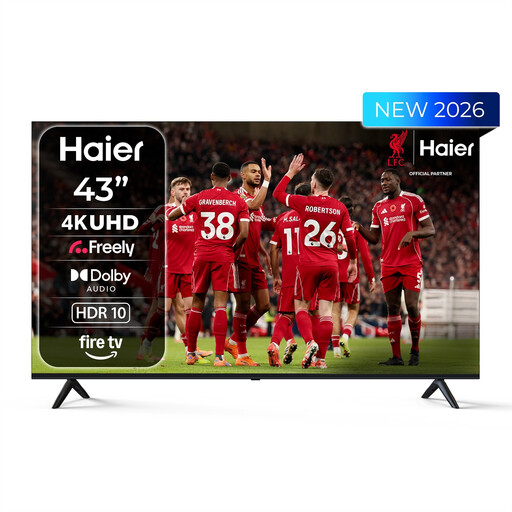
Haier H43K85GUF 43-inch 4K LED Smart TV with Freely and Fire TV
For replacing a screen with a TV that lists built-in Freely and Fire TV.
43-inch 4K Ultra HD LED display; Wi-Fi, Ethernet and HDMI are listed, along with an Alexa voice remote, HDR10, Dolby Audio and energy rating E. Freely recommends at least 10 Mbps for its service; some apps may require subscriptions.
Joybuy
 No image available
Haier H50S80GUF 50-inch 4K QLED Smart TV with Freely and Fire TV
For replacing a screen with a TV that lists built-in Freely and Fire TV.
50-inch 4K Ultra HD QLED display; Wi-Fi, Ethernet and HDMI are listed, along with an Alexa voice remote, HDR10+, Dolby Audio and energy rating E. Freely recommends at least 10 Mbps for its service; some apps may require subscriptions.
Joybuy
 No image available
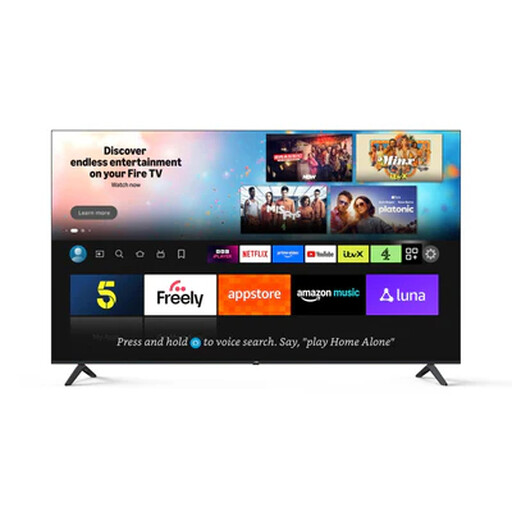
Haier H65S80GUF 65-inch 4K QLED Smart TV with Freely and Fire TV
For replacing a screen with a TV that lists built-in Freely and Fire TV.
65-inch 4K Ultra HD QLED display; Wi-Fi, Ethernet and HDMI are listed, along with an Alexa voice remote, HDR10+, Dolby Audio and energy rating E. Freely recommends at least 10 Mbps for its service; some apps may require subscriptions.
Joybuy
 No image available
Coocaa 40CTQH38ZUK 40-inch FHD QLED Smart TV with Freely and TiVo
For replacing a screen with a TV that lists built-in Freely and TiVo.
40-inch FHD QLED display; Wi-Fi and LAN/RJ45 are listed. The product name also specifies Direct-LED, HDR10 and Dolby Audio. Freely recommends at least 10 Mbps for its service.
Joybuy
Common questions
Will connecting my existing Freeview TV to the internet automatically give it Freely?
No. Check whether the particular TV or external device supports Freely. Roku specifies Freely for certain supported Roku TVs; a Roku stick should not be assumed to add that integrated service.
Can I keep watching aerial Freeview if my broadband stops working?
Aerial-delivered Freeview channels do not need an internet connection. Continuing to watch them depends on having a working aerial reception path and a suitable TV or recorder; internet-only programmes still need a connection.
What do I need to set up an internet TV device?
Follow the chosen device’s setup instructions and connect it to your network. Freely’s setup guidance describes using Wi-Fi credentials or connecting Ethernet, possible postcode and channel-scan steps, and signing in separately to on-demand player apps.
Does free-to-air internet TV mean there are no ongoing costs?
Not necessarily. Freely access does not require a subscription, but broadband use may count towards a data allowance and optional apps or bundle features can have separate terms. Check those terms rather than treating optional services as part of Freely access.


