What matters when choosing?
Start with the controller and destination device, then decide whether ordinary Bluetooth pairing supplies the functions you need.
Standard USB Bluetooth adapter
Choose it when: A Windows PC needs Bluetooth and your controller supports Bluetooth pairing with that PC.
Trade-off: Adding Bluetooth does not establish controller-specific features or support for a console.
Xbox Wireless Adapter for Windows
Choose it when: You have a compatible Xbox Wireless Controller on Windows and need functions Xbox documents as unavailable over Bluetooth.
Trade-off: This Xbox connection route is not a general Bluetooth adapter for other controller brands.
Controller-specific wireless adapter
Choose it when: Its published list names both your controller and the system you want to use.
Trade-off: Supported features can vary by host and mode; 8BitDo specifies one controller per USB Wireless Adapter 2.
| Concern |
What to check |
Who this matters to |
| Controller and host compatibility |
Match the full controller model and generation with the intended device on the maker’s compatibility list; confirm whether the controller uses Bluetooth. |
If my controller and destination device are not both supported, the adapter will not solve my pairing problem. Around 36% of consumers put that exact match first. |
| Xbox functions on PC |
Check the connection required for controller audio, attached accessories and any Xbox Accessories functions you need. |
I want to keep the Xbox controller functions I use on Windows, not just establish a wireless connection. For around 29% of consumers, retaining those functions is the primary concern. |
| Use across supported systems |
Check every intended controller-and-host combination, feature restrictions and the number of controllers each adapter connects. |
Moving one controller between systems matters most to me, provided the adapter supports each pairing. Around 21% of consumers prioritise that flexibility. |
| Straightforward PC Bluetooth pairing |
Confirm Windows support, setup requirements and whether existing Bluetooth or USB-port placement could affect use. |
My controller already supports Bluetooth; I mainly need a usable connection on my Windows PC. Roughly 14% of consumers make simple PC pairing their first priority. |
Joybuy products for PC Bluetooth
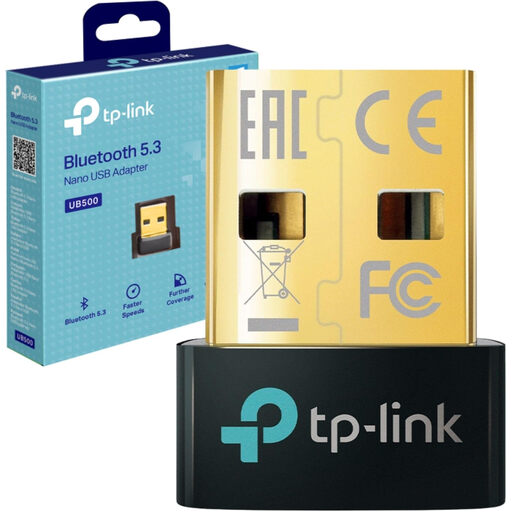
This USB adapter is relevant if you need to add Bluetooth to a supported Windows PC. Before choosing it for a game controller, confirm that the exact controller supports Bluetooth pairing with your Windows setup; the other adapter routes above address different connection needs.
 No image available
TP-Link UB500 Bluetooth 5.0 Nano USB Adapter
Consider this adapter for adding Bluetooth to a Windows PC when your controller supports Bluetooth pairing with that PC.
TP-Link specifies Bluetooth 5.0 and support for Windows 7, 8.1, 10 and 11 for the UB500. Check your controller’s pairing instructions and any Xbox-specific functions you need separately.
Joybuy
Common questions
Can any USB Bluetooth adapter pair any game controller?
No. A standard adapter adds Bluetooth to a supported device, but the controller must support Bluetooth pairing with that device. A controller-specific adapter has its own list of supported controller models and hosts, so check both sides of the pairing.
Should I use Bluetooth or an Xbox Wireless Adapter on a Windows PC?
Bluetooth can be sufficient for a Bluetooth-capable Xbox controller when you only need supported wireless pairing. Choose a compatible Xbox Wireless Adapter for Windows if you need functions that Xbox Support documents as unavailable over Bluetooth, such as audio through the controller or attached accessories; check the required connection for your controller’s Xbox Accessories functions as well.
Can one 8BitDo USB Wireless Adapter 2 connect several controllers?
No. 8BitDo specifies one controller per USB Wireless Adapter 2. For simultaneous play, check the number of compatible adapters and available USB ports your setup requires.
Why is the controller connection unreliable after installing an adapter?
Start by checking setup, USB placement and nearby interference rather than assuming the controller is faulty. TP-Link identifies obstacles, 2.4 GHz Wi-Fi and USB 3.0 devices as possible interference factors; for its Xbox Wireless Adapter, Xbox Support advises line of sight and a distance of no more than 6 metres when troubleshooting.
What compliance information should I check for a Bluetooth USB adapter?
For an adapter supplied for Great Britain, check that the listing and accompanying information identify the product and its applicable radio-equipment compliance details. GOV.UK’s guidance on the Radio Equipment Regulations 2017 addresses safety, electromagnetic compatibility and radio-spectrum requirements in Great Britain; its guidance notes that the rules apply differently in Northern Ireland, so check the requirements for the destination where relevant.


