Choose a controller for the console you use most: an Xbox Wireless Controller for Xbox-led play, DualSense for PS5, or a Pro Controller or Joy-Con arrangement for Nintendo Switch. If you also play on a computer or host local co-op, check the individual game’s controller support, the number of players and the permitted control layout before buying another pad.
Who needs a co-op controller?
Cross-platform co-op players
If you move between a console and a computer or mobile device, start with native console support, then check the connection available on your other device. Microsoft Xbox and PlayStation list different supported devices for their controllers; neither list makes a controller universal.
Living-room local co-op hosts
You need a usable control arrangement for every player, not merely enough controllers in the room. Check the game’s player count and layout alongside the console’s pairing rules. Nintendo says Bluetooth audio restricts a Switch to two connected wireless controllers.
Switch players sharing controls
A Joy-Con pair offers a different local-play arrangement from a full-size Pro Controller. Sharing one Joy-Con per person is a choice only when the particular game supports it; otherwise, plan around the controllers its multiplayer mode requires.
What matters when choosing?
Settle the main console and the game’s local-player requirements before weighing secondary-device connections or charging habits. A controller’s ability to pair with a device does not establish support for every game or feature.
| Concern |
What to check |
Who this matters to |
| Platform fit |
Match the controller to your main console, then check the supported connection on any second device. |
If I switch between my console and another device, I want a controller that connects to both without giving up native console support. Around 36% of consumers put platform fit first. |
| Local-player setup |
Check the game’s player count and permitted controller layout; on Switch, account for each Joy-Con and any connected Bluetooth audio. |
When friends play in the same room, I need to know that each person can actually use the controls the game allows. For around 29% of consumers, local-player capacity is the main concern. |
| PC game support |
Check the individual game’s controller support and whether any desired features work with your connection method. |
I may be able to connect a controller to my PC, but I still need it to work as intended in the co-op game I play. Game-specific PC support comes first for around 21% of consumers. |
| Session practicality |
Consider the controller’s shape, power source and charging arrangements before a long session. |
For an extended session, I care about how the pad feels to hold and whether I can keep it powered. Around 14% of consumers make those practicalities their primary concern. |
Co-op controller pitfalls
-
Assuming a co-op game accepts any controller layout
A controller connecting to the device does not establish that the game supports its controller type, the intended number of local players or one Joy-Con per person.
Check the individual game’s store page or official support information. Steam offers controller-type filters for browsing, but the game’s own support details are the more relevant purchase check.
-
Counting a Joy-Con pair as one wireless controller
Nintendo counts left and right Joy-Con as separate wireless controllers. That matters when arranging a larger Switch session, particularly because connected Bluetooth audio limits the console to two wireless controllers.
Count each Joy-Con separately, then confirm the game’s control layout and whether Bluetooth audio will be in use.
-
Expecting DualSense’s advanced PC feedback in every game
PlayStation describes haptic feedback and adaptive triggers on PC as features of select titles, rather than every game that accepts the controller.
If those features are a deciding factor, check support for the exact PC title before buying. PlayStation also says the controller’s headset jack requires a wired connection on PC and Mac.
Controller brands to consider
Xbox
An Xbox Wireless Controller route for Xbox-led play and supported Windows PC or mobile use.
- Microsoft Xbox lists Xbox Wireless and Bluetooth support, switching between Xbox consoles, Windows PC, Android and iOS, and a 3.5 mm headset jack.
- Check the individual game and secondary device; those compatibility statements do not establish PlayStation or Nintendo console support.
PlayStation
A DualSense route for PS5 players who may also play on supported computers or mobile devices.
- PlayStation lists USB Type-C and Bluetooth connections for supported Windows PCs, Macs, Android and iOS devices.
- Haptic feedback and adaptive triggers on PC are limited to select titles. On PC and Mac, the controller’s headset jack requires a wired connection.
Nintendo
Switch-focused options include a full-size Pro Controller and Joy-Con arrangements for compatible local multiplayer games.
- Nintendo lists approximately 40 hours of battery life and approximately six hours of charging for the Switch Pro Controller; battery life varies with use.
- The usable Joy-Con layout depends on the game. Nintendo says a Switch can generally pair up to eight wireless controllers, but connected Bluetooth audio limits it to two.
Joybuy controller choices
These controllers cover Switch Joy-Con sharing, Xbox or Windows play, and PS5-led play. Choose by the game and platform you will use, then check the control arrangement needed for each local player.
 No image available
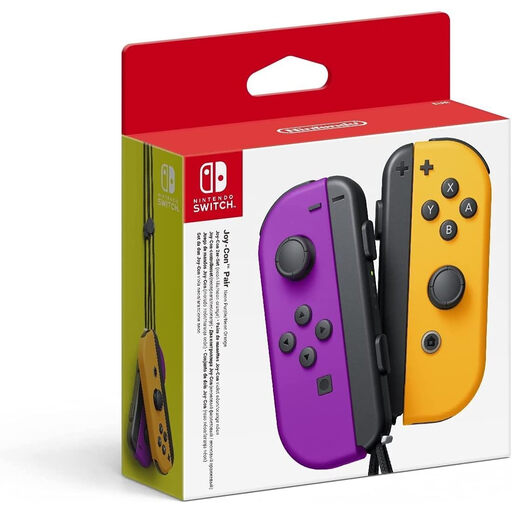
Nintendo Joy-Con Pair – Neon Purple/Neon Orange
Consider this pair for Switch co-op if the game permits the Joy-Con arrangement you want, including one Joy-Con per player. Check the game’s local controls before relying on the pair for two players, and check whether you need a separate grip for a combined gamepad arrangement.
View on Joybuy
 No image available
Microsoft Elite Wireless Controller Series 2 (Xbox One/Xbox Series X/S/PC)
Consider the Series 2 variant for an Xbox or PC co-op setup when you want an additional controller. The product title identifies Xbox One, Xbox Series X/S and PC; check your game’s controller and local-player support separately.
View on Joybuy
 No image available
Turtle Beach PDP Victrix Pro BFG Wireless Controller – Black
This Xbox and PC controller is a route to consider when those are your co-op platforms. The listed variant names Xbox Series X|S, Xbox One and Windows 10/11 PC; confirm support for the particular game and connection you intend to use.
View on Joybuy
 No image available
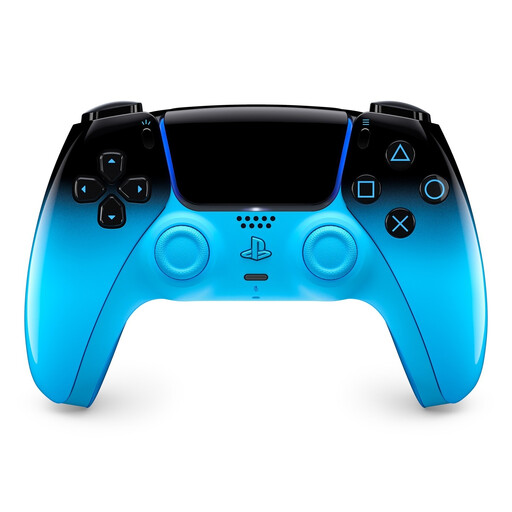
Sony DualSense Wireless Controller – HYPERPOP Rhythm Blue
Choose this DualSense variant for PS5-led co-op if the game supports your intended local-player setup. Its title also lists PC, Mac and mobile use; PlayStation says PC haptic feedback and adaptive triggers work only in select titles, so check the exact game if those features matter.
View on Joybuy
 No image available
Xbox Wireless Controller – Robot White
This Xbox Wireless Controller is an option for Xbox-led co-op and supported Windows PC play. Microsoft Xbox lists Xbox Wireless and Bluetooth connections for the controller family; check the connection available on your device and the game’s local-player support.
View on Joybuy
Frequently asked questions
Should I choose an Xbox controller, DualSense or a Switch controller for co-op?
Choose the controller that fits the console you use most, then check the particular co-op game. Microsoft Xbox lists Xbox and supported Windows PC use for its Wireless Controller; PlayStation lists DualSense for PS5 and supported computer use; Nintendo’s Pro Controller and Joy-Con arrangements serve Switch play. The number of local players and the game’s accepted control layout can change which option is practical.
Can two people share a Joy-Con pair?
Yes, if the specific Switch game supports one Joy-Con per player. Check its multiplayer control options before buying: a game that requires a different layout will not become playable by splitting the pair.
Why might my Switch connect fewer controllers than expected?
The usable total depends on the controller arrangement and connected features. Nintendo says a Switch can generally pair up to eight wireless controllers, but no more than two can be connected while a Bluetooth audio device is in use. Count left and right Joy-Con separately, and disconnect Bluetooth audio before connecting a third wireless controller.
Can I cancel an online controller purchase in the UK?
For a qualifying distance purchase, GOV.UK says customers can tell the seller they want to cancel within 14 days of receiving the item and then have another 14 days to return it. Check the applicable conditions and keep your order details; a change-of-mind cancellation is distinct from seeking a remedy if goods are faulty or misdescribed.


