Choose a controller that works with your main platform and the games you play before weighing extra features: the Xbox Wireless Controller suits supported Xbox and Windows PC setups, DualSense is the native PS5 route, and Nintendo’s controllers serve their specified Switch consoles. For narrative puzzles in a bright room, check whether the controls feel comfortable and easy to locate without relying on small lights, then choose a battery or charging routine you can maintain. Features on other devices may depend on the game and connection method.
Who these controllers suit
Platform-first puzzle players
If you mainly play on Xbox, PlayStation, Nintendo Switch or PC, start with a controller that connects to your device and works with your game. Check feature support as well as basic pairing, particularly when using a console controller on another device.
Long-session narrative players
If you spend extended sessions exploring, navigating menus and following dialogue, consider grip fit, control feel and how you will keep the controller powered. Comfort is personal, so handling a controller where possible is more useful than judging its shape from a picture alone.
Bright-room control-clarity buyers
If you play in daylight or strong room lighting, look for controls you can recognise by position and feel. A light bar or decorative lighting need not determine whether the buttons are easy for you to find.
What matters when choosing
Start with your main platform and game, then assess control feel, power and visibility in the room where you play. The percentages below relate to consumers whose primary need is the concern in each row.
| Concern |
What to check |
Who this matters to |
| Platform and game compatibility |
Check the exact console or operating system, your game’s controller support and any connection required for a feature you want. |
If my controller will not work with my main device or puzzle game, its layout is beside the point. Around 36% of consumers put compatibility first. |
| Comfort and navigation |
Check grip fit, thumbstick and trigger reach, and how the D-pad feels when navigating menus or making deliberate moves. |
During a long story session, I want to find the controls comfortably without repeatedly adjusting my grip; for around 29% of consumers, that is the primary concern. |
| Power and connection |
Confirm the battery or charging arrangement and whether your intended device supports the wired or wireless connection you plan to use. |
I would rather manage charging or spare batteries between sessions than stop midway through a chapter. Keeping play uninterrupted comes first for around 21% of consumers. |
| Bright-room control clarity |
In similar lighting, check whether you can distinguish the D-pad, face buttons and other essential controls by location and feel. |
When daylight makes small lights less useful to me, I want physical controls I can locate without looking down; around 14% of consumers make that their first priority. |
Buying pitfalls
-
Choosing a colour or layout before checking the platform
A controller may connect to one device but not another, and pairing alone does not establish that every feature works in your game.
Check your main device, the specific game’s controller support and any USB requirement for a feature you intend to use.
-
Assuming immersion features work wirelessly everywhere
PlayStation says DualSense haptic feedback on PC requires USB and a supported game; adaptive triggers also depend on game support.
Check the game and device notes before choosing DualSense primarily for those features.
You may need a suitable USB cable for the connection you intend to use.
-
Overlooking how the controller is powered
Microsoft’s Xbox Wireless Controller uses AA batteries or a compatible rechargeable pack, while DualSense and the Nintendo Switch Pro Controller have built-in rechargeable batteries. Charging accessories vary by configuration.
Check what comes with the exact controller and whether its battery routine suits the way you play.
Your chosen arrangement may require separate rechargeable cells, a charger, a compatible pack or a cable.
-
Treating decorative lighting as a bright-room solution
A light bar or RGB effect does not establish whether you can identify the buttons comfortably in strong room light.
Where possible, handle the controller in similar lighting and check button spacing, D-pad feel and the position of essential controls.
Relevant brands to consider
Microsoft Xbox
The Xbox Wireless Controller is Microsoft’s controller route for Xbox consoles, with stated support for Windows PC, Android and iOS.
- Microsoft lists textured triggers and bumpers, a hybrid D-pad, button mapping and Bluetooth.
- The standard controller uses AA batteries or a compatible rechargeable pack rather than a built-in rechargeable battery.
PlayStation
DualSense is the native PS5 route and can also be used with supported PC, Mac and mobile devices.
- PlayStation lists a touch pad, motion features, haptic feedback and adaptive triggers.
- Feature availability depends on the game and connection; PlayStation says PC haptic feedback requires USB. Check whether a charging cable is included with the configuration you choose.
Nintendo
The Nintendo Switch Pro Controller is a full-size option for Switch play; Nintendo also confirms wireless compatibility with Switch 2.
- Nintendo lists a + Control Pad, motion controls, HD Rumble and NFC. Its stated battery life is approximately 40 hours and varies with use.
- Choose it for a compatible Nintendo setup rather than assuming support for another console or PC. It is a different product from the Nintendo Switch 2 Pro Controller listed below.
8BitDo
The Ultimate 2 Wireless Controller is a third-party route to consider for the Windows, Android, SteamOS and specified Apple devices listed by 8BitDo.
- 8BitDo lists a charging dock, configurable controls and several connection options for this model.
- Check support for your exact device and game; the manufacturer’s latency and durability claims are not a basis for assuming an advantage in narrative puzzles.
Joybuy controllers for these platforms
These controllers offer choices to consider for Xbox, Nintendo Switch or Switch 2, and PC or Android play, depending on the model. Match the individual controller to your device and game before comparing how its controls suit a bright room.
 No image available
Xbox Wireless Controller, Carbon Black
Consider this for a supported Xbox or Windows PC setup if you prefer the familiar Xbox layout. Microsoft lists a hybrid D-pad and textured controls for this model; its AA batteries or compatible rechargeable-pack option make the power routine worth choosing in advance. Check your game’s support and the button feel in your usual lighting.
View on Joybuy
 No image available
Turtle Beach PDP Victrix Pro BFG Wireless Controller, Xbox and PC, Black
Consider this model if your main device is an Xbox Series X|S, Xbox One or Windows 10/11 PC and you want to assess a customisable control layout. Check whether its D-pad arrangement suits your puzzle games, how you will charge it and whether its labels are clear in your room.
View on Joybuy
 No image available
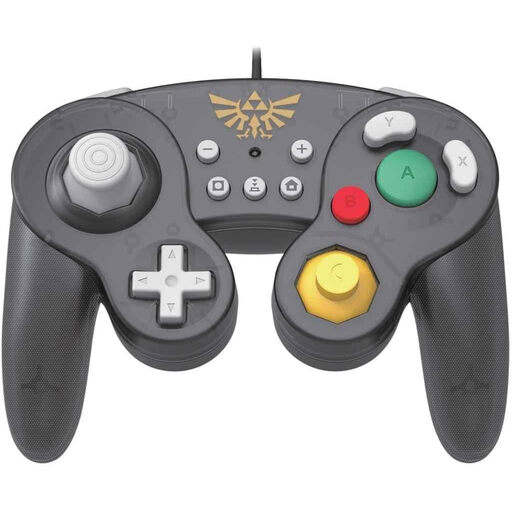
HORI Battle Pad GameCube Style Controller, Zelda, Switch
If you play on Nintendo Switch, check whether this Zelda variant’s GameCube-style layout suits your game’s menus and directional puzzles. Confirm the connection your setup needs and assess the grip and button positions for longer sessions.
View on Joybuy
 No image available
Nintendo Switch 2 Pro Controller, Black
Consider this model for narrative puzzles on Nintendo Switch 2, rather than treating it as the earlier Nintendo Switch Pro Controller. Check how its directional controls feel for your games and whether you can identify the buttons easily in your usual room lighting.
View on Joybuy
 No image available
Machenike G3 V2 Tri-mode Controller, White
For PC or Android play, consider whether this tri-mode controller matches your device’s connection options and your narrative game’s controller support. Check its grip, directional controls and button visibility before deciding whether it suits longer sessions in a bright room.
View on Joybuy
Common questions
Do I need RGB lighting on a controller for a bright room?
No: decorative lighting is not a substitute for controls you can identify comfortably. Check button placement and feel in lighting similar to where you play, and treat lights as a separate preference.
Will DualSense haptics and adaptive triggers work on my Windows PC?
They depend on the game and connection. PlayStation says PC haptic feedback requires USB and a supported game, while adaptive triggers also require game support; check the specific game before choosing the controller for either feature.
Can I use a Nintendo Switch Pro Controller with Switch 2?
Yes. Nintendo confirms that the original Nintendo Switch Pro Controller can pair wirelessly with Switch 2 and can be charged through the Switch 2 dock using a USB cable. It is distinct from the Nintendo Switch 2 Pro Controller.
How do I power an Xbox Wireless Controller?
Microsoft says the standard Xbox Wireless Controller uses AA batteries or a compatible rechargeable battery pack. Rechargeable AA cells need a separate charger; decide which routine suits you before buying accessories.
What should I do if a controller bought in the UK is faulty?
Contact the seller and keep your order record and details of the fault. The UK Consumer Rights Act 2015 covers faulty consumer goods; a manufacturer’s warranty is not your only route for raising a faulty-goods issue.


