Dark-room Xbox or Windows quest players
If you play for long stretches in low light, controller visibility, grip shape and access to audio or mappable controls may matter alongside Xbox or Windows compatibility.


Choose a controller that works with your platform and game before weighing lighting or extra controls. For a dark-room setup, exterior RGB may help you locate the controller, but it does not establish that button labels are readable; then decide whether a wired connection, wireless play or remappable controls suit where and how you play.
If you play for long stretches in low light, controller visibility, grip shape and access to audio or mappable controls may matter alongside Xbox or Windows compatibility.
DualSense haptics and adaptive triggers may be part of your decision on PS5 or in compatible PC games. PlayStation says feature support depends on the game; PC haptics require USB when supported.
Connection methods and supported platforms differ between controller variants. In particular, 8BitDo lists separate Ultimate 2C models for Windows and Android, and for Switch and Switch 2.
For dark-room open-world play, establish platform and game support first. Then decide which remaining consideration matters most to your setup.
| Concern | What to check | Who this matters to |
|---|---|---|
| Platform and game support | Check the exact controller variant against your device and confirm whether your game supports the effects you want. | If my controller cannot run on my console or deliver the game feature I want, its other features will not resolve that mismatch. Around 33% of consumers put compatibility first. |
| Low-light use and comfort | Look at the placement of any lighting, the button layout and the grip shape; do not equate exterior RGB with lit button labels. | When I play in a dark room for a long session, I want to find the controller and use its controls comfortably. For around 27% of consumers, that is the primary concern. |
| Connection and session setup | Check the connection available on your device and whether a wired cable reaches your seat or a wireless controller can be charged as needed. | I play away from the screen and would rather avoid a trailing cable, even though I need to plan for charging. Wireless convenience comes first for around 20% of consumers. |
| Custom controls | Check which buttons or triggers can be adjusted on the exact model and whether configuration works on your platform. | I want frequently used quest actions within easy reach and would make remapping my main reason to choose between compatible controllers. Around 20% of consumers prioritise custom controls. |
A lit controller is of little use if its exact variant does not work with your platform. For example, 8BitDo specifies different supported devices for its Ultimate 2C Wireless and Ultimate 2C Bluetooth models.
Confirm your platform and game first, then compare lighting and extra controls among suitable models.
PlayStation says PC haptic feedback requires USB when the game supports it, while adaptive triggers are not compatible with Android devices.
Check the game’s support information and the connection you intend to use before choosing DualSense for those effects.
PlayStation’s UK DualSense listing says a cable is not included, so a suitable cable may be needed for wired use.
Configurable lighting zones describe illumination on the controller, not necessarily the legends on every button.
Inspect close photographs of the exact model and its button layout. If you need to identify controls by sight, plan for some ambient light rather than relying on exterior RGB alone.
A wired controller limits how far you can sit from the device; a wireless choice makes charging part of the routine.
Check cable reach and routing for wired play, or the charging method and stated battery conditions for wireless play.
The DualSense route is relevant to PS5 players and to PC players whose games support its particular features.
The Xbox Wireless Controller is a route for compatible Xbox, Windows PC and mobile setups where wireless use matters more than decorative lighting.
Its Afterglow Wave wired variants offer a lighting-focused route, with different models specified for Xbox and Windows or for the Switch family.
The Ultimate 2C range includes distinct routes for Windows and Android, and for Switch and Switch 2.
These controllers cover wired Xbox and PC choices, wireless Xbox play, a PS5 DualSense option and a configurable Xbox-family model. Match the exact version to your platform before considering lighting or controls.
 No image available
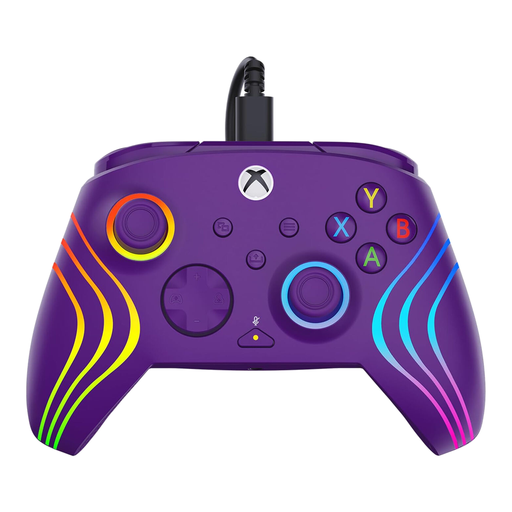
Consider this wired Xbox route if visible controller lighting and mappable actions matter in your dark-room setup. Turtle Beach specifies eight configurable RGB zones and two mappable quick-action buttons for the Afterglow Wave Xbox model. Check cable reach and the exact button illumination if you need to read labels in low light.
 No image available
This wired RGB variant is worth considering for an Xbox or PC setup where the controller’s appearance matters. Check the exact device compatibility, cable reach and whether its lighting makes the controls you use visible enough in your room.
 No image available
Choose this route if wireless play on a compatible device matters more to you than RGB styling. Microsoft lists Xbox Wireless and Bluetooth connectivity, button mapping and textured controls for the Xbox Wireless Controller. Check the exact listing for power accessories and do not assume the Carbon Black finish improves button visibility in the dark.
 No image available
This is the PS5 route to consider if your games support DualSense haptics or adaptive triggers. PlayStation says those effects depend on game support, and PC haptics require USB when supported. The Midnight Black finish does not establish whether you can read the controls in a dark room.
 No image available
Consider this wireless model only after confirming that this exact listing supports your Xbox or PC. Its compatibility descriptions conflict, so the model name alone should not settle whether it will work with your device; check that point before weighing its custom-control options.
Not necessarily: exterior lighting zones do not establish that every button label is illuminated. Check close photographs of the exact controller and allow for some ambient light if you need to identify controls by sight.
No. PlayStation says haptics and adaptive triggers depend on game support, and PC haptic feedback requires USB when supported. Check the particular game and your intended connection before choosing the controller for those effects.
No. Nintendo UK states that its Switch 2 Pro Controller is only for Switch 2. That restriction should not be applied to every third-party controller: check the maker’s compatibility statement for the exact model and firmware.
Check the exact listing before relying on an included cable. PlayStation’s UK DualSense listing says a cable is not included; a suitable one may be needed for charging or for supported PC haptics over USB.