For exploration games in a shared bedroom, choose a controller that works with your main gaming platform before weighing cross-device convenience or extra feedback features. Then check how you will use headphones and whether you can adjust vibration: those choices can address some sources of disturbance, but they do not establish how loudly a controller’s buttons or triggers will sound.
Who this choice affects
Players who need personal audio
If someone else shares the bedroom, you may want game sound in headphones rather than through room speakers. Check the headset connection on the exact controller and platform: Xbox lists a 3.5 mm stereo headset jack for its Wireless Controller, while Nintendo lists a 3.5 mm audio jack for the Switch 2 Pro Controller.
Players committed to one console
If most of your exploration games are on Xbox, PS5 or a Nintendo console, start with that platform’s controller compatibility. The controllers’ documented pairing options and features differ, and a familiar product name does not establish that it works on another console generation.
Players moving between PC and mobile
If you switch between Windows and mobile games, compare supported devices and connection modes rather than assuming all wireless controllers work alike. Xbox lists Windows, Android and iOS support for its Wireless Controller; 8BitDo lists Windows and Android for the Ultimate 2C Wireless, with different connections for each.
What to check before choosing
Start with the device on which you play most often, then decide whether private audio, connection flexibility or charging matters most to your shared-room routine.
| Concern |
What to check |
Who this matters to |
| Platform and game features |
Match the exact console generation or operating system, then check whether the game supports any controller-specific features you want. |
I want movement, camera controls and game prompts to work as expected on my main device. Around 36% of consumers would put platform fit first. |
| Shared-room disturbance |
Check the headset connection and vibration controls for your controller and platform; assess physical button noise separately if it matters to you. |
When someone else is resting nearby, I want game audio kept to myself and feedback I can tolerate. For roughly 29% of consumers, limiting disturbance would be the primary concern. |
| Use across devices |
Compare the supported devices and the connection method required on each; Bluetooth, wired and other wireless modes need not offer identical behaviour. |
I move between games on more than one device and want to avoid buying a controller that works only with one part of my setup. About 21% of consumers would prioritise cross-device use. |
| Session continuity |
Check the stated power arrangement, what charging equipment is included and the conditions attached to any battery-life estimate. |
I do not want a flat controller to interrupt a longer exploration session when charging is inconvenient. Keeping sessions going would come first for around 14% of consumers. |
Buying mistakes to avoid
-
Confusing the two Nintendo Pro Controller generations
Nintendo documents different specifications for the older Switch Pro Controller and the Switch 2 Pro Controller. An audio jack listed for the Switch 2 model should not be assumed to be a feature of the older model.
Check the full controller name against your console generation before ordering.
-
Assuming wireless means quiet
A wireless connection does not make game audio private or establish how much noise buttons and triggers make. Feedback features can also be distracting if you prefer less vibration.
Plan your headphone connection and check for a vibration setting. If physical clicks are decisive, inspect the exact model or look for a model-specific independent test.
-
Expecting identical features over every connection
Xbox Support says rumble does not work during PC gameplay when the Xbox Wireless Controller is connected by Bluetooth. 8BitDo lists different device connections for its Ultimate 2C Wireless controller.
Check the features you need using the device and connection method you actually intend to use.
Relevant controller brands
These product lines offer different platform routes; a brand name alone does not establish compatibility or a quieter shared-room setup.
Xbox
The Xbox Wireless Controller is a first-party route for Xbox consoles and the Windows, Android and iOS devices listed by Xbox.
- Xbox lists device switching and a compatible 3.5 mm stereo headset jack; Xbox Support documents a vibration on/off setting.
- Xbox says rumble does not work for PC gameplay over Bluetooth. Its supported-device list does not establish native PlayStation or Nintendo compatibility.
PlayStation
DualSense is Sony’s PS5 controller route, with features whose availability depends on the game and device.
- Sony describes haptic feedback and adaptive triggers for supported games.
- Those tactile effects may not suit someone who wants less feedback. Check feature support and the available controls for your intended setup.
Nintendo
Nintendo documents separate Pro Controller generations for Switch and Switch 2.
- Nintendo lists a 3.5 mm audio jack, motion controls and remappable GL/GR buttons for the Switch 2 Pro Controller.
- Do not transfer those specifications to the older Switch Pro Controller; confirm the model and console generation.
8BitDo
The Ultimate 2C Wireless and Ultimate 2C Bluetooth are distinct controllers for different supported devices.
- 8BitDo lists Windows and Android connections for the Wireless version, and Switch and Switch 2 compatibility for the Bluetooth version.
- 8BitDo describes some controls as tactile or clicky. Check the exact variant and its physical sound if button noise is important.
Joybuy controller choices
These controllers cover Xbox and Windows play, plus one DualSense option for PS5 and its listed devices. Choose by your main platform and exact model first; for a shared bedroom, check your headphone arrangement and any feedback settings separately.
 No image available
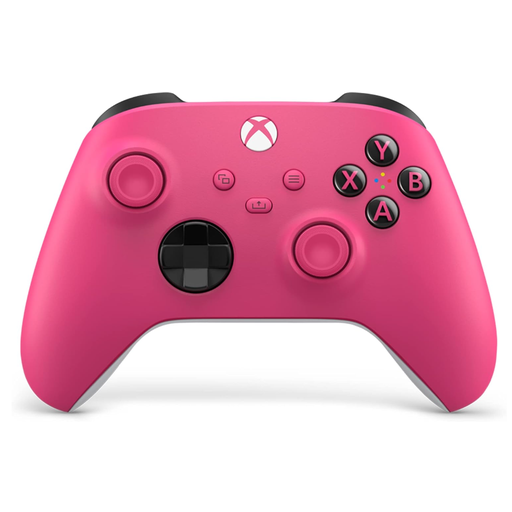
Xbox Wireless Controller – Deep Pink
Consider this model if Xbox is your main platform and you also want to check its documented Windows or mobile-device options.
Xbox lists a compatible 3.5 mm stereo headset jack and a vibration on/off setting for the Xbox Wireless Controller. Check how your intended device connects; Xbox says rumble does not work for PC gameplay over Bluetooth.
View on Joybuy
 No image available
Microsoft Xbox Elite Wireless Controller Series 2
This is an Xbox One, Xbox Series X|S and PC choice if one of those is your main gaming platform.
Confirm the connection, headset arrangement and feedback controls you need for the exact device on which you will play.
View on Joybuy
 No image available
Turtle Beach PDP Victrix Pro BFG – Xbox and PC, Black
Consider this Xbox Series X|S, Xbox One and Windows 10/11 PC model if your games are on those listed platforms.
If physical button sound or vibration control will determine your choice, check the exact controller before buying rather than treating its wireless design as a quietness measure.
View on Joybuy
 No image available
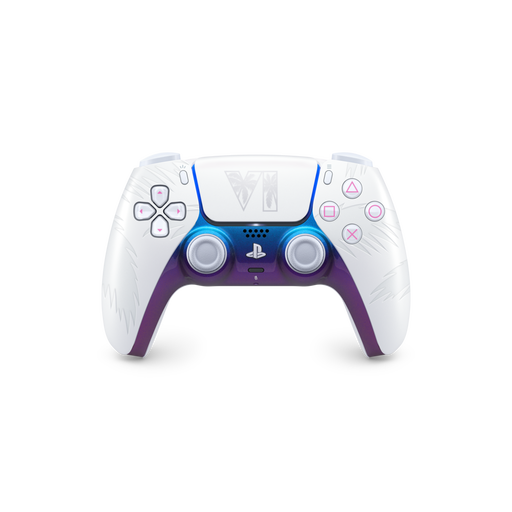
PlayStation DualSense – Grand Theft Auto VI White Limited Edition
Consider this edition if PS5 is your main platform; its product name also lists PC, Mac and mobile use.
Sony describes DualSense haptic feedback and adaptive triggers, but their use depends on game and device support. Check the headphone and feedback options for your particular setup if you want to limit disturbance.
View on Joybuy
Common questions
Will a wireless controller make exploration games quiet enough for a shared bedroom?
Not by itself: wireless operation does not make game audio private or establish how loudly the controls click. Use headphones through a supported connection, check vibration settings and assess the exact model’s physical sound if it could disturb someone nearby.
Can I plug headphones into the controller?
You can use a compatible wired headset with the 3.5 mm jack that Xbox lists for its Wireless Controller. Nintendo lists a 4-pole CTIA-standard 3.5 mm audio jack for the Switch 2 Pro Controller. Check your headset plug and controller generation before relying on either connection.
Can I switch off vibration while playing?
Xbox Support documents a vibration on/off setting for the Xbox Wireless Controller. Check the controls available for your own controller, platform and connection method rather than assuming every model offers the same setting; Xbox also says rumble does not work for PC gameplay over Bluetooth.
Are the Switch Pro Controller and Switch 2 Pro Controller the same purchase?
No. Nintendo documents them as different models: its older Switch Pro Controller guidance includes an approximate 40-hour battery estimate, while the Switch 2 Pro Controller listing includes an audio jack and remappable GL/GR buttons. Match the full model name to your console before ordering.


