Choose a controller that works with your gaming platform, then decide how it will draw power without taking up a wall socket. Replaceable AA batteries, wired USB play and charging from a console or PC USB port offer different routines; the right choice depends on your available ports, cable reach and preference for wireless play. If you want game-specific features such as DualSense haptics, check support for the action RPG and device you use.
Who these choices suit
Console or PC players short of plug sockets
If you would rather keep a wall socket free, compare replaceable AA batteries, wired USB play and charging through a console or PC port. Microsoft Xbox Support, PlayStation Support and GameSir document these approaches for their respective controllers.
PS5 and PC players interested in game feedback
DualSense haptics and adaptive triggers may matter to you, but PlayStation says availability depends on the game and device. On PC, haptic feedback requires a USB connection.
Xbox or PC players who want to adjust their controls
If your preferred action-RPG layout calls for additional or adjustable controls, compare those features only after checking platform support and whether a wired connection or periodic charging fits your setup.
What matters when choosing
Start with your platform and the way you will power the controller. Then weigh your preferred control layout against the accessories and upkeep that come with it.
| Concern | What to check | Who this matters to |
|---|
| Wall-socket use |
Choose between replaceable batteries, wired USB power and a rechargeable controller; check that the required batteries, cable or USB port fit your setup. |
I need to keep scarce wall sockets available, so the controller’s power routine comes before extra features. Around 36% of consumers put avoiding wall-socket dependence first. |
| Platform and game support |
Confirm the exact device and connection method, then check your chosen game for any controller features you expect to use. |
If I switch between devices, a controller is useful only where my games and expected features work. For around 29% of consumers, compatibility is the primary concern. |
| Control layout |
Look at the available extra controls and whether mapping or adjustment works on your device. |
I want combat and item actions arranged to suit my hands, rather than paying for controls I would leave unused. Around 21% of consumers prioritise their control layout. |
| Ownership routine |
Check what cables, batteries or charging accessories you would need and whether you would use the controller’s added features. |
I would rather have a straightforward routine between sessions than manage accessories or settings I do not need. Keeping ownership simple comes first for around 14% of consumers. |
Buying pitfalls
-
Assuming wireless means no charging
A controller with an internal battery still needs periodic charging. Microsoft Xbox Support also notes that rechargeable AA batteries do not charge inside a standard Xbox Wireless Controller.
Decide whether replaceable batteries, wired USB play or charging from an available console or PC port is the easier routine for you.
Depending on the route, you may need separate AA batteries, a suitable charger or a compatible USB cable.
-
Buying DualSense for PC features without checking the game
PlayStation says haptic feedback and adaptive triggers depend on game and device support; PC haptics require USB.
Check your action RPG’s feature support before buying for those effects, and plan for a suitable USB connection if PC haptics matter to you.
-
Assuming a PC controller works on every console
GameSir documents the G7 SE for Xbox, Windows and Android, while 8BitDo lists Windows and Android for the Ultimate 2C Wireless. Extra controls do not overcome a platform mismatch.
Check the exact controller model against the console or device you will use.
-
Choosing adjustable controls to solve a power problem
Microsoft’s Xbox Elite Wireless Controller Series 2 Core offers control adjustments but still has an internal battery that needs charging.
Choose added adjustments if you will use them; assess the charging routine separately.
Relevant brands to consider
Microsoft Xbox
Microsoft offers Xbox controller options with different power and control arrangements.
- Microsoft Xbox Support says the standard Xbox Wireless Controller can use AA batteries or a compatible rechargeable pack.
- The Elite Wireless Controller Series 2 Core adds adjustable sticks and trigger locks, but its internal battery still needs charging.
Sony PlayStation
DualSense is a PS5 controller that can also connect to supported PC, Mac and mobile devices.
- PlayStation documents USB and Bluetooth connection options on supported devices.
- Haptics and adaptive triggers depend on game and device support; PC haptics require USB.
8BitDo
The Ultimate 2C Wireless is an option to examine for Windows or Android play.
- 8BitDo documents a 2.4G receiver for Windows, Bluetooth for Android and additional configurable bumpers.
- Its documented platform scope does not include Xbox or PlayStation consoles, and its rechargeable battery still needs charging.
GameSir
The G7 SE is a wired option documented for Xbox, Windows and Android.
- GameSir lists a USB-C wired connection and two lockable back buttons, avoiding controller battery charging.
- You need a compatible USB port and a cable that reaches your playing position.
Joybuy controller choices
These controllers include wired choices for Xbox or PC setups, an Xbox wireless controller with a rechargeable battery and a DualSense option for PS5 and supported devices. Check your platform, available USB connection and preferred playing position before choosing.
 No image available
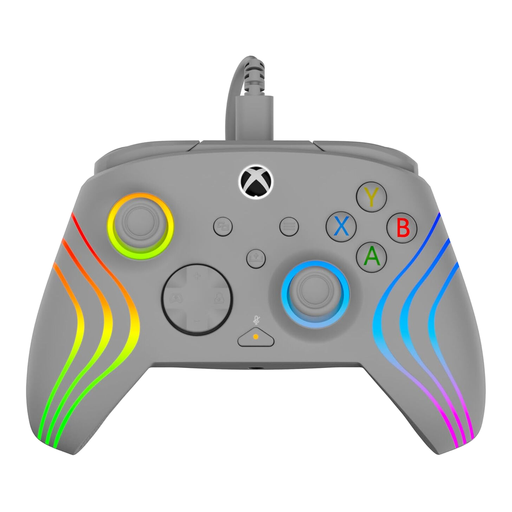
Turtle Beach Afterglow Wave Wired Controller for Xbox, Grey
Consider this wired Xbox controller if you can play within reach of a compatible USB connection and want to avoid controller battery charging.
View on Joybuy
 No image available
Turtle Beach Rematch Advanced Wired Controller for Xbox and PC, Blue Kitsune
This wired Xbox and PC option suits a setup with a free, reachable USB port. Check that its connection and any customisation you want work with your device.
View on Joybuy
 No image available
Hyperkin DuchesS Wired Controller for Xbox Series X|S, Xbox One and Windows 10/11, White
Choose this wired controller if its stated Xbox or Windows compatibility fits your setup and you can keep a USB connection within reach. Confirm that the cable connector suits your device.
View on Joybuy
 No image available
Microsoft Xbox Elite Wireless Controller Series 2 for Xbox and PC
This wireless option is worth considering if Xbox or PC play and adjustable controls matter more to you than avoiding controller charging. Microsoft Xbox Support documents charging the Series 2 through a console or PC connection; check that you have a suitable cable and USB port.
View on Joybuy
 No image available
Sony DualSense Wireless Controller, HYPERPOP Techno Red, for PS5, PC, Mac and mobile
Consider DualSense for PS5 or a supported device if its connection options fit your setup. It needs periodic charging; PlayStation says haptics and adaptive triggers depend on game and device support, with USB required for haptics on PC.
View on Joybuy
Frequently asked questions
Do I need a spare wall socket for a game controller?
Not necessarily: a compatible wired controller can draw power from your console or PC USB port, while a standard Xbox Wireless Controller can use AA batteries. Rechargeable models still need charging, but PlayStation and Microsoft document USB charging through supported console or PC setups. Check your available ports and cables.
Can I use rechargeable AA batteries in an Xbox Wireless Controller?
Yes, but they will not charge inside the standard Xbox Wireless Controller. Microsoft Xbox Support says to recharge AA batteries separately using the battery manufacturer’s recommended method.
Will DualSense haptics and adaptive triggers work over Bluetooth on PC?
Do not count on Bluetooth for those features. PlayStation says PC haptic feedback requires USB, while adaptive triggers depend on support in the individual game; check that game’s requirements before choosing DualSense for either feature.
Do I need a charging dock for an Xbox Elite Series 2 controller?
No. Microsoft Xbox Support documents charging the Elite Series 2 through a USB connection to an Xbox console or PC. Check that you have a suitable cable and an available port; the Series 2 Core does not include a charging dock.


