Crowded-desk PC players
If your keyboard and mouse already take up the desk, a controller’s cable or receiver matters alongside its shape. Check the Windows connection method and the ports you can spare.


Choose a controller supported by both the device and the detective adventure you play before comparing layouts or extra features. At a small desk, check whether its connection needs a cable or a USB receiver; features such as DualSense haptics may also depend on the game and connection.
If your keyboard and mouse already take up the desk, a controller’s cable or receiver matters alongside its shape. Check the Windows connection method and the ports you can spare.
If you mainly play on PS5, Xbox or Nintendo Switch, start with the controller’s stated console support. A familiar layout alone does not establish compatibility with another console.
If you move between a console, computer and phone, distinguish basic controller input from features that need a particular game or connection. PlayStation, for example, sets separate conditions for DualSense features on PC.
Confirm support for your device and detective adventure first. Then work out where a cable, receiver or charging lead would go on the desk.
| Concern | What to check | Who this matters to |
|---|---|---|
| Device and game compatibility | Check the exact controller model against your device, then check whether the game accepts controller input. | If I play on a particular console, computer or phone, I need the game to recognise the controller before its other features matter. About 36% of consumers put compatibility first. |
| Connection and desk space | Identify whether wireless play uses Bluetooth or a USB receiver, and where a wired or charging lead would sit. | With little room beside my keyboard, I want to know whether playing will occupy a port or leave a cable in the way. Around 29% of consumers make the desk setup their primary concern. |
| Controls and game features | Consider the D-pad, button layout and remapping; check game and connection requirements for optional features. | If I spend a session navigating dialogue and menus, I care about the controls I will actually use, rather than features the game may never enable. Roughly 21% of consumers put layout and supported features first. |
| Power and upkeep | Check the battery arrangement, charging access and any conditions attached to a stated runtime. | For short sessions, I want the controller ready when I sit down without rearranging the desk to charge it. About 14% of consumers prioritise power and upkeep. |
Controllers that look similar can have different supported devices. Microsoft lists Xbox consoles, Windows PC, iOS and Android for its Xbox Wireless Controller, while Nintendo presents its Switch Pro Controller for Switch play.
Note your device and detective adventure, then check support for the exact controller model and the game. Treat an unlisted platform as one to investigate, not as confirmed compatible.
PlayStation says DualSense haptic feedback on PC requires USB, while adaptive triggers require game support. A Bluetooth connection alone does not establish that either feature will work in your game.
Check the game’s feature support and the required connection before choosing DualSense for those effects.
Using PC haptics means accommodating a USB cable on the desk.
8BitDo lists 2.4G wireless or wired use for the Ultimate 2C Wireless Controller on Windows, but lists Bluetooth for Android. Its Windows wireless connection uses the included USB-A receiver.
Check for a free USB-A port and a practical receiver position before planning where the controller and other desk equipment will sit.
The receiver occupies a USB port that you may need for another device.
Microsoft’s Xbox Wireless Controller is a first-party option for Xbox consoles and a Windows PC setup.
DualSense is a first-party PS5 controller with PlayStation-documented connection options for supported computers and mobile devices.
The Ultimate 2C Wireless Controller is an 8BitDo option to consider for Windows PC or Android play.
Nintendo’s Switch Pro Controller is a full-size first-party option for Nintendo Switch play.
These controllers cover different named devices, including consoles, PCs and Type-C phones. Match a product to where you play your detective adventure before deciding whether its controls and connection suit your desk.
 No image available
Consider this variant for PS5 play or a supported PC, Mac or mobile setup, provided your detective adventure accepts controller input.
PlayStation lists USB-C and Bluetooth connection options for DualSense. On PC, haptic feedback requires USB, and adaptive triggers depend on game support.
 No image available
Consider it for an Xbox console or Windows PC once you have checked controller support in your game.
Microsoft lists Bluetooth and Xbox Wireless support, a hybrid D-pad and button mapping for the Xbox Wireless Controller. Check which connection your desk setup can use and whether AA batteries suit you.
 No image available
This wireless controller is a candidate if you play on an Xbox Series X|S, Xbox One or Windows 10/11 PC, as named in its product title.
Before planning a clear desk, check how you would connect this variant, whether that method occupies a USB port and whether your game supports controller input.
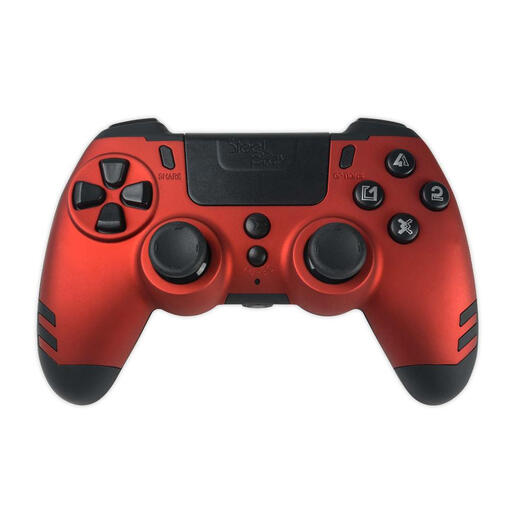 No image available
Consider this model for PS4 or PC play if your detective adventure supports a controller.
Check its wireless connection method and the space available for the controller when you put it down; the word wireless alone does not tell you whether a receiver is needed.
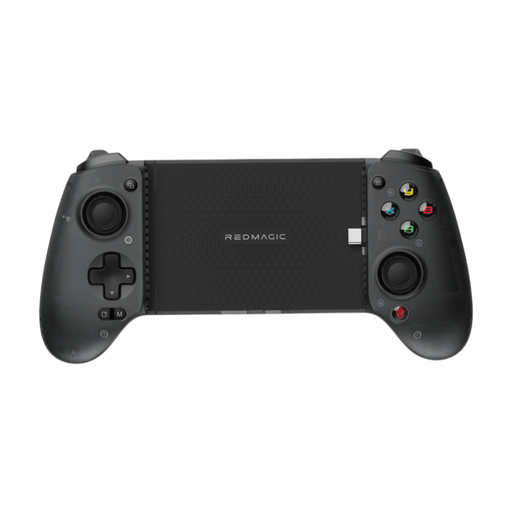 No image available
This is a phone-focused choice if you play on a compatible Type-C iPhone or Android device, rather than a controller to assume will work with a console or PC.
Check your phone’s connector and the detective game’s controller support before choosing a Type-C gamepad.
Yes, PlayStation lists Bluetooth as well as USB connection for DualSense on supported Windows PCs. Its PC haptic feedback requires USB, though, and adaptive triggers require support from the game; check those conditions if either feature matters to you.
8BitDo lists 2.4G wireless or wired connection for the Ultimate 2C Wireless Controller on Windows, while Bluetooth is listed for Android. For wireless Windows play, allow a USB-A port for its included receiver.
Check the support instructions for your exact controller model. Microsoft recommends keeping Xbox Wireless Controllers updated for capabilities and compatibility, but another model may use a different update process.
Contact the selling trader and keep your order details. GOV.UK explains that the Consumer Rights Act 2015 covers what happens when goods are faulty; the appropriate remedy depends on the circumstances and timing, rather than simply on a retailer’s change-of-mind policy.
Use an appropriate electrical-product collection or retailer take-back route rather than assuming it belongs in household rubbish. Nintendo specifically advises against putting its Switch Pro Controller or built-in battery in household waste, and UK government guidance notes that battery-powered products can be electrical and electronic equipment; check the arrangements available locally.