Choose a controller that supports the device you play exploration games on before comparing feedback effects or extra buttons. DualSense is worth considering for supported PS5 haptics and adaptive triggers, while Xbox Wireless Controller suits its stated Xbox, Windows and mobile platforms; Switch players should distinguish the original Switch Pro Controller from the separate Switch 2 model. Check your game, connection method and charging needs before choosing.
Who is choosing a controller?
PS5 players seeking environmental feedback
If you mainly explore on PS5, DualSense haptics and adaptive triggers may matter to you when your games support them. PlayStation says access to these effects depends on the game and, on other devices, the connection and platform.
Players settling in for longer console sessions
If you spend extended periods moving through large maps, consider how a controller feels in your hands and how you will keep it powered. Start with a model intended for your console rather than choosing by a battery figure alone.
Windows and Android players using more than one device
If you switch between a PC and an Android device, check which connection method the controller supports on each. Microsoft Xbox, 8BitDo and PowerA describe different platform and connection options for their named controllers; features need not carry over unchanged.
What matters when choosing?
For exploration games, establish platform and game support first. Then weigh the controls you will use throughout a session against charging, feedback and customisation preferences.
| Concern |
Buying checks |
Who this matters to |
| Platform and game compatibility |
Match the exact console or operating system, connection method and game support to the controller. |
If I play across devices, I need to know the controller will work with the games on the device I actually use. Around 33% of consumers put compatibility first. |
| Comfort and charging |
Consider grip and layout; check the power arrangement, charging equipment and conditions attached to runtime claims. |
Long stretches exploring a large map make how the controller feels and when it needs charging important to me; for around 27% of consumers, that is the primary concern. |
| Feedback in supported games |
Check the game and platform notes for haptics or trigger effects, including any required USB connection. |
I want to feel environmental or equipment effects as I explore, but only if my game can use them. This is the main priority for around 20% of consumers. |
| Analogue and configurable controls |
Check the exact model and platform for the stick, trigger and button-mapping features you want. |
Frequent movement and camera adjustments make control options more important to me than extra feedback; around 20% of consumers put configurable controls first. |
Buying pitfalls
-
Choosing features before checking the platform
8BitDo specifies the Ultimate 2C Wireless Controller for Windows and Android, whereas Microsoft lists Xbox consoles, Windows PC, iOS and Android for Xbox Wireless Controller. A desirable control feature does not establish support for another console.
Check the named model against your device, operating system and intended connection method before comparing its extras.
-
Expecting feedback effects in every game
PlayStation says DualSense haptics and adaptive triggers need game support. On PC, haptic feedback also requires USB; adaptive triggers are not compatible with Android-based mobile devices.
Check the game and platform notes if a particular effect is a reason for your purchase.
-
Comparing battery figures without their conditions
Nintendo says the original Switch Pro Controller can last approximately 40 hours when fully charged, but software and functions can shorten that time. 8BitDo gives different stated runtimes for 2.4G and Bluetooth on the Ultimate 2C Wireless Controller.
Compare figures alongside their connection modes and conditions, and plan charging around your own sessions.
Relevant brands to consider
Xbox
The Xbox Wireless Controller is an official route for Xbox consoles, with Microsoft also listing Windows PC, iOS and Android compatibility.
- Microsoft lists Bluetooth, Xbox Wireless, textured grips, a hybrid D-pad, button mapping and a 3.5 mm headset jack.
- Check your individual game and device before assuming every feature works in the same way on each platform.
PlayStation
DualSense is the official PS5 controller family to consider when supported haptic feedback and adaptive triggers matter to your exploration games.
- PlayStation describes haptics and adaptive triggers as DualSense features for supported games.
- On PC, haptics require USB; adaptive triggers are not compatible with Android-based mobile devices, and some features are unavailable on Mac and mobile devices.
Nintendo
The original Nintendo Switch Pro Controller is an official full-size option for Nintendo Switch play.
- Nintendo states wireless or docked USB pairing, approximately six hours for a full charge and approximately 40 hours of battery life when fully charged.
- Runtime can be shorter depending on software and functions. Do not transfer these figures to the separate Nintendo Switch 2 Pro Controller.
8BitDo
The Ultimate 2C Wireless Controller is a Windows-and-Android option for players interested in Hall Effect controls and extra remappable bumpers.
- 8BitDo specifies Windows 10 or later with 2.4G or USB, and Android 9.0 or later with Bluetooth.
- The maker gives different battery estimates by connection mode. Its stated compatibility does not establish support for PS5, Xbox consoles or Nintendo Switch.
PowerA
The Advantage Wireless Controller for Xbox Series X|S is an Xbox-focused alternative with configurable controls.
- PowerA lists Xbox Series X|S, Xbox One and Windows 10/11 compatibility, plus Hall Effect components, mappable buttons and 2.4 GHz, Bluetooth or wired modes.
- Its stated battery life of up to 30 hours varies with conditions, and some feedback functions depend on the game.
Joybuy controller choices
These controllers cover different platform and play arrangements, including Xbox, Nintendo Switch 2, PC, the original Switch and PS5. Choose by your exact device and preferred connection; the Switch 2 model below is not the original Switch Pro Controller discussed above.
 No image available
Xbox Wireless Controller – Carbon Black
A starting point for Xbox exploration games if you also want to consider Windows or mobile play. Microsoft lists Bluetooth, Xbox Wireless, textured grips and button mapping for the Xbox Wireless Controller; check your device and game for the functions you intend to use.
View on Joybuy
 No image available
Nintendo Switch 2 Pro Controller – Black
Consider this model for exploration games on Nintendo Switch 2. Confirm that Switch 2 is your intended platform, and check its charging arrangements rather than relying on battery figures for the original Switch Pro Controller.
View on Joybuy
 No image available
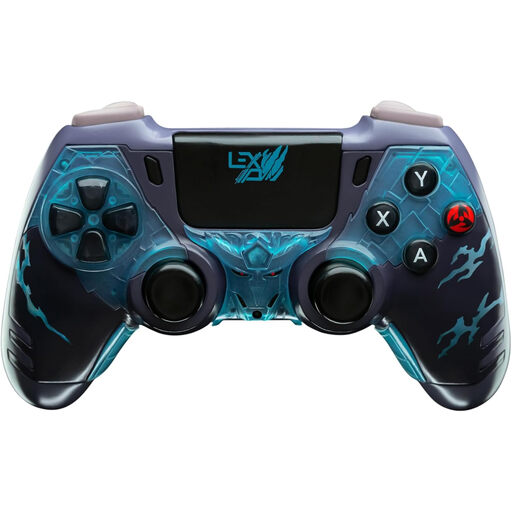
LEXIP Kakashi Kamui Controller (PC, Switch)
For PC or Switch players considering a controller for exploration games, confirm the required Switch play mode and connection before ordering. Check the exact variant’s power arrangement if it affects your setup.
View on Joybuy
 No image available
Sony DualSense Edge PS5 Wireless Controller – White
A PS5 option for players interested in tailoring their controls while exploring. If haptics or adaptive triggers are important to your choice, check support in your specific game and confirm the connection and charging arrangement you prefer.
View on Joybuy
 No image available
Turtle Beach Afterglow Ignite Time Wired RGB Controller for Xbox and PC – Time Machine
Consider this wired option if your Xbox or PC exploration setup suits a cable-connected controller. Check the connection against your play space and confirm any analogue-control or game-feedback features you specifically want.
View on Joybuy
Frequently asked questions
Will DualSense feedback work in every exploration game?
No. PlayStation says haptic feedback and adaptive triggers require game support. On PC, haptics require USB; adaptive triggers are not compatible with Android-based mobile devices, and some features are unavailable on Mac and mobile devices.
How do I pair and charge the original Nintendo Switch Pro Controller?
Nintendo says it can pair wirelessly or through a USB cable connected to the Switch dock. Nintendo states that a full charge takes approximately six hours and that battery life when fully charged is approximately 40 hours, though software and functions can shorten it. These figures do not describe the separate Switch 2 Pro Controller.
Does Bluetooth mean a controller will work with any console?
No. A wireless connection method does not establish console compatibility. For instance, 8BitDo specifies the Ultimate 2C Wireless Controller for Windows and Android; check the exact controller model and platform before buying.
Must a controller sold in Great Britain carry UKCA rather than CE marking?
Not necessarily. Department for Business and Trade guidance dated 21 August 2026 says Great Britain continues to recognise CE marking alongside or instead of UKCA marking where applicable. Which requirements apply to a particular controller still needs checking; this Great Britain guidance covers England, Scotland and Wales, while Northern Ireland has different processes.


