Choose a controller that supports the device running your historical adventure, then decide how it will draw power without occupying another wall socket. An Xbox Wireless Controller offers replaceable AA cells or a rechargeable pack; compatible PlayStation controllers can charge from a PS5 USB port, and the original Nintendo Switch Pro Controller can charge from a powered Switch dock. Check the exact game and connection method before relying on advanced feedback or wireless support.
Who this is for
Players with no spare wall socket
If another mains charger would be awkward, consider whether you can swap AA cells or charge through an already-powered console or dock. Microsoft, PlayStation Support and Nintendo describe different arrangements for their controllers.
PC and multi-device adventure players
If you move between a computer, mobile device and console, check support for each device and your intended connection method. Microsoft, Sony and 8BitDo list different compatible platforms for the controllers discussed here.
Console-native feature seekers
If you mainly play on PS5 or Nintendo Switch, the controller designed for that console may be your starting point. Check its charging route and whether the particular game supports the features you want; Sony says DualSense haptics and adaptive triggers depend on game support and may require USB.
What matters when choosing
Start with the device running the game: a convenient charging arrangement is little help if the controller does not support that platform. Then work out where it will charge or get replacement cells during longer sessions.
| Concern |
What to check |
Who this matters to |
| Platform and connection |
Match the exact model to your console or operating system, then confirm whether it uses Bluetooth, a 2.4G receiver or USB on that device. |
If I move between a console and PC, I need to know the controller can connect where I actually play; around 34% of consumers put compatibility first. |
| Power without another socket |
Check for replaceable cells or a usable console or dock USB port. Microsoft says rechargeable AA cells do not charge inside an Xbox Wireless Controller. |
With every wall socket occupied, I would rather swap cells or use a powered gaming device to charge; roughly 33% of consumers make that power arrangement their primary concern. |
| Long-session charging |
Compare stated runtime and charging arrangements under the relevant connection mode. Nintendo says Switch Pro Controller battery duration varies with software and functions. |
During a long stretch of exploration, I want to plan charging without interrupting play; around 20% of consumers focus chiefly on that routine. |
| Game-specific controls |
Check the game and platform before choosing for haptics, adaptive triggers or remappable buttons. Sony says DualSense feedback features require game support and may require USB. |
If a particular adventure uses the controls I care about, those features could influence my choice; roughly 13% of consumers prioritise supported feedback or extra inputs. |
Buying pitfalls
-
Choosing a layout before checking compatibility
A wireless controller will not necessarily work with every console, operating system or connection method. Microsoft, Sony and 8BitDo publish different supported-device lists.
Check the exact controller model against the device running your game before comparing its charging arrangement or extra buttons.
-
Expecting rechargeable AA cells to charge in the controller
Microsoft says rechargeable AA cells used in an Xbox Wireless Controller do not charge inside it.
Plan how you will charge, store or replace the cells if you choose the AA option.
Using rechargeable AA cells calls for a separate charger.
-
Assuming advanced feedback works in every game
Sony says DualSense haptic feedback and adaptive triggers are available only in supported games and may require a USB connection.
Check support for your particular historical adventure and gaming platform before making those features decisive.
-
Putting spent batteries or an old controller in household rubbish
GOV.UK advises taking batteries and electrical products to appropriate recycling collection points rather than putting them in household rubbish.
Use a suitable battery or electrical-waste collection point when the cells or controller reach the end of their useful life.
Brands to consider
Xbox
The Xbox Wireless Controller is a first-party option for Xbox consoles and other devices listed by Microsoft.
- Microsoft lists Xbox consoles, Windows PC, iOS and Android support; Xbox Support describes AA (LR6) cells and a rechargeable battery-pack option.
- Rechargeable AA cells need charging outside the controller, so that option still requires a separate charging routine.
PlayStation
Sony positions DualSense primarily for PS5 play and also lists PC, Mac and mobile compatibility.
- DualSense has a built-in battery and USB-C charging; PlayStation Support describes charging a compatible controller through a console USB port.
- Sony says haptic feedback and adaptive triggers need support from the game and may require USB.
Nintendo
The original Nintendo Switch Pro Controller offers a charging route through an available USB port on a powered Switch dock.
- Nintendo states that this controller takes approximately six hours to charge and can run for approximately 40 hours when fully charged.
- Nintendo says battery duration varies with software and functions. Its guidance for the original Switch Pro Controller should not be assumed to describe a Switch 2 controller.
8BitDo
The Ultimate 2C Wireless Controller is a Windows and Android option with connection modes specified by 8BitDo.
- 8BitDo lists 2.4G, Bluetooth and wired modes, plus remappable extra bumpers. Its stated runtimes are 19 hours over 2.4G and 32 hours over Bluetooth in laboratory conditions.
- Check which mode works with your device and where you will charge its rechargeable battery; the stated Windows and Android compatibility does not establish support for other consoles.
Joybuy controller choices
These controllers cover PS5, Xbox, PC and Nintendo play in different combinations. Check the precise platform and power arrangement for each model: a USB charging cable, a wired connection and replaceable batteries solve different socket problems.
 Image unavailable
Sony DualSense PS5 Wireless Controller, Midnight Black V3
For PS5 play where a usable console USB port makes charging more convenient than dedicating another wall socket.
The product description lists PS5 and PC compatibility, a built-in rechargeable battery, Bluetooth and USB-C. Sony says DualSense haptics and adaptive triggers depend on game support and may require USB; check your game and expected battery runtime before choosing for a long session.
View on Joybuy
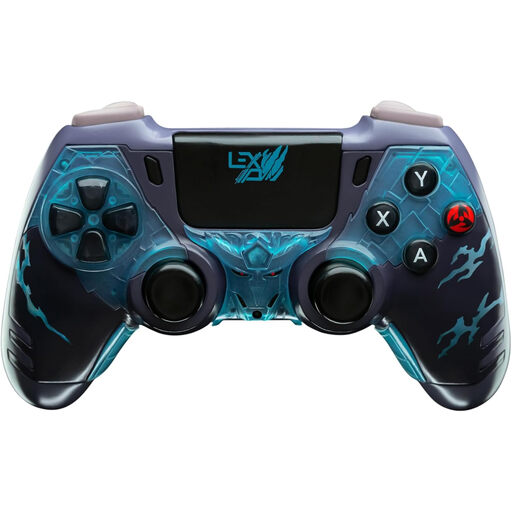 Image unavailable
LEXIP Kakashi Kamui Controller (PC, Switch)
For PC or Switch play if connecting a controller to the gaming device suits your limited-socket setup.
The product description names PC and Switch compatibility and describes USB wiring, but qualifies the connection as model-dependent. Confirm the connection and power arrangement for this exact variant before relying on wired operation without a controller battery.
View on Joybuy
 Image unavailable
Microsoft Xbox One S Elite Wireless Controller Series 2 (Xbox One/Xbox Series X/S/PC)
For Xbox or PC play when configurable controls matter and you can accommodate charging an integrated battery.
The product description lists remappable back buttons, adjustable sticks, USB-C and a magnetic charging station. It claims up to 40 hours per charge, with duration varying by use. This Series 2 model is not the replaceable-AA Xbox Wireless Controller discussed above; check how its charging station would connect in your setup.
View on Joybuy
 Image unavailable
Machenike G3 V2 Tri-mode Controller, White
For PC, Switch or Android play when a choice of connection modes is useful; check which mode applies to your device.
The product description lists 2.4G, Bluetooth and wired USB-C modes, an 800mAh rechargeable battery and a claimed runtime of up to 20 hours. Confirm where the battery can be charged in your setup before relying on it to avoid another wall socket.
View on Joybuy
 Image unavailable
Nintendo Switch 2 Pro Controller, Black
For Nintendo Switch 2 play if you can arrange a convenient USB charging source.
The product description lists a rechargeable battery, a USB charging cable and mappable GL/GR rear buttons. Check the charging source and expected runtime for this Switch 2 model; Nintendo’s dock-charging and runtime figures for the original Switch Pro Controller should not be applied to it.
View on Joybuy
Frequently asked questions
Can I use a controller without another wall socket?
Yes, if its power arrangement fits the gaming device you already use. PlayStation Support describes charging a compatible controller from a PS5 USB port, Nintendo describes charging the original Switch Pro Controller from an available dock USB port, and Microsoft lists AA-cell and rechargeable-pack options for the Xbox Wireless Controller. Check that the relevant console or dock is powered and has a usable port.
Will DualSense haptics work in every historical adventure?
No. Sony says DualSense haptic feedback and adaptive triggers are available only when supported by the game and may require a USB connection. Check the game’s support information for the platform on which you will play.
What if an online controller purchase is unsuitable or faulty?
For an online purchase in the UK, GOV.UK says customers can normally cancel within 14 days of receiving the item. A fault or a controller that is not as described is a separate matter from changing your mind; contact the seller about the applicable remedy rather than assuming the cancellation period is your only option.
How should I dispose of old controller batteries?
Take used batteries to an appropriate battery collection point rather than putting them in household rubbish. GOV.UK also advises taking electrical products to a suitable recycling point when the controller itself reaches the end of its useful life.


