What matters when choosing?
For a console, start with its supported controllers; for a living-room PC, check the exact model’s Windows connection options. In either case, the game’s local multiplayer mode determines how many players can join.
| Concern |
What to check |
Who this matters to |
| Host and game compatibility |
Confirm the exact console or PC and connection mode, then check the game’s controller and local co-op support. |
If my controller cannot be used with the host and game I have chosen, its other features will not help our session. Around 36% of consumers put compatibility first. |
| Enough controllers for the group |
Check the game’s local-player limit and how the host counts the controllers you intend to use. |
When friends join us, I need a working pad for each supported player, not just a console that can pair several devices. For around 29% of consumers, group readiness is the primary concern. |
| Connection from the sofa |
Compare the seating distance with guidance for the exact wireless method; check whether a data-transfer USB cable offers a practical fallback. |
With the host away from our seats, I want a connection arrangement I can set up and troubleshoot in that room. Connection reliability comes first for around 21% of consumers. |
| Power and upkeep |
Check the included charging or power accessories and the controller’s update procedure. |
I would rather know how everyone’s pads will stay powered and maintained between games than discover an interruption on co-op night. Around 14% of consumers make ongoing upkeep their main priority. |
Controllers for these setups
These controllers relate to Xbox or Windows-PC, PS5 and Switch 2 co-op setups. Match each model to the host and intended game first; a controller’s platform support alone does not establish that the game offers the local mode or player count your group needs.
 Image unavailable
Turtle Beach PDP Victrix Pro BFG Wireless Controller for Xbox and Windows 10/11 PC, Black
Consider this model for an Xbox Series X|S, Xbox One or Windows 10/11 PC setup. Check that its connection method works from your seating position and that your game supports the intended local group.
View on Joybuy
 Image unavailable
Xbox Wireless Controller, Robot White
For an Xbox or Windows-PC co-op setup, confirm the connection you plan to use and the game’s local-player support. If the host sits away from the sofa, check the guidance for that specific connection method rather than assuming every wireless setup has the same range.
View on Joybuy
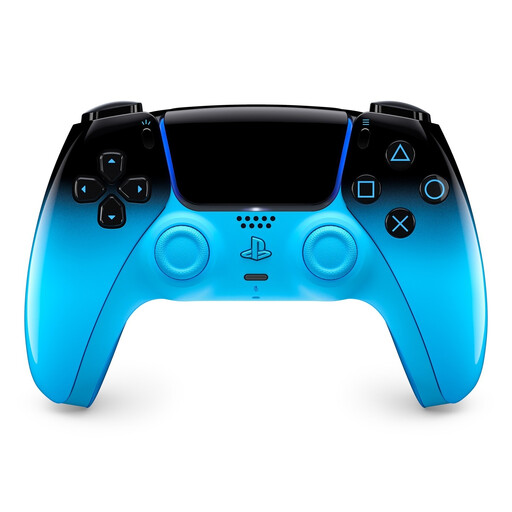 Image unavailable
Sony DualSense Wireless Controller, HYPERPOP Rhythm Blue
This DualSense variant suits a PS5 setup or supported PC, Mac or mobile play. PlayStation says haptic feedback and adaptive triggers require game support and may require USB; check cable contents and seating-distance needs before choosing how to connect it.
View on Joybuy
 Image unavailable
Microsoft Xbox Elite Wireless Controller Series 2
For an Xbox or PC setup where you want an Elite Series 2 controller, confirm support for your exact console or PC before buying: the model’s compatibility descriptions differ in specificity. Also check the wireless method against your seating position and the game’s local-player limit.
View on Joybuy
 Image unavailable
Nintendo Switch 2 Pro Controller, Black
Choose this full-size controller for a Switch 2 setup, not on the assumption that it is interchangeable with an earlier Switch Pro Controller. Check your game’s local-player support, then consider how many controllers your group needs to keep charged.
View on Joybuy
Frequently asked questions
How many controllers do I need for a local co-op game?
Plan for the number of local players supported by the exact game and mode you intend to use. Nintendo says up to eight wireless controllers can be paired to a Switch, subject to controller types and features, but that pairing figure does not set an individual game’s player limit.
Should I use a wireless or wired connection from the sofa?
Choose the connection that works with your exact controller, host and room layout; a cable is also useful for troubleshooting. For the Xbox Wireless Adapter on Windows, Microsoft advises staying within 6 metres and line of sight, while its wired troubleshooting guidance calls for a data-transfer-capable cable.
Will DualSense haptics and adaptive triggers work on my PC?
They depend on support in the individual game, and PlayStation says a USB connection may also be required. Check that game’s PC feature information before choosing DualSense for those controls.
How should I dispose of an old controller or its batteries?
Take unwanted electrical products and batteries to appropriate collection points rather than putting them in household rubbish, as GOV.UK advises. A controller with a non-removable battery should be treated as electrical waste.


